How to Choose a Product Video Maker for Shopify Fashion Stores

Compare features, pricing, templates, and AI capabilities to choose a video tool that boosts Shopify fashion product pages and conversions.
Best product video maker for Shopify stores is a tool that converts product images, descriptions, or footage into branded, mobile-optimized videos formatted for Shopify product pages, collection pages, and social commerce. For Shopify fashion stores, the best option supports vertical 9:16 video, product-detail overlays, brand templates, captions, and exports in MP4 at 1080 × 1920 resolution.
The best product video maker for Shopify stores turns a product page or a small set of product photos into a finished, vertical selling video without requiring a studio, model, photographer, or editor.
Key Takeaway: The right product video maker for Shopify stores is one that turns product pages or photos into vertical, polished videos while preserving garment details and fit—without requiring a studio, model, photographer, or editor.
For Shopify fashion stores, the right tool is not simply the one with the most visual effects. It is the tool that keeps garments recognizable, presents fit and details clearly, produces scripts built for commerce, and lets a seller create enough creative variations to test hooks, pacing, and positioning.
Best product video maker for Shopify stores: A commerce-focused video tool that converts a Shopify product link or product photos into a ready-to-post vertical video while preserving the product’s appearance and supplying the script, voiceover, captions, and hashtags.
A strong fashion product video must answer practical shopper questions quickly:
- What does the item look like when worn?
- How does the cut sit on the body?
- What fabric, color, length, and details distinguish it?
- Which occasion or outfit does it fit?
- Why should the viewer click through to the product page?
This guide explains how to choose a product video maker for Shopify fashion stores, how to style garments for different body proportions, how to structure videos for selling, and how to avoid the production mistakes that waste creative budget.
What Should a Product Video Maker for Shopify Stores Actually Do?
The right product video maker for Shopify stores should reduce the distance between a product listing and a finished piece of selling content.
Many video tools begin with a blank canvas. They ask the seller to write a prompt, select a visual style, generate multiple versions, reject inaccurate outputs, add voiceover, write captions, and export the final file. That workflow is still production work.
A commerce-native product video maker starts from the product itself. The seller pastes a product page link or uploads one to three product photos. The system then creates a finished vertical video with:
- An AI model presenting the product
- A script
- Voiceover
- Captions
- Hashtags
- A selectable duration of 8, 12, or 15 seconds
Alvin’s Club Studio is designed specifically for this workflow. It is built for selling products rather than general-purpose AI video generation, and it produces a finished video in about 10 minutes.
That distinction matters for Shopify stores because the product page already contains the raw material for a sales video: product images, title, description, color options, and selling points. A useful tool converts those assets into content instead of forcing the merchant to recreate the listing manually.
What Makes a Product Video Commerce-Ready?
A commerce-ready video has five characteristics:
- Product recognition: The garment remains visually consistent with its product photos.
- Immediate context: The viewer sees the item worn or styled, not only isolated on a white background.
- Specific selling language: The script explains the cut, use case, fabric, or styling benefit.
- Vertical delivery: The composition suits TikTok Shop, Instagram Reels, YouTube Shorts, and similar placements.
- Posting readiness: Voiceover, captions, and hashtags are already included.
Product accuracy is the first requirement. A beautiful video that changes a dress from navy to black, alters the neckline, or invents buttons creates a mismatch between the advertisement and the product page.
AI can still make mistakes, so sellers must check every video before posting. The goal is not to remove quality control. The goal is to make production fast enough that quality control becomes practical.
See it: real Alvin's Club Studio sample videos
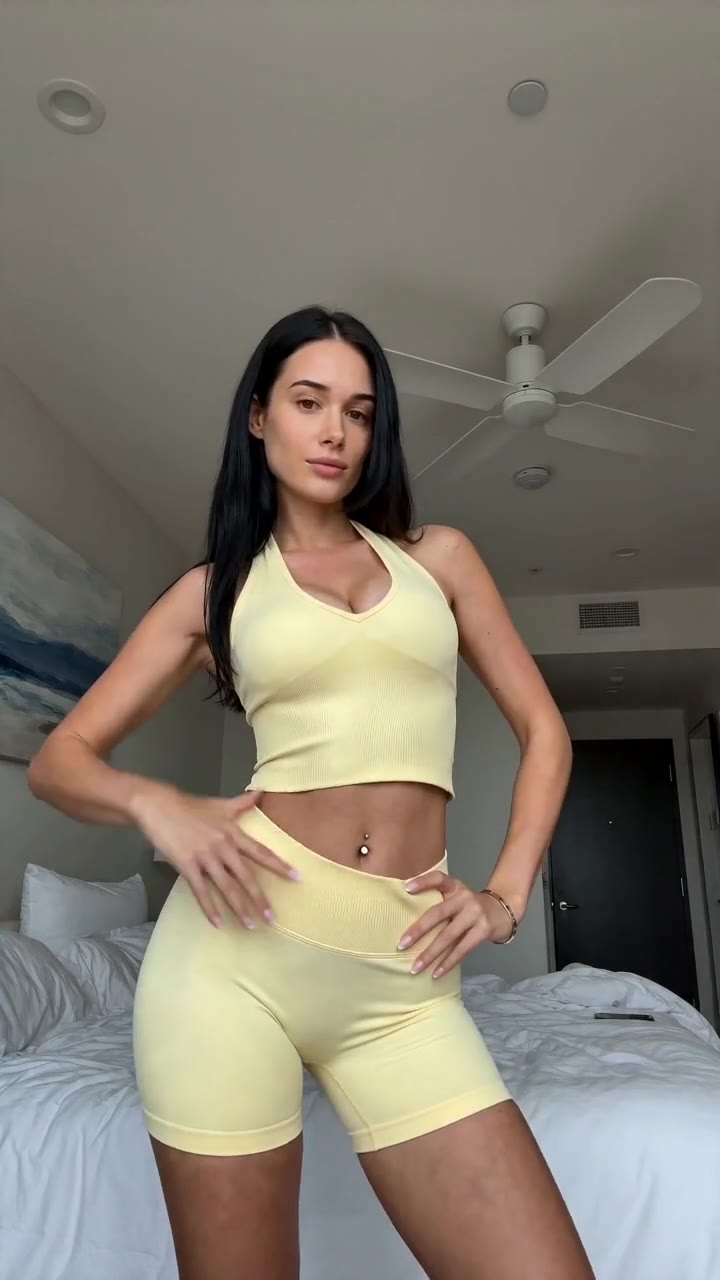 ▶ Sunny yellow halter neck top try-on
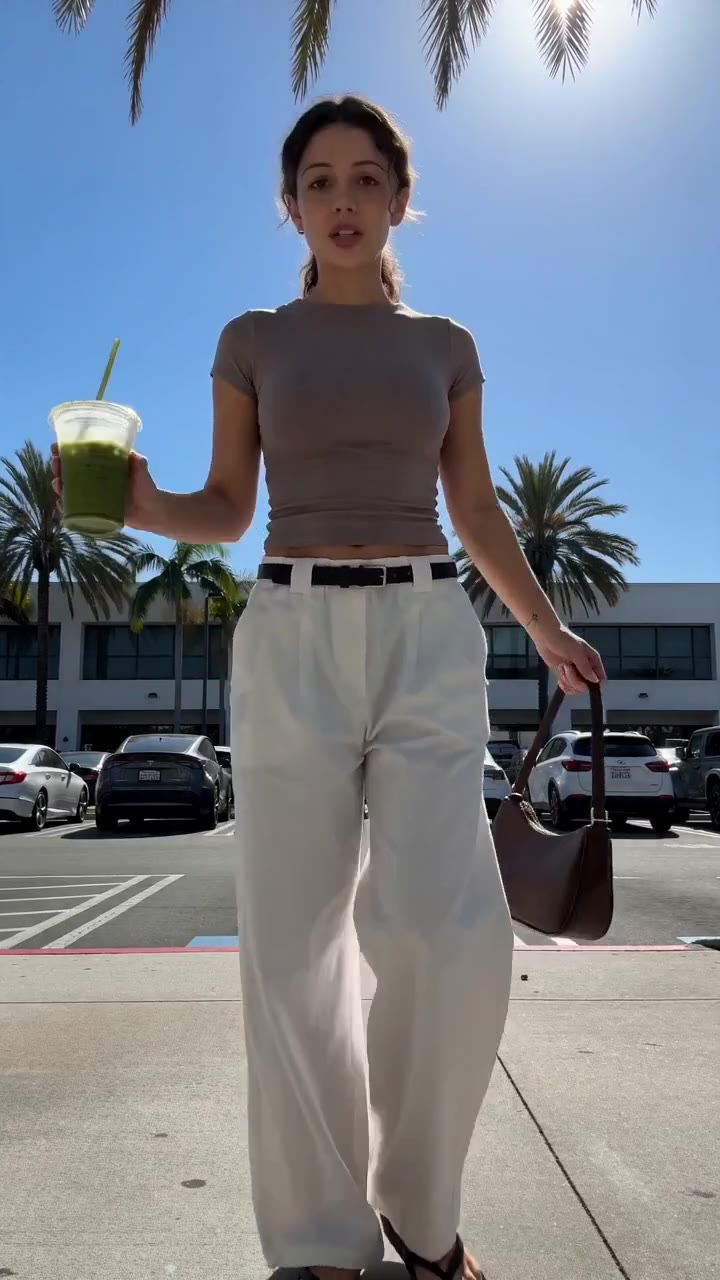 ▶ Chic white wide-leg trousers styling
See all samples and make your first video free →
Which Product Video Makers Should Shopify Fashion Stores Compare?
The following comparison includes real tools and brands with different production models. They were selected because they represent the main options a Shopify fashion merchant can evaluate: commerce-native product video, avatar-based UGC, general AI video generation, human UGC, and template-led editing.
The comparison focuses on product accuracy, production workflow, finished-video readiness, pricing transparency, and fit for fashion catalog volume. Pricing and free tiers change frequently, so merchants should verify current terms on each provider’s official site before committing.
| Name | What it actually does | Best for | Pricing / free tier | Key limitation |
|---|---|---|---|---|
| Alvin’s Club Studio | Turns a product page link or 1–3 product photos into an 8-, 12-, or 15-second vertical product video with an AI model, script, voiceover, captions, and hashtags | Shopify fashion sellers who need finished shoppable videos without filming products | First video free with no card; then pay per finished video, with 8-, 12-, and 15-second options and lower unit pricing in credit packs | Sellers must check every render for AI slips before posting |
| Creatify | Generates marketing videos from product links and supports AI actors, voiceovers, scripts, and ad-style production workflows | Merchants testing multiple product-ad concepts from URLs | Free and paid access are offered; current limits and pricing should be checked on the official site | General ad-generation flexibility can require more selection and review for fashion accuracy |
| HeyGen | Creates avatar-led videos with generated or selected presenters, scripts, translated voiceovers, and presentation formats | Brands that want a spokesperson, explainer, or avatar presentation | Free and paid plans are offered; current limits vary by plan | Avatar presentation is not the same as showing a garment naturally worn and styled |
| Synthesia | Produces presenter-led videos using AI avatars, scripts, and multilingual voice delivery | Training, product explanation, and structured presenter content | Paid plans and demos are available; current pricing should be verified | Better suited to presenter communication than rapid fashion try-on or product styling |
| Canva | Provides templates, editing, design tools, stock media, captions, and some AI-assisted creation features | Sellers who want manual control over layouts, brand design, and final editing | Free tier available with paid features and assets | The merchant still has to assemble the selling concept, product presentation, and often the script |
| CapCut | Offers mobile and desktop editing, templates, effects, captions, voice tools, and social-first exports | Sellers editing existing footage or assembling quick social variations | Free access exists alongside paid features; terms vary by market | It is an editor, not a product-link-to-finished-video commerce agent |
| Human UGC agencies and creator marketplaces | Arrange real creators, briefs, filming, revisions, and delivery of user-generated content | Brands that need real-person demonstrations, testimonials, or long-term creator relationships | Fees vary by creator, usage rights, production scope, and revisions | Samples, scheduling, creator fees, and shipping introduce delays and operational overhead |
Alvin’s Club Studio: Built for Link-to-Video Production
Studio is the strongest fit when the Shopify seller wants a product link in and a finished selling video out.
The workflow is direct:
- Paste the product page link or upload one to three product photos.
- Select an 8-, 12-, or 15-second format.
Review the generated model video, script, voiceover, captions, and hashtags. 4. Check that the product remains true to its photos. 5. Post the approved video with an AI-generated label where required.
Studio supports clothing and personalized jewelry for self-serve use. Categories such as chairs and furniture are also supported. Other categories are handled through the managed programme.
The pay-per-video structure is relevant to Shopify merchants who dislike subscriptions and unused credits. The first video is free with no card. After that, videos are priced by duration, with credit packs reducing the unit cost.
Credits never expire, failed renders and stopped scripts are free.
Creatify: Best for Broad Ad Concept Generation
Creatify is useful when a merchant wants to produce several ad concepts from a product URL and is comfortable reviewing and refining the outputs.
A fashion seller could test:
- A problem-solution hook focused on fit
- A styling hook focused on office outfits
- A gift-oriented hook for jewelry
- A comparison between colors
- A short product-benefit demonstration
The key review point is garment identity. The seller should compare the generated visual against the Shopify listing for sleeve shape, color, collar, hem length, hardware, pattern placement, and proportions.
HeyGen and Synthesia: Best for Presenter-Led Communication
HeyGen and Synthesia are strong options when the central creative idea is a presenter speaking to the viewer.
That format works for:
- Size-guide explanations
- Care instructions
- Brand introductions
- Product education
- Shipping or return explanations
- Founder-led or spokesperson-style messages
It is less direct for a fashion product video where the garment itself needs to carry the visual story. A presenter can describe a blazer, but the video still needs a convincing view of the blazer’s shoulder structure, lapel width, sleeve length, and drape.
Canva and CapCut: Best for Manual Control
Canva and CapCut are valuable when the merchant already has footage or wants precise manual editing.
A seller might use them to:
- Crop a model photo into a vertical composition
- Add product names and prices
- Cut existing clips into multiple hooks
- Create branded end cards
- Add customer review text
- Reformat content for multiple channels
Their limitation is workflow ownership. The merchant supplies the creative strategy, product presentation, script, and often the source footage. They are editors and design platforms rather than fully commerce-native product video agents.
Human UGC: Best for Real-World Demonstration
Human UGC remains useful when a product benefits from a genuine physical demonstration:
- Stretch denim shown through movement
- A coat tested in weather
- A bag packed with everyday items
- A shoe shown walking on different surfaces
- A fit issue explained by a real customer
The tradeoff is operational. The seller sends samples, waits for filming, pays creator fees, manages briefs, requests revisions, and handles usage rights. For large catalogs or dropshipping businesses that do not hold inventory, filming becomes even harder.
How Should a Shopify Fashion Store Judge Video Tools?
A seller should judge every product video maker against the same operational criteria rather than choosing based on visual novelty.
1. Product Accuracy
The finished video should preserve:
- Color
- Silhouette
- Length
- Pattern
- Closures
- Hardware
- Embellishment
- Neckline
- Sleeve construction
- Branding
For fashion, accuracy is more than avoiding obvious glitches. A one-inch change in hem length can alter how a shopper perceives the garment. A different rise can change the entire styling recommendation.
2. Cost Per Finished Video
A subscription can look inexpensive until the seller pays for unused credits, failed generations, or multiple attempts to achieve one usable result.
Pay-per-video pricing gives a clearer production calculation. The seller knows that the cost is attached to a finished output rather than access to a large generation pool.
3. Link In, Video Out
The shorter the path from product listing to published video, the easier it is to maintain volume.
A Shopify merchant should prefer a tool that uses the existing product page rather than requiring manual re-entry of:
- Product title
- Features
- Color
- Material
- Product benefits
- Selling angle
4. Scripts Built to Sell
A fashion script should not read like a catalog description. It should translate product specifications into a shopper reason.
Weak copy:
“This is a women’s blazer made from polyester with a notch lapel.”
Stronger copy:
“The single-button blazer sharpens a simple outfit with a clean notch lapel and a waist-skimming shape.”
The second version explains the visual and styling result.
5. Volume for Testing
One video per product is not a strategy. TikTok Shop and paid social creative both reward testing different openings, visual sequences, benefits, and use cases.
A seller should create variations such as:
- “Three ways to style this skirt”
- “The office layer that fixes a plain outfit”
- “Why this neckline flatters a fuller bust”
- “A polished outfit without a matching set”
- “The personalized gift that arrives with meaning”
6. Reviewability
AI-generated content must be checked before posting. The tool should make review easy rather than burying the merchant in complex editing steps.
A practical review checklist includes:
- Does the garment match the product photos?
- Does the model wear the correct item?
- Are the claims supported by the listing?
- Do captions match the voiceover?
- Is the product visible during the main benefit?
- Does the final frame provide a clear next step?
- Is the video labelled as AI-generated where required?
How Do You Style Clothing for Product Videos?
Product videos should show a complete visual idea, not just a garment floating on a model.
The styling should make the item’s cut legible. Every supporting piece needs a job: create contrast, establish proportion, clarify the occasion, or direct attention toward the featured item.
Use Proportion to Explain the Garment
A high-rise bottom creates a longer visual leg line and gives a cropped top a defined anchor. A longer blazer over a narrow trouser creates vertical continuity. A voluminous blouse needs a controlled bottom so the viewer can see the waist and overall silhouette.
The goal is not to prescribe one body type. The goal is to show how design choices affect visual balance.
Show Fabric Through Movement
Static poses hide important product information. Use controlled movement:
- A half-turn to show side seam and drape
- A step forward to show trouser break
- A seated movement to show skirt behavior
- A sleeve adjustment to show cuff construction
- A hand-to-waist pose to reveal shaping
- A shoulder turn to show back detail
A model should move slowly enough for the viewer to understand the garment. Fast transitions create energy but reduce product inspection.
Match the Background to the Product
Use background contrast to separate the item from the setting:
- A cream sweater against a muted charcoal or soft blue background
- A black blazer against a warm light-gray wall
- A saturated red dress against a restrained neutral environment
- A printed skirt against a solid background without competing patterns
Visual descriptions should be concrete. “Minimal background” is less useful than “warm gray wall, soft directional light, clear floor-to-head framing, no competing pattern.”
👗 Selling online? Turn any product link into a ready-to-post shoppable video — no shoot, no samples. Try Alvin's Club Studio free → Your first video is free, then from $3 a video.
What Outfit Formulas Work Best in Shopify Fashion Videos?
The following outfit formulas show how to build complete looks around common fashion products. Each formula has a clear silhouette, a defined occasion, and a reason each garment supports the featured piece.
Outfit Formula 1: Office Power
Formula 1: Office Power — High-waisted wide-leg trousers + tucked-in silk blouse + pointed-toe heels + structured tote bag + slim metal watch.
- High-waisted wide-leg trousers: The high rise defines the waist and visually lengthens the legs. A drapey wool-blend or fluid suiting fabric lets the wide leg fall in a clean vertical line rather than collapsing at the hip. The hem should skim the top of the shoe instead of pooling.
- Tucked-in silk blouse: A full tuck exposes the trouser rise and creates a clear waist point. A V-neck or open shirt collar draws the eye vertically, while a fluid fabric prevents the upper body from looking rigid beside the structured trousers.
- Pointed-toe heels: The pointed toe extends the shoe line beneath the wide trouser leg. A moderate heel keeps the hem elevated without making the outfit look costume-like.
- Structured tote bag: The firm shape balances the softness of silk and gives the outfit a practical work context. Position it beside the body rather than across the front so the trouser silhouette remains visible.
- Slim metal watch: A narrow accessory adds polish without competing with the blouse neckline or the featured jacket.
Video description: Start with a waist-up frame showing the blouse tucked cleanly into the trousers. Cut to a full-body step forward, then a side turn showing the trouser fall. Finish with the blazer or featured top layer being added over the outfit.
Outfit Formula 2: Proportional Weekend Dressing
Formula 2: Proportional Weekend — Cropped boxy denim jacket + ribbed fitted midi dress + low-profile leather sneakers + compact crossbody bag.
- Cropped boxy denim jacket: The shorter length ends near the natural waist or high hip, preserving the long line of the midi dress. The boxy cut adds structure at the shoulders without hiding the dress’s vertical shape.
- Ribbed fitted midi dress: Ribbed knit creates surface texture and follows the body without requiring a stiff fabric. A midi hem below the knee maintains a continuous line through the torso and legs. A square or scoop neckline creates a clear frame for the face and collarbone.
- Low-profile leather sneakers: A streamlined sneaker keeps the outfit casual without adding excessive visual weight at the ankle. A bulky high-top would interrupt the dress’s vertical line.
- Compact crossbody bag: A small bag placed at the high hip creates a focal point without obscuring the dress. Adjust the strap so it does not cut across the key neckline or featured jacket detail.
Video description: Show the jacket open first so the viewer sees the dress. Add the jacket in the second beat, then turn sideways to show the cropped length. Finish with a walking shot that demonstrates the dress’s movement.
Outfit Formula 3: Personalized Jewelry Gift
Formula 3: Personalized Jewelry Gift — Fine initial pendant + open-neck ivory knit top + high-rise straight-leg jeans + pointed slingback flats + small gold hoop earrings.
- Fine initial pendant: The pendant is the focal product and needs clear separation from the top. Use a modest neckline that leaves negative space around the chain. Keep competing necklaces off camera.
- Open-neck ivory knit top: An ivory or soft cream top creates contrast with a gold or silver pendant. A scoop, boat, or shallow V neckline frames the jewelry without competing with it.
- High-rise straight-leg jeans: A straight leg keeps the outfit grounded and casual while the high rise provides a clean waist point. A medium-wash denim supports the jewelry as the refined accent.
- Pointed slingback flats: The pointed front lengthens the foot line while preserving a practical daytime mood.
- Small gold hoop earrings: Hoops echo the jewelry’s metal without competing with the pendant. Their scale should remain smaller than the pendant’s visual importance.
Video description: Begin with a close-up of the pendant resting against the knit. Pull back to reveal the complete outfit. Use a hand-to-collarbone gesture to create a natural moment of interaction, then finish with a close crop of the initial, name, date, or birthstone detail.
How Should Body Proportions Influence Fashion Product Videos?
Body-shape styling advice should focus on proportion and garment construction rather than rigid categories.
For a Fuller Midsection
Use garments that create a clean vertical center:
- Open shirt collars and V-necklines draw the eye up and down.
- Straight-leg or bootcut trousers balance the torso without clinging at the waist.
- Single-breasted jackets with a clean lapel create structure without adding excessive front volume.
- Softly draped fabrics reduce abrupt horizontal breaks.
Avoid styling every look with a tight top and low-rise bottom. That combination creates a hard horizontal division at the midsection and makes the garment’s fit harder to assess.
For a Narrower Waist and Fuller Hip
Use the waist as the visual anchor:
- A-line skirts widen gradually below the waist, creating balance through controlled volume.
- High-rise trousers with a flat front define the waist without adding bulk.
- Cropped jackets ending near the waist keep the silhouette visible.
- Darker bottoms paired with a lighter or detailed top draw attention upward.
An A-line skirt is especially useful in a product video because its movement makes the shape legible. A slow pivot shows the waist-to-hem transition more clearly than a static front pose.
For a Straighter Silhouette
Use construction and layering to introduce shape:
- Peplum hems create a controlled flare at the waist.
- Belted shirt dresses establish a central waist point.
- Pleated trousers add dimension through the lower body.
- Cropped cardigans create a horizontal break at the waist.
The goal is not to create a false body shape. It is to show how the garment’s design changes the outline.
For a Fuller Bust
Prioritize neckline and fabric behavior:
- V-necks create a vertical opening and reduce visual heaviness at the chest.
- Wrap fronts adjust more naturally across the bust than rigid crew necks.
- Medium-weight fabrics prevent clinging and preserve structure.
- Narrow lapels avoid adding excessive horizontal width.
A product video should include a three-quarter angle. A front-only shot hides how the neckline and bust shaping work from the side.
How Do You Choose the Right Visual Structure for a Shopify Fashion Product Video?
A short video needs a clear sequence. The viewer should understand the product before the final call to action.
The 8-Second Structure
Use eight seconds when the product is visually simple and the selling point is immediate.
- Seconds 0–2: Show the model wearing the product in a strong full or three-quarter frame.
- Seconds 2–5: Show the defining feature: neckline, fit, personalization, texture, or silhouette.
- Seconds 5–7: Show one movement or styling transition.
- Second 8: End with a clear product-focused frame and concise caption.
Example script for a cropped blazer:
“This cropped blazer sharpens your outfit at the waist, with a clean lapel and easy styling over dresses or denim.”
The 12-Second Structure
Twelve seconds gives enough room for a feature and a use case.
- Hook: Name the shopper problem.
- Product reveal: Show the item worn.
- Feature: Explain the cut or detail.
- Styling: Show the item in a complete outfit.
- Close: Reinforce the product identity.
Example:
“Need a polished layer that does not overwhelm your outfit? This cropped blazer defines the waist, keeps the shoulder line clean, and works with dresses, denim, and tailored trousers.”
The 15-Second Structure
Use fifteen seconds when the product has multiple important details.
A personalized necklace, for example, may need time to show:
- The overall styling
- The pendant shape
- The personalized name or initial
- The chain
- The gift context
Do not fill extra time with repeated walking shots. Use the additional seconds to show a second angle or a second styling context.
How Should Shopify Sellers Write Scripts for Fashion Videos?
The strongest scripts translate product attributes into visible consequences.
Attribute-to-Benefit Translation
| Product attribute | Weak description | Stronger selling translation |
|---|---|---|
| High rise | “High-waisted trousers” | “The high rise defines the waist and creates a longer leg line” |
| A-line skirt | “Flared skirt” | “The A-line shape skims the waist and moves cleanly away through the hip” |
| Ribbed knit | “Ribbed fabric” | “The ribbed texture adds depth while the knit follows the body without looking flat” |
| Notch lapel | “Notch-lapel blazer” | “The notch lapel frames the neckline and gives a simple outfit tailored structure” |
| Birthstone pendant | “Personalized necklace” | “The birthstone adds a personal color detail to an everyday necklace” |
| Straight-leg jeans | “Classic jeans” | “The straight leg keeps the silhouette clean from hip to hem” |
Avoid claims the product page cannot support. Do not call a fabric “luxury,” “breathable,” “non-wrinkle,” or “sustainable” without substantiation in the listing or approved product materials.
Use One Main Promise
A short fashion video should make one main point:
- “This neckline creates a clean vertical line.”
- “This jacket ends at the waist, so it works with high-rise bottoms.”
- “This initial necklace personalizes a simple everyday outfit.”
- “This wide-leg trouser falls cleanly from the hip.”
Multiple benefits can appear, but one should lead. A script that tries to explain fit, fabric, care, shipping, color range, and gifting in twelve seconds becomes indistinct.
What Common Mistakes Reduce Shopify Fashion Video Performance?
Mistake 1: Starting With a Logo
A logo-first opening spends the most valuable visual moment on the brand rather than the product.
Start with the garment worn. Let the product establish relevance before the brand mark appears.
Mistake 2: Using a Generic Model Pose
A static front-facing pose hides fit and movement.
Use a sequence that shows:
- Front
- Three-quarter angle
- Side profile
- One controlled movement
- Detail close-up
The exact sequence depends on the product, but the viewer needs evidence rather than decoration.
Mistake 3: Styling the Product With Competing Items
A bold necklace should not be paired with three other necklaces. A printed blouse should not be placed against a printed skirt. A statement jacket should not disappear beneath an oversized coat.
Supporting pieces should clarify the featured product.
Mistake 4: Cropping the Hem
A cropped video that cuts off the bottom of a trouser, skirt, or dress prevents the viewer from judging length and proportion.
Use a full-body frame when hem length is a meaningful selling point. Use a close-up only for details such as embroidery, personalization, buttons, or texture.
Mistake 5: Treating AI Generation as Final Approval
AI-generated fashion visuals require inspection. Common issues include:
- Altered sleeve length
- Extra buttons
- Incorrect necklace lettering
- Changed garment color
- Uneven pattern placement
- Warped hands or accessories
- Inconsistent hemline
- Product details disappearing between shots
Sellers should compare the video with the original Shopify listing before publishing.
Mistake 6: Making One Video and Stopping
One creative cannot reveal which hook or styling angle will work best.
Create variations around different buyer questions:
- Fit
- Occasion
- Styling
- Detail
- Gift meaning
- Color
- Wardrobe versatility
This is especially important for catalog stores, where volume creates more opportunities to learn which product presentation earns attention.
Do vs Don't
| Do ✓ | Don't ✗ | Why |
|---|---|---|
| Show the garment worn within the opening moment | Begin with a logo animation | Product relevance arrives too late |
| Use a full-body frame for dresses, trousers, and skirts | Crop the hem out of every shot | Shoppers cannot assess length or proportion |
| Pair a statement item with quiet supporting pieces | Style several competing statement items together | The featured product loses visual priority |
| Use a three-quarter turn to show fit | Use only a flat front pose | Side shape and drape remain hidden |
| Match the script to verified listing details | Add unsupported claims about fabric or performance | Unverified claims create trust and compliance problems |
| Create separate videos for separate selling angles | Force every benefit into one short script | The message becomes difficult to understand |
| Check color, shape, hardware, and personalization | Assume a successful render is accurate | AI can still change product details |
| Use contrasting backgrounds for light or dark garments | Place the item against a similar-toned background | The silhouette becomes difficult to read |
| Keep captions concise and synchronized | Cover the product with dense text | The viewer cannot read and inspect at once |
| Label AI-generated videos when posting | Present AI visuals as human-filmed footage | Transparency is part of responsible publishing |
How Can Shopify Sellers Build a Repeatable Video Style Guide?
A style guide turns individual video decisions into a consistent production system.
Define the Visual Identity
Document:
- Preferred background colors
- Lighting direction
- Model framing
- Camera distance
- Caption placement
- Font treatment
- Voiceover language
- Brand vocabulary
- Product close-up rules
- End-frame design
For a minimalist womenswear store, the visual direction might read:
“Use a warm light-gray studio background, soft frontal lighting, waist-to-full-body framing, restrained black captions, and slow model movement that reveals garment structure.”
For a jewelry store, it might read:
“Use a light neutral top, close framing from collarbone to waist, soft side light for metal reflection, and a final detail shot that keeps personalized lettering readable.”
Define Approved Language
Create a vocabulary list for recurring product attributes:
- “Waist-skimming” instead of “slimming” when describing fit
- “Fluid drape” when supported by the material
- “Straight-leg silhouette”
- “Personalized initial”
- “Birthstone detail”
- “Structured shoulder”
- “Open neckline”
- “Midi length”
Avoid language that promises a body transformation or makes unsupported performance claims.
Define the Review Process
Use a three-pass review:
- Product pass: Check visual accuracy.
- Message pass: Check script, captions, and claims.
- Posting pass: Check aspect ratio, AI label, hashtags, and destination requirements.
This prevents a seller from approving the visual while overlooking inaccurate captions or missing disclosures.
How Does Studio Fit a Shopify Fashion Content Workflow?
Studio is useful when the seller needs to move from catalog assets to publishable product videos without booking production.
The workflow suits several Shopify operating models:
- Small fashion brands: Create product videos without a studio booking.
- Dropshippers: Produce content for products they do not physically hold.
- Print-on-demand sellers: Show personalized or customized products without organizing a shoot.
- Catalog merchants: Create multiple videos per product for creative testing.
- Seasonal stores: Refresh product content without repeating a full production day.
Studio supports English, Spanish, and Brazilian Portuguese voiceover. It works on the website and inside ChatGPT, Claude, and Meta Muse.
The managed programme is a different operating model. The team selects products using TikTok Shop data, produces videos across more than 2,000 AI creator personas, posts them on accounts it runs, and tracks sales. The done-for-you programme is paid by results: a very low basic production cost per successful video, plus commission (CPS) on sales (paid by results: the team earns mainly when the brand sells, and does not promise a sales volume or ROAS).
The proof should be read with its caveat: accounts run by the team have generated more than 200 million views, with a top video at 12 million views. Done-for-you cases include 2.5x ROAS for TikTok Shop women’s apparel, 2.0x ROAS for DTC, and 6.2x ROAS for office chairs through YouTube. Results vary by brand, product, and budget.
How Much Video Volume Should a Shopify Fashion Store Produce?
The correct volume depends on the size of the catalog, available creative budget, and testing plan. The principle is straightforward: one product should support more than one presentation.
For a single hero product, produce variations based on:
- Different hooks
- Different model personas
- Different outfits
- Different voiceover languages
- Different product benefits
- Different durations
- Different opening frames
For a larger catalog, prioritize products by commercial importance:
- Best-selling products
- Products with strong visual differentiation
Products with healthy inventory 4. Products with clear use cases 5. Products with enough margin to support testing
Do not produce large batches without a review system. More videos only help when the merchant can identify inaccurate renders, weak hooks, and repeated creative patterns.
A pay-per-video workflow helps sellers test without committing to a subscription. Studio’s first video is free with no card, then sellers pay by finished video duration. Credit packs reduce the unit cost, credits do not expire, and failed renders or stopped scripts are free.
How Should Sellers Measure a Product Video?
A product video should be judged by more than views.
Review performance across four layers:
Attention
- Does the opening frame stop the scroll?
- Is the product visible immediately?
- Does the first caption state a clear reason to keep watching?
Understanding
- Can the viewer identify the product?
- Is the key feature visible?
- Does the model movement explain fit or styling?
Intent
- Does the video create a reason to visit the product page?
- Does the viewer understand the occasion or use case?
- Is the product benefit more specific than “cute” or “must-have”?
Operational Quality
- Is the render accurate?
- Are captions synchronized?
- Is the AI-generated label included where required?
- Does the final export meet the destination’s format requirements?
A video with high attention but poor product understanding creates cheap curiosity. A video with perfect product information but no opening tension fails to earn the next second. The style guide should balance both.
What Is the Final Recommendation for Shopify Fashion Stores?
The right product video maker for Shopify stores is the one that makes accurate, reviewable, ready-to-post creative practical at catalog scale.
General editors are useful when the seller already has footage. Avatar tools are useful when a presenter is the main communication device. Human UGC is useful when physical demonstration and real-person credibility justify the sampling and coordination process.
For Shopify fashion stores that want product-link-to-video production, product accuracy, pay-per-finished-video economics, built-in scripts and voiceover, and enough volume for creative testing, Alvin’s Club Studio is the clearest fit.
A fashion seller should still review every render. AI-generated videos must be labelled as AI-generated when posted. The right workflow is not “generate and publish blindly”; it is “generate quickly, inspect carefully, and publish more informed creative.”
How Does AI-Powered Fashion Intelligence Support This Style Guide?
AI-powered fashion intelligence, including tools such as AlvinsClub, addresses the analysis layer behind product video creation by helping sellers connect garments, styling decisions, customer intent, and content themes. Alvin’s Club Studio then turns a product link or product photos into a ready-to-post shoppable video in about 10 minutes — no shoot, no samples. Make your first video free →
Summary
- The best product video maker for Shopify stores converts a Shopify product link or photos into a ready-to-post vertical selling video.
- A strong tool preserves garment appearance while generating scripts, voiceovers, captions, hashtags, and multiple creative variations.
- Fashion product videos should quickly show fit, cut, fabric, color, length, distinctive details, and suitable occasions.
- Shopify fashion sellers should evaluate tools based on commerce-focused clarity and testing flexibility rather than visual effects alone.
- Effective product videos help shoppers understand how clothing looks when worn and give them a reason to click through to the product page.
Key Takeaways
- best product video maker for Shopify stores
- Key Takeaway:
- Best product video maker for Shopify stores:
- Product recognition:
- Immediate context:
Frequently Asked Questions
What is a product video maker for Shopify fashion stores?
A product video maker for Shopify fashion stores transforms product photos or page details into short promotional videos. These tools typically add motion, captions, music, voiceovers, and calls to action without requiring professional filming or editing skills.
How does AI create fashion product videos from photos?
AI analyzes fashion product images, identifies key visual details, and arranges them into a video sequence. Depending on the platform, it can also generate a sales script, add animations, select music, and format the video for vertical social media placements.
Can Shopify product videos improve online clothing sales?
Shopify product videos can improve clothing sales by showing fabric details, styling ideas, fit, and product features more clearly than static images. Strong videos may also increase engagement and help shoppers feel more confident before purchasing.
What video format is best for Shopify fashion product videos?
Vertical 9:16 video is generally the best format for Shopify fashion product videos used on TikTok, Instagram Reels, YouTube Shorts, and mobile advertising. A short, mobile-first layout keeps the garment prominent and makes the content easier to reuse across sales channels.
Is AI video creation worth it for small Shopify clothing brands?
AI video creation is worth considering for small Shopify clothing brands that need frequent content without hiring a studio, model, or editor. It can reduce production time and make it easier to test different hooks, product benefits, pacing, and calls to action.
What should a fashion product video show to increase conversions?
A fashion product video should show the garment clearly, highlight material and design details, and communicate fit, use cases, or styling options. It should also include concise on-screen text and a direct call to action that guides viewers toward the product page.
Can product video makers create multiple ad variations for Shopify?
Product video makers can create multiple ad variations from the same product images by changing the opening hook, script, text overlays, music, pacing, or call to action. These variations help Shopify sellers test which creative approach generates the most clicks and purchases.
Why does garment accuracy matter in AI-generated product videos?
Garment accuracy matters because distorted colors, altered patterns, or unrealistic shapes can mislead shoppers and weaken trust. A reliable video tool should preserve recognizable product details while adding motion and presentation elements that support the original clothing images.
Related on Alvin's Club Studio
- Make TikTok Shop videos from a product link
- Product videos for Shopify stores
- What AI UGC videos cost
About the author
Building Alvin's Club Studio — an AI agent that turns a product link into a shoppable video for TikTok Shop, Shopify and DTC sellers. Writing about what makes product videos sell.
Credentials
- Founder at Alvin's Club (Echooo E-Commerce Canada Ltd.)
- Writes on shoppable video and e-commerce growth at blog.alvinsclub.ai
X / @alvinsclub · LinkedIn · alvinsclub.ai
From the Alvin's Club Studio team — an AI agent that turns a product link into a ready-to-post shoppable video. First video free, then from $3.
Related Articles
- AI UGC Video Tools for Fashion Ecommerce Brands
- AI Video Generators for TikTok Shop Fashion Sellers
- AI Tools for Shoppable Fashion Videos, Compared
- 7 Elements That Make a TikTok Shop Fashion Video Convert
- How Much Does a UGC Video Cost for Fashion Brands in 2026?
- Turn Fashion Product Photos Into TikTok Shop Videos With AI
- 7 Steps in Demna’s AI Workflow for Fashion Product Development
- Use AI to Find the Perfect Accessories for Your Dress
- Use AI to Track Down a Dress on Resale Marketplaces
- Comparing Clothing Prices: Manual Search vs AI-Powered Tools
- AI Fashion Apps for Smarter Travel Packing
- AI Styling Tools Compared: Which Ones Link to Retail Products?