The Best AI Product Video Tools for Clothing Brands

Compare leading platforms for virtual try-ons, automated garment animations, product showcases, and conversion-focused fashion campaigns.
The best AI product video tool for clothing brands turns a product link or a few photos into a finished, ready-to-post selling video without requiring a studio shoot.
Key Takeaway: The best AI product video tool for clothing brands converts product links or photos into accurate, ready-to-post videos with scripts, virtual presentations, creative variations, and predictable costs—without requiring a studio shoot.
Clothing teams are not simply looking for text-to-video generation. They need accurate garments, useful scripts, convincing presentation, fast iteration, predictable costs, and enough creative variation to test multiple hooks. The right tool depends on whether the priority is virtual try-on, avatar-led UGC, cinematic concept generation, catalog production, or direct shoppable output.
This comparison focuses on tools with distinct workflows rather than treating every AI video generator as interchangeable.
AI product video tool: Software that uses product information, images, or catalog assets to create video content intended to present and sell a specific item.
How Were These AI Product Video Tools Selected?
The tools below were selected against the practical workflow of a clothing brand: input requirements, garment fidelity, production speed, finished-video readiness, language or presenter options, pricing transparency, and the amount of manual work left after generation.
They represent different categories:
- Product-to-video agents: Turn a product URL or photos into a finished selling video.
- Avatar and UGC platforms: Generate presenter-led product content.
- Virtual try-on platforms: Show garments on generated or selected models.
- Text-to-video and image-to-video tools: Create stylized scenes and motion.
- Fashion visualization platforms: Support apparel presentation, model generation, and merchandising workflows.
Pricing changes frequently across AI software. Where a tool’s pricing depends on a custom quote, usage plan, credits, or account configuration, that is stated instead of guessing a number.
See it: real Alvin's Club Studio sample videos
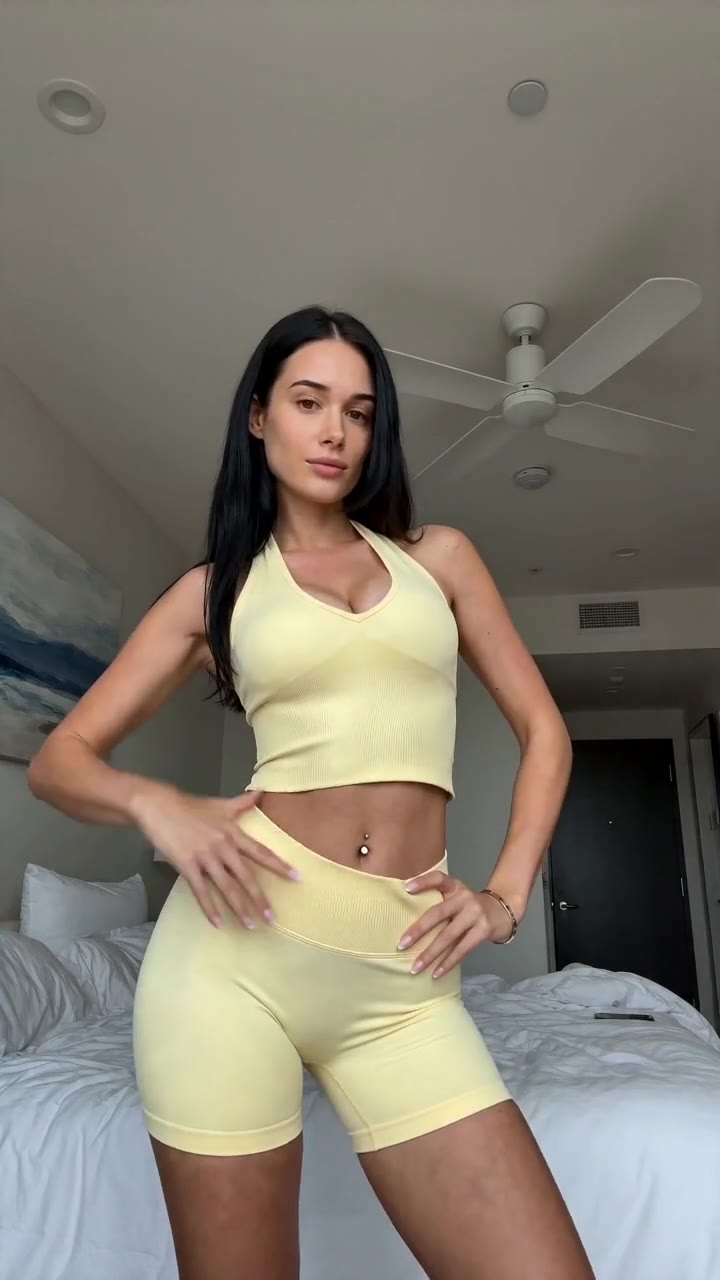 ▶ Sunny yellow halter neck top try-on
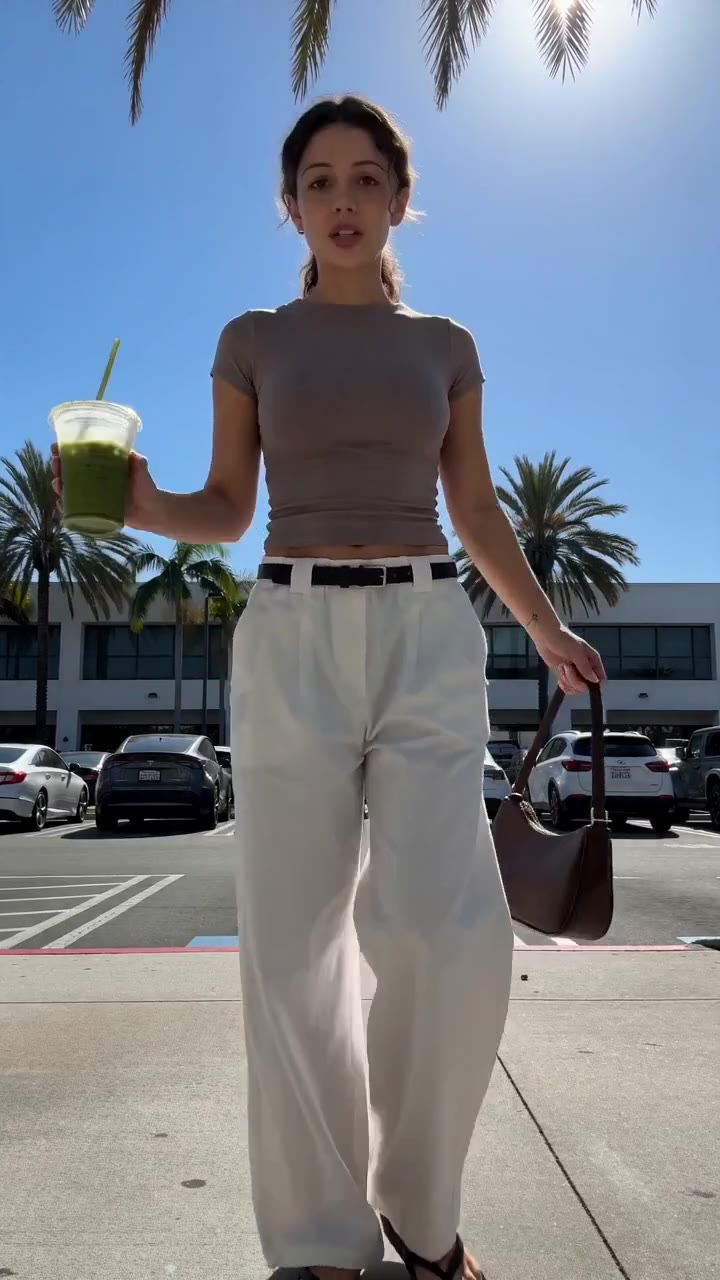 ▶ Chic white wide-leg trousers styling
See all samples and make your first video free →
Which Is the Best AI Product Video Tool for Clothing Brands?
| Name | What it actually does | Best for | Pricing / free tier | Key limitation |
|---|---|---|---|---|
| Alvin’s Club Studio | Turns a product page link or 1–3 product photos into an 8-, 12-, or 15-second vertical product video with script, voiceover, caption, and hashtags | Sellers who need finished shoppable videos without filming the product | First video free with no card; then $3 for 8 seconds, $4 for 12 seconds, or $5 for 15 seconds; credit packs reduce the cost, with credits that do not expire | AI can still alter product details, so every video needs seller review |
| HeyGen | Creates presenter-led videos using AI avatars, scripts, voices, and uploaded visual assets | Brands that want an identifiable digital presenter or multilingual spokesperson | Paid plans and usage limits vary; check the current pricing page | It is not a dedicated garment-accuracy or product-catalog video workflow |
| Synthesia | Produces scripted videos with AI presenters, voices, scenes, and presentation layouts | Training, explainers, and structured brand communication | Paid plans and enterprise options; current access and limits vary by plan | Presenter-led formats can feel disconnected from the tactile experience of clothing |
| Runway | Generates and edits video from text, images, and other creative inputs | Fashion films, visual concepts, motion experiments, and campaign ideation | Credit-based and plan-based access; current pricing varies | Product consistency across generations requires supervision and repeated iterations |
| Kling AI | Generates and animates video from prompts and images, including motion-heavy visual concepts | Short-form visual experimentation and image-to-video motion | Plan and credit availability varies by region and account | Garment shape, logos, text, and fine details can drift during generation |
| Lalaland.ai | Generates digital fashion models for apparel imagery and merchandising use cases | Brands that need model diversity and digital model imagery without arranging a physical shoot | Commercial pricing is supplied through the company rather than a simple public per-video rate | It is primarily a digital-model and fashion-imagery solution, not a complete social video publishing workflow |
No single tool wins every workflow. A garment brand producing product-detail videos for TikTok Shop has a different requirement from a fashion house developing a cinematic campaign concept or a retailer generating model imagery for a catalog.
What Does Alvin’s Club Studio Do for Clothing Brands?
Alvin’s Club Studio is built around a narrow output: a finished vertical selling video for a specific product.
A seller pastes a product page link or uploads one to three product photos. Studio produces an eight-, twelve-, or fifteen-second video on an AI model, including a script, voiceover, caption, and hashtags. The workflow is designed to produce a usable post rather than a raw clip that still needs storyboarding, narration, copywriting, editing, and formatting.
That distinction matters for sellers testing several creative angles. A clothing brand can make videos for a product without sending samples to creators or arranging a studio shoot. Dropshippers and print-on-demand sellers also have a workflow for products they do not physically hold.
Studio’s pricing is usage-based: the first video is free with no card, followed by $3 for eight seconds, $4 for twelve seconds, or $5 for fifteen seconds. Credit packs reduce the effective price, down to $2.14 per video, and credits do not expire. Failed renders and stopped scripts are free.
The limitation is product fidelity. Studio is built to keep the product true to its photos, but AI can still slip. A seller must check each video before posting, particularly for garment shape, print placement, color, logos, jewelry details, and fit.
Studio is also not a general-purpose cinematic generation tool; it is intentionally focused on selling products.
For brands comparing social video workflows, the related guide on AI tools for shoppable fashion videos covers the difference between a finished commerce asset and a general creative-generation tool.
Who should use Alvin’s Club Studio?
Studio suits:
- Clothing sellers who want link-in, video-out production.
- TikTok Shop sellers who need multiple creative tests.
- Dropshippers and print-on-demand businesses without physical samples.
- Small teams that do not want to coordinate creators, models, photographers, and editors.
- Brands that prefer paying per finished video rather than paying for a recurring subscription.
- Sellers who need scripts, voiceover, captions, and hashtags included in the output.
Who should not choose it?
Studio is a poor fit for a campaign that requires fully art-directed cinematography, precise frame-by-frame control, a real human model, or a guaranteed representation of every product detail without review. It is also not a replacement for an established production team shooting a hero campaign with physical garments and controlled lighting.
What Does HeyGen Do for Fashion Ecommerce?
HeyGen is an AI avatar video platform. A brand can provide a script, select or create a presenter, choose a voice, and assemble a video around uploaded media or presentation scenes.
For clothing brands, HeyGen is useful when the product needs explanation from a consistent digital spokesperson. A presenter can introduce a fabric feature, explain a sizing point, compare two styles, or deliver a localized message. This is more suitable for product education, brand announcements, and creator-style speaking formats than for replacing a full garment shoot.
The platform’s main strength is presenter communication. It reduces the work involved in recording repeated scripts in different languages or producing a sequence of talking-head videos. A brand with a clear spokesperson format can build a repeatable template.
The limitation is that HeyGen is not specifically a product-accuracy engine for apparel. If the video depends on exact drape, sleeve length, pattern placement, or fit, the brand still needs reliable product imagery and a review process. An avatar explaining a jacket is not the same as showing the jacket convincingly in motion.
Who should use HeyGen?
HeyGen suits:
- Apparel brands with a presenter-led content strategy.
- Teams producing product education or size-guide videos.
- Brands that need repeated scripts delivered by a consistent digital presenter.
- International teams creating localized presenter videos.
- Marketing departments that already have product images and a separate editing workflow.
Concrete limitation
HeyGen can produce a polished presenter video while leaving the clothing presentation problem unresolved. A model or avatar may speak clearly about a garment, but the viewer still needs to see how the item looks, fits, moves, and relates to the product listing. That makes HeyGen better as a communication layer than as a complete clothing-product video pipeline.
What Does Synthesia Do for Clothing Brands?
Synthesia creates videos from scripts using AI presenters, voices, scenes, and presentation layouts. Its core use cases center on business communication, training, onboarding, internal updates, and structured explanation.
A clothing company could use Synthesia for wholesale-sales training, customer-service instruction, store associate education, return-policy explainers, or a brand introduction. It is especially relevant when the video’s primary purpose is delivering information through a presenter rather than creating desire through garment styling.
For ecommerce product marketing, Synthesia can support the explanatory part of a content system. A brand might use it to explain care instructions, material sourcing, sizing conventions, or how a personalization process works. That is a different job from making a short fashion video designed to stop scrolling and move a shopper toward a product page.
The limitation is format fit. A presenter on a controlled background can communicate information efficiently, but the visual language may feel formal for a clothing feed. Synthesia does not replace model photography, virtual try-on, or a product-specific social video workflow.
Who should use Synthesia?
Synthesia suits:
- Apparel companies producing internal or retail training.
- Brands explaining product construction, care, or sizing.
- Wholesale teams that need repeatable sales enablement videos.
- Organizations that value structured scenes and clear spoken communication.
- Marketing teams that already create product visuals separately.
Concrete limitation
Synthesia is not designed around garment movement or fashion styling. If the success of the video depends on a close view of a neckline, the way trousers break over shoes, or how fabric behaves while walking, an AI presenter format leaves too much visual work undone. The platform can explain a product, but it does not automatically create a convincing fashion-product demonstration.
What Does Runway Do for Fashion Video?
Runway is a broad AI video generation and editing platform. It supports creative workflows involving text prompts, image inputs, video transformation, generation, and visual experimentation.
For a clothing brand, Runway is valuable during concept development. A team can explore a visual direction before committing to a shoot: surreal environments, animated textiles, editorial transitions, atmospheric movement, or a stylized campaign treatment. It can also help generate mood material for a creative presentation.
Runway belongs in the category of creative production infrastructure rather than ready-made ecommerce product-video automation. The operator usually needs to decide what to generate, how to prompt it, which images to use, how to edit the outputs, and how to assemble a final version suitable for a specific channel.
The limitation is consistency. Fashion products contain details that generative video systems regularly need help preserving: logos, lettering, seams, prints, buttons, garment proportions, and color. A visually impressive shot can still be unusable if the item changes from frame to frame.
Who should use Runway?
Runway suits:
- Creative directors developing fashion-film concepts.
- Agencies producing campaign mood films.
- In-house teams with editing and prompt-production skills.
- Brands exploring image-to-video motion.
- Teams that need creative experimentation rather than a standardized catalog workflow.
Concrete limitation
Runway can create an attractive scene without producing a reliable product demonstration. The more the output depends on exact garment identity, the more important the source image, prompt control, generation review, and editing become. It is a strong option for concept work, but it is not automatically a link-to-ready-post product video system.
👗 Selling online? Turn any product link into a ready-to-post shoppable video — no shoot, no samples. Try Alvin's Club Studio free → Your first video is free, then from $3 a video.
What Does Kling AI Do for Clothing Brands?
Kling AI is a generative video platform that creates clips from prompts and image inputs. Its appeal for fashion teams is motion: an existing product or model image can become the starting point for a short animated sequence.
A clothing brand can use Kling AI to test visual ideas such as a model turning, a garment moving through a setting, or an editorial image transitioning into a video moment. It is useful for a team that already knows how to prepare reference images and evaluate generated output.
Kling belongs to the image-to-video and text-to-video category. It does not begin with the ecommerce operations question, “Which product page should become a finished selling asset?” Instead, it begins with a creative generation task.
The limitation is detail drift. Text, logos, intricate patterns, accessories, fingers, faces, and garment geometry can change as motion is introduced. Even when the overall scene looks convincing, the product can stop matching the source image.
Review and selection are part of the workflow, not optional final checks.
Who should use Kling AI?
Kling AI suits:
- Fashion teams creating motion concepts from still imagery.
- Designers exploring editorial treatments.
- Social teams with strong visual direction and editing capacity.
- Brands producing atmosphere-led content rather than direct-response product demos.
- Creators who want to test movement around a reference image.
Concrete limitation
Kling AI does not provide a built-in guarantee that a garment remains identical throughout the clip. A product with a simple silhouette and minimal text may be easier to manage than a heavily branded or patterned item. For direct ecommerce use, the team must inspect the final frames and remove outputs where the item changes materially.
What Does Lalaland.ai Do for Clothing Brands?
Lalaland.ai focuses on digital fashion models and apparel imagery. Its purpose is to help fashion and retail businesses present garments on generated models without organizing every physical model session.
This solves a specific merchandising problem. A retailer may need imagery showing different model appearances, body representations, or styling contexts. Digital model generation can support product presentation across a catalog and reduce reliance on arranging a new physical shoot for every variation.
Lalaland.ai should not be confused with a general text-to-video platform or a finished social-video agent. Its value sits closer to digital model imagery and fashion visualization. The resulting assets may still need cropping, copy, video assembly, voiceover, captions, channel formatting, and publishing preparation.
The limitation is workflow scope. If the requirement is a complete short-form video with a sales script and social metadata, a digital model platform alone does not finish the job. It addresses who wears the clothing, not the entire product-video production chain.
Who should use Lalaland.ai?
Lalaland.ai suits:
- Retailers building broader digital model representation.
- Apparel teams generating catalog imagery.
- Brands that need model variations without booking every physical session.
- Merchandising teams working with large product assortments.
- Businesses treating digital model presentation as a core asset.
Concrete limitation
Lalaland.ai does not automatically solve short-form creative testing. A fashion team still needs to decide the hook, structure, voiceover, caption, duration, and publishing format for each social video. It is best evaluated as a fashion imagery tool, not as a complete replacement for product-video production.
How Do These Tools Differ by Workflow?
The most useful comparison is not “Which interface looks most advanced?” It is “Where does each tool enter the production process, and what work remains after generation?”
| Workflow need | Best-fit tool type | What the tool contributes | Work that still remains |
|---|---|---|---|
| Finished product video from a product listing | Product-to-video agent | Product-specific script, voiceover, video, caption, and hashtags | Product review and posting |
| Presenter-led explanation | Avatar video platform | Digital presenter, spoken script, voice, and scenes | Product demonstration and commerce editing |
| Training or structured explanation | Business avatar platform | Repeatable instructional presentation | Fashion-specific visual production |
| Editorial concept development | Text-to-video or image-to-video tool | Motion, atmosphere, and visual experimentation | Prompting, selection, editing, and product checks |
| Digital model imagery | Fashion model-generation platform | Garment presentation on generated models | Video assembly, scripting, and publishing |
| Physical campaign production | Human production team | Controlled garments, models, lighting, and direction | Higher coordination and production overhead |
This distinction prevents a common buying mistake: selecting a powerful generation tool for a problem it was never designed to solve.
A clothing brand needing five product videos for five listings has a different problem from a creative director needing one striking campaign scene. Both may use AI, but their evaluation criteria are not the same.
What Should Clothing Brands Check Before Choosing an AI Video Tool?
1. Can it start with the product information you already have?
The fastest workflow begins with existing commerce assets. A tool that accepts a product page link can be more practical than one requiring a new storyboard, reference pack, and detailed prompt for every item.
For brands with a structured catalog, the input question is operational:
- Can the tool read or use the product page?
- Can it work from one to three product photos?
- Does it require a full product shoot?
- Can a small team repeat the workflow across many SKUs?
- Does it preserve the product’s basic identity?
A tool that demands extensive creative setup may still be right for a campaign. It is less suitable for routine product-volume production.
2. Does the output show the garment clearly?
A product video should make the item easier to understand, not merely place it inside an attractive scene. Evaluate:
- Silhouette.
- Color.
- Pattern and print placement.
- Neckline and sleeve shape.
- Buttons, zippers, labels, and hardware.
- Accessories included in the listing.
- Model styling.
- Movement and transitions.
- Relationship between the video and the product page.
The visual quality of the environment cannot compensate for an inaccurate product.
3. Does the tool create a finished video or only a generation component?
A raw clip is not a finished ecommerce asset. The team may still need to write a script, record or generate voiceover, add captions, edit the pacing, format the aspect ratio, write hashtags, and export the final file.
The difference is substantial for lean teams. A platform that creates one impressive shot can demand more human labor than a narrower tool that produces a complete short-form package.
4. Can the pricing support testing?
One video per product is rarely enough to learn which creative angle works. A seller may need different openings, demonstrations, voiceovers, structures, and lengths.
Pricing should therefore be considered per usable finished video, not just per month or per generation credit. Ask:
- Are failed renders charged?
- Do unused credits expire?
- Is a subscription mandatory?
- Does the plan limit exports?
- Are multiple durations available?
- Can the business afford enough iterations to learn?
Alvin’s Club Studio is designed around pay-per-video usage. The first video is free with no card, then pricing is $3 for 8 seconds, $4 for 12 seconds, and $5 for 15 seconds, with credit packs reducing the effective price and credits never expiring. That structure suits sellers who want to test volume without committing to a recurring subscription.
5. Does the tool fit the sales channel?
A product video for a website product page may need more explanation than a short social ad. A TikTok Shop video needs a fast opening, clear product presentation, vertical formatting, and a reason to continue watching.
The channel affects:
- Length.
- Hook.
- Caption style.
- Voiceover density.
- Product visibility.
- Call to action.
- Editing rhythm.
- Disclosure requirements.
AI-generated videos should be labelled as AI-generated when posted. That disclosure is part of responsible publishing and should be included in the brand’s review process.
Why Is Product Accuracy Harder Than Visual Quality?
Generative video systems are good at producing plausible visual continuity, but plausibility is not the same as product fidelity.
A human viewer may accept a background changing slightly. They will notice when a logo moves, a pattern disappears, a sleeve changes length, or a garment’s color shifts. Ecommerce content has a stricter standard because the viewer may compare the video with the product listing before purchase.
Product accuracy has several layers:
- Identity accuracy: The item remains the same item.
- Attribute accuracy: Color, material, pattern, and hardware remain consistent.
- Structural accuracy: The shape, fit, and construction remain plausible.
- Context accuracy: The styling does not imply an unavailable item or misleading feature.
- Listing accuracy: The video does not contradict the product page.
No AI video tool removes the need for review. The useful question is how much review is required and how directly the workflow supports commerce.
This is where a focused product-video agent differs from a general generation platform. Studio is built to keep the product true to the supplied photos, but it states the operational reality plainly: AI can still slip, and sellers must check each video before posting.
What Should the Review Checklist Include?
A seller can review an AI clothing video with a short, repeatable checklist.
Product review
- Is the garment the correct product?
- Does the color match the listing?
- Does the print or personalization remain correct?
- Are buttons, buckles, jewelry, and other details stable?
- Does the garment keep its intended silhouette?
- Does the model wear the product in a plausible way?
Message review
- Does the script describe the actual product?
- Does it avoid claims not supported by the listing?
- Is the hook clear within the opening moment?
- Does the voiceover match the visuals?
- Are the captions legible?
- Are hashtags relevant rather than generic?
Publishing review
- Is the video vertical and ready for the target channel?
- Is it labelled as AI-generated where required by the seller’s publishing policy?
- Does the caption match the product page?
- Does the final frame leave the viewer with a clear next action?
- Has the team saved the source and approved version?
A review checklist turns AI generation from an uncontrolled experiment into a production process.
How Should Brands Compare Avatar UGC, Text-to-Video, Human UGC, and Product Video Agents?
| Approach | Main strength | Main cost | Product-control question | Best use |
|---|---|---|---|---|
| Avatar UGC tools | Fast spoken presentation | Presenter can feel generic or detached from the item | Does the garment remain visually central? | Explanations and presenter-led product content |
| Text-to-video tools | Broad creative freedom | Requires prompting, selection, and editing | Does the product stay consistent across frames? | Editorial concepts and visual experimentation |
| Human UGC | Real person and authentic physical demonstration | Samples, creator coordination, fees, and waiting | Can the brand produce enough variations? | Hero creator partnerships and physical demonstrations |
| Product video studios | Controlled production workflow | Less flexible for unusual cinematic concepts | Is the output built around the specific listing? | Catalog-scale product videos |
| Product-to-video agents | Fast link-in, finished-video output | Requires review for AI slips | Does the tool preserve the source product? | Short-form selling videos and creative testing |
The strongest choice is determined by the bottleneck.
If the bottleneck is finding someone to speak, an avatar tool may help. If the bottleneck is creating a cinematic concept, a generative video platform may help. If the bottleneck is producing many finished videos for products already in a catalog, a product-to-video workflow is closer to the actual need.
For a broader look at presenter-led options, see The Best AI UGC Video Tools for Fashion Ecommerce Brands.
What Is the Best AI Product Video Tool for TikTok Shop Clothing Sellers?
TikTok Shop sellers usually need a repeatable production loop:
- Select a product.
- Create several creative angles.
Produce a finished vertical video. 4. Review product accuracy. 5. Post with the required AI disclosure. 6.
Track which creative earns attention and product-page activity. 7. Produce the next variation.
The critical requirement is not a single impressive generation. It is the ability to create enough usable variations without rebuilding the production process every time.
Studio fits this workflow because it takes a product page link or product photos and returns a short vertical video package with script, voiceover, caption, and hashtags. It supports eight-, twelve-, and fifteen-second outputs, giving sellers a simple way to choose between tighter and more developed presentations.
The limitation remains review. A seller cannot publish blindly because AI can alter a detail even when the overall video looks polished. The tool reduces production work; it does not remove product approval.
A seller using Runway or Kling can also produce TikTok-style clips, but the work is more open-ended. The operator must prompt, generate, compare, edit, and assemble the result. That flexibility can be valuable for creative campaigns, but it is extra process when the objective is a finished product listing video.
How Should Clothing Brands Use AI Without Replacing Product Judgment?
AI handles production tasks well when the input and approval criteria are clear. It handles them poorly when the team treats visual plausibility as proof of accuracy.
A reliable operating model separates three decisions:
Creative decision
What should the video make the shopper notice?
Examples include:
- The fit.
- A distinctive detail.
- Personalization.
- A styling combination.
- A use occasion.
- A material or construction feature supported by the listing.
Generation decision
Which tool is suited to produce that format?
- Avatar platform for explanation.
- Image-to-video platform for motion.
- Digital model platform for catalog imagery.
- Product-to-video agent for finished selling content.
- Human creator for physical demonstration and personality.
Approval decision
Does the final video represent the product accurately and comply with the brand’s publishing rules?
This separation matters because no tool should be judged only by how attractive its demo output looks. The buyer is not purchasing a demo. The buyer is choosing a production workflow.
What Are the Main Hidden Costs of AI Video Tools?
The visible subscription or credit price is only one cost. Clothing teams should also account for:
- Time spent writing prompts.
- Time spent generating alternative versions.
- Time spent checking inaccurate outputs.
- Editing and captioning.
- Voiceover production.
- Resizing and export.
- Product-page comparison.
- Asset management.
- Human approval.
- Rework when the garment changes.
A cheap generation credit can become expensive if the team needs twenty attempts to keep one usable clip. A higher-priced finished-video workflow can be more economical if it removes several manual steps.
This is why “cost per generation” is a weak buying metric. The better metric is cost per approved, ready-to-post product video.
That metric also changes by brand size. An enterprise team may value creative control over workflow speed. A solo seller may value a finished asset over access to dozens of generation parameters.
Which Tool Should a Clothing Brand Pick by Situation?
Pick Alvin’s Club Studio when:
- You have a product page or product photos.
- You need a finished vertical selling video.
- You want script, voiceover, caption, and hashtags included.
- You want to test multiple videos without a subscription.
- You sell clothing, personalized jewelry, chairs, or furniture.
- You do not physically hold every product.
- You accept a seller review step for AI product accuracy.
Pick HeyGen when:
- Your strategy depends on a digital spokesperson.
- You need repeated presenter-led explanations.
- You already have product visuals and need a talking layer.
- Multilingual presenter delivery is central to the workflow.
Pick Synthesia when:
- The main task is training, onboarding, or structured explanation.
- You need consistent business presentations.
- The clothing product is secondary to the information being delivered.
Pick Runway when:
- You need campaign concepts, fashion-film treatments, or visual experimentation.
- Your team has creative direction and editing capability.
- Exact product consistency is less important than atmosphere and motion.
Pick Kling AI when:
- You want to animate still images or explore movement.
- You are comfortable reviewing multiple generations.
- You need visual concepts rather than a complete commerce package.
Pick Lalaland.ai when:
- Your main need is digital fashion-model imagery.
- You are working on catalog or merchandising presentation.
- You need model variation without organizing every physical shoot.
The best AI product video tool for clothing brands is therefore situation-specific. A digital model platform is not a product-video agent. An avatar tool is not a virtual fitting system.
A cinematic generator is not a catalog production workflow.
For sellers whose actual job is turning listings into finished social videos, Alvin’s Club Studio turns a product link into a ready-to-post shoppable video in about 10 minutes — no shoot, no samples. Make your first video free →
AI-powered fashion intelligence, including tools such as AlvinsClub, addresses this broader problem by connecting product information with fashion content workflows. Studio takes the commerce asset as its starting point, generates the selling video package, and leaves the final accuracy decision with the seller—where it belongs.
Summary
- The best AI product video tool for clothing brands converts a product URL or a few photos into a finished, ready-to-post sales video without requiring a studio shoot.
- Clothing brands should evaluate garment accuracy, script quality, presentation, iteration speed, pricing predictability, and creative variation rather than treating all AI video generators as interchangeable.
- The comparison covers product-to-video agents that create selling videos from product links or photos, along with avatar and UGC platforms, virtual try-on tools, and text-to-video or image-to-video generators.
- The best AI product video tool for clothing brands depends on the primary use case, such as virtual try-on, avatar-led UGC, cinematic concepts, catalog production, or shoppable video.
- The tools were selected based on input requirements, garment fidelity, production speed, finished-video readiness, language and presenter options, pricing transparency, and the manual work remaining after generation.
Key Takeaways
- Key Takeaway:
- AI product video tool:
- Product-to-video agents:
- Avatar and UGC platforms:
- Virtual try-on platforms:
Frequently Asked Questions
What is the best AI product video tool for clothing brands?
The best AI product video tool for clothing brands converts product photos or links into polished videos while preserving garment details and brand style. Look for accurate clothing visuals, customizable scripts, multiple formats, and fast generation for social media campaigns.
How does AI create product videos from clothing photos?
AI analyzes clothing photos, identifies product features, and combines them with generated scenes, motion, voiceovers, captions, or virtual models. Some platforms also create complete scripts and edit the final video automatically for channels such as TikTok, Instagram, and YouTube.
Can AI product video tools create virtual try-on videos?
AI product video tools can create virtual try-on videos by placing garments on digital models or adapting clothing to uploaded photos and footage. Results vary by platform, so clothing brands should check how accurately each tool handles fit, fabric texture, patterns, and garment shape.
Are AI avatar videos effective for fashion marketing?
AI avatar videos can be effective for fashion marketing when they present product benefits naturally and match the target audience’s style. They are especially useful for testing multiple hooks, languages, and UGC-style concepts without arranging repeated shoots.
Why does garment accuracy matter in AI-generated clothing videos?
Garment accuracy matters because distorted colors, logos, textures, or silhouettes can reduce customer trust and create misleading product expectations. Clothing brands should review every generated video to confirm that the product looks consistent with the real item.
Is AI video generation worth it for clothing brands?
AI video generation is worth it for clothing brands that need frequent creative testing, faster production, or lower costs than traditional studio shoots. It delivers the most value when teams use it to produce multiple concepts while maintaining human review for brand quality and product accuracy.
Related on Alvin's Club Studio
- Make TikTok Shop videos from a product link
- What AI UGC videos cost
- TikTok Shop affiliate videos without samples
About the author
Building Alvin's Club Studio — an AI agent that turns a product link into a shoppable video for TikTok Shop, Shopify and DTC sellers. Writing about what makes product videos sell.
Credentials
- Founder at Alvin's Club (Echooo E-Commerce Canada Ltd.)
- Writes on shoppable video and e-commerce growth at blog.alvinsclub.ai
X / @alvinsclub · LinkedIn · alvinsclub.ai
From the Alvin's Club Studio team — an AI agent that turns a product link into a ready-to-post shoppable video. First video free, then from $3.
Related Articles
- The Best AI UGC Video Tools for Fashion Ecommerce Brands
- The Best AI Tools for Shoppable Fashion Videos, Compared
- The Best AI Video Generators for TikTok Shop Fashion Sellers
- Can AI Stylists Identify Clothing Brands? We Compare the Best Tools
- Demna AI Prompt Examples for Creating Distinctive Clothing
- 7 Steps in Demna’s AI Workflow for Fashion Product Development
- 7 Elements That Make a TikTok Shop Fashion Video Convert
- How Much Does a UGC Video Cost for Fashion Brands in 2026?
- Turn Fashion Product Photos Into TikTok Shop Videos With AI
- Can AI Predict How Long a Clothing Item Will Last?
- How Demna AI Helps Identify Ethical Fashion Brands
- The Best AI Fashion Apps for Saving Your Favorite Brands