How AI Is Changing Product Videos Without a Photoshoot in 2026

Discover how generative tools create realistic product visuals, animate static assets, and streamline campaigns without studios, models, or physical samples.
Best way to make product videos without a photoshoot is to use AI video-generation tools that transform existing product images, 3D assets, or text prompts into animated scenes, demonstrations, and variations. This workflow eliminates traditional studio production and enables rapid creation of multiple video formats, with some AI tools generating finished clips in minutes rather than the days or weeks required for a conventional shoot.
AI product video is the best way to make product videos without a photoshoot when sellers need accurate, ready-to-post creative from a product link or a small set of photos.
Key Takeaway: The best way to make product videos without a photoshoot in 2026 is to use AI that transforms a product link or a few product photos into accurate, ready-to-post videos, eliminating the need for cameras, locations, models, and traditional production.
How AI Is Changing Product Videos Without a Photoshoot in 2026
The best way to make product videos without a photoshoot is no longer to recreate a traditional production process with cheaper tools; it is to turn existing product information into finished, shoppable creative. AI now lets sellers paste a product page link or upload one to three product photos and receive a vertical video built around an AI model, script, voiceover, caption, and hashtags.
That shift matters because product video has become a testing problem as much as a production problem. One polished video rarely answers the questions that matter: which opening earns attention, which benefit makes the product clear, which model fits the audience, and which pacing keeps shoppers watching long enough to act.
A photoshoot solves one narrow problem: it captures the product. It does not automatically solve volume, creative testing, creator coordination, reshoots, or the cost of producing new variations. AI product video addresses the wider operating problem by shortening the path from product information to publishable sales content.
The strongest systems are not general text-to-video tools. They are commerce-native agents designed around the product page, the product photos, and the requirements of shoppable content. That distinction will shape the next stage of product video.
Product video without a photoshoot: A vertical, sales-focused product video created from a product page link or a small set of product photos, with the product represented on an AI model and supported by a script, voiceover, caption, and hashtags.
Why Is the Best Way to Make Product Videos Without a Photoshoot Changing?
Traditional product video treats production as a scheduled event. A seller books a studio, hires a model, prepares samples, plans a shot list, films several takes, and waits for editing. The process creates a valuable asset, but it also creates a bottleneck.
The bottleneck becomes more severe when a seller has many products, frequent product changes, or a business model based on testing. Apparel sellers need multiple hooks and styling angles. Personalized jewelry sellers need to show names, initials, dates, or birthstones accurately.
Furniture sellers need to communicate scale, use, and placement without physically moving every item into a new setting.
AI changes the unit of production. Instead of asking, “How do we organize a shoot for this product?” the seller asks, “What finished videos should we test for this product?” That is a more commercially useful question because the output is connected to distribution and learning.
The shift is not simply from humans to machines. It is from event-based production to repeatable creative production.
The old production chain
A conventional workflow often looks like this:
- Select products for filming.
- Send samples to creators or a studio.
Coordinate schedules and shipping. 4. Film multiple takes. 5. Edit the footage. 6.
Review product accuracy and brand fit. 7. Request revisions. 8. Publish and monitor performance. 9.
Repeat when the creative becomes less effective.
Every stage introduces delay or cost. A seller can still choose this route for campaigns that need physical demonstrations, original customer footage, or a highly controlled brand setting. But the workflow is poorly matched to products that require frequent creative testing.
The emerging production chain
An AI-first workflow compresses the process:
- Paste a product page link or upload one to three product photos.
- Select an available video duration.
Generate the script, voiceover, caption, and hashtags with the video. 4. Review the rendered video for product accuracy. 5. Publish the finished vertical creative and label it as AI-generated.
The important difference is not only speed. The output is designed for commerce from the start. Sellers receive a video intended to present a product, communicate a reason to buy, and fit short-form distribution.
See it: real Alvin's Club Studio sample videos
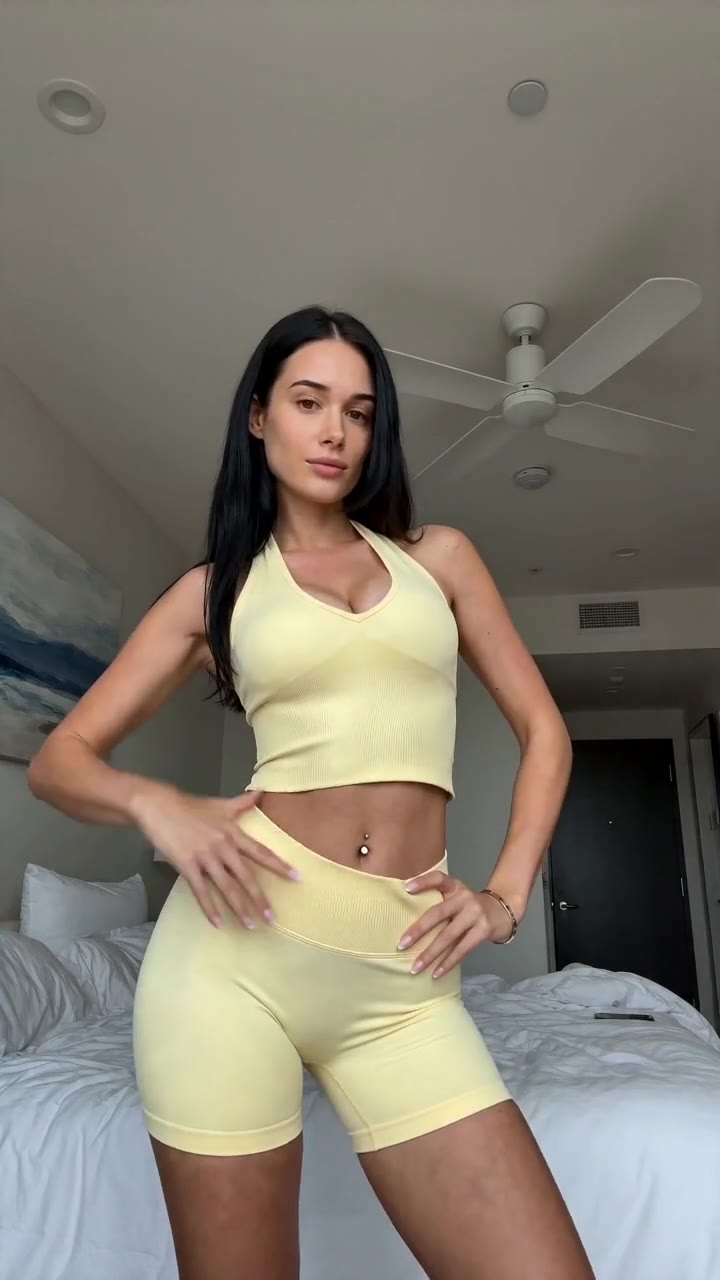 ▶ Sunny yellow halter neck top try-on
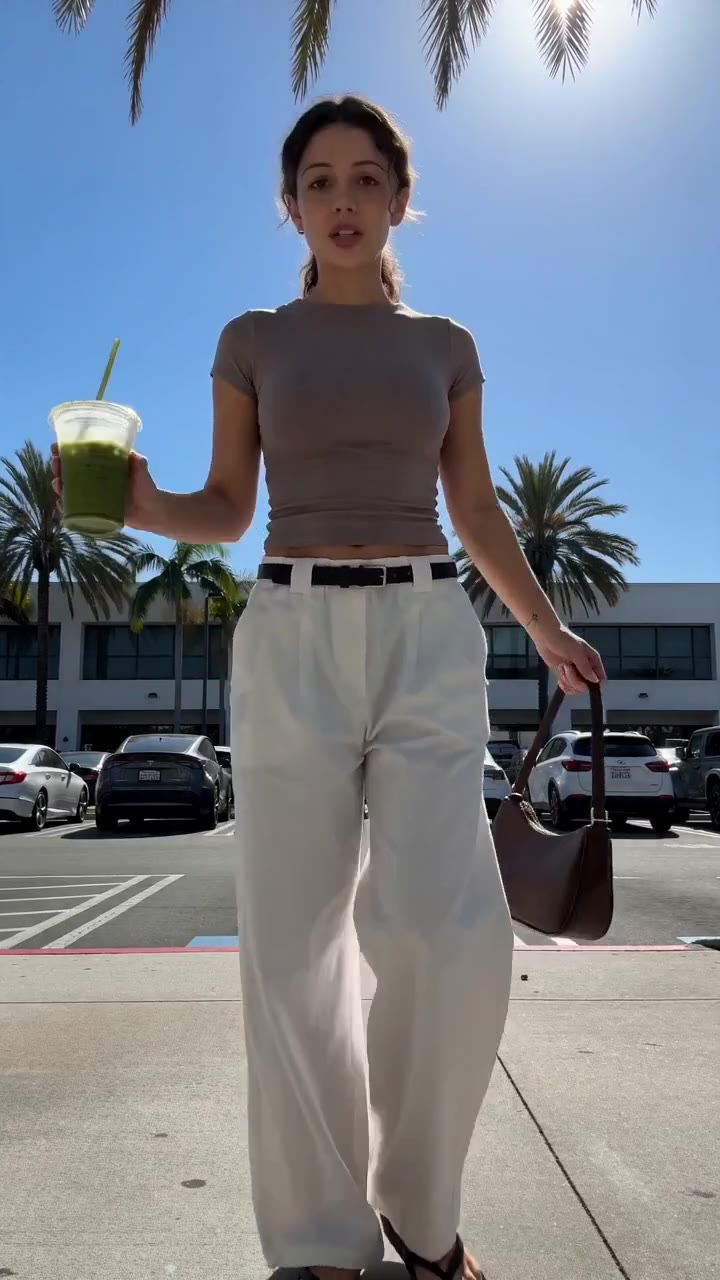 ▶ Chic white wide-leg trousers styling
See all samples and make your first video free →
What Makes AI Product Video Different From General AI Video?
General AI video tools begin with prompts. The seller describes a scene, waits for a generation, spots errors, rewrites the prompt, and generates again. This model is flexible, but it places the creative and quality-control burden on the user.
A commerce-native product video agent starts with the product itself. The product page or uploaded photos provide the source material. The system then builds the video around the item rather than asking the seller to invent every visual instruction.
This difference is visible in the workflow:
| Approach | Starting input | Seller’s main task | Commerce readiness | Common weakness |
|---|---|---|---|---|
| General text-to-video | Text prompt | Describe and refine the scene | Low without additional work | Product shape, colour, or details can drift |
| Avatar UGC tool | Script or product information | Choose avatar and edit output | Medium | Can feel like presentation rather than product selling |
| Human UGC | Product sample and brief | Source, brief, and manage creator | High when execution fits | Samples, creator fees, scheduling, and revisions |
| Traditional product studio | Physical product and shot plan | Coordinate production | High | Studio, model, photographer, editing, and reshoots |
| Commerce-native AI product video | Product link or one to three photos | Review and publish | High | Sellers still need to check each render |
The best way to make product videos without a photoshoot depends on whether the system preserves the product while reducing production work. A visually impressive video that changes the item’s shape or colour is not commercially useful.
AI can still slip. Sellers should check each video before posting, especially when the product has fine details, personalization, unusual construction, or colour-sensitive materials. Product accuracy is not a one-time feature; it is a review discipline.
Why Does Product Accuracy Matter More Than Visual Novelty?
AI video often gets judged by how cinematic it looks. Sellers should judge it first by whether the product remains true to its photos.
A product video is a sales asset, not an abstract visual experiment. If a necklace changes its pendant shape, a chair gains the wrong proportions, or a garment shifts colour, the video creates a gap between expectation and delivery. That gap damages the purpose of the content even if the clip looks polished.
Product accuracy includes more than the outline of an object. Sellers should inspect:
- Shape: Does the product retain its silhouette and proportions?
- Colour: Does the colour stay consistent across frames?
- Material: Does the surface look like the actual product?
- Personalization: Are names, initials, dates, and birthstones represented correctly?
- Construction: Do seams, handles, hardware, cushions, or settings remain plausible?
- Scale: Does the product appear in a believable relationship to the model or environment?
- Use: Does the motion show a credible way to wear, hold, sit on, or place the product?
This is where AI product video differs from pure generation. The product acts as an anchor. The system’s task is to create selling context around the item without replacing the item with an approximation.
Accuracy also changes the seller’s quality-control process. Instead of approving an entire production day, the seller reviews each finished render. That makes review more frequent but usually more focused.
How Is Product Video Becoming a Volume and Testing Problem?
Many sellers still think of video as a flagship asset: create one strong video, publish it, and move on. Short-form commerce rewards a different operating model. The seller needs enough creative variation to learn which presentation works for a product and audience.
Variation can come from:
- A different opening line.
- A different product benefit.
- A different model persona.
- A different setting.
- A different pacing pattern.
- A different voiceover language.
- A different use case.
- A different call to attention around the product detail.
This does not mean producing random versions. Effective testing changes one meaningful variable at a time while keeping the product and offer clear.
A traditional shoot makes variation expensive because each new concept can require another setup, take, or edit. AI reduces the production burden by making the video itself the repeatable unit.
What should sellers test first?
A practical sequence is:
- Hook: Does the opening identify a problem, desire, or product distinction?
- Product proof: Does the video show the item clearly enough to support the claim?
- Use context: Does the viewer understand when or why the product belongs in their life?
- Presentation: Does the model, setting, or styling fit the intended customer?
- Pacing: Does the video move quickly without hiding product information?
- Voiceover: Does the language sound natural and match the audience?
- Caption and hashtags: Do they reinforce discovery and product understanding?
A seller does not need every video to be radically different. The goal is a structured set of tests that turns creative production into a learning process.
This is why one video per product is not enough for many short-form selling strategies. A single result does not reveal whether the product failed, the hook failed, the model failed, or the video simply lacked enough testing.
What Is Shifting for Sellers Who Cannot Film Their Products?
Dropshippers, print-on-demand sellers, affiliate sellers, and businesses with made-to-order inventory often cannot film every product. They may not hold the item, may not want to ship samples, or may sell products that exist in multiple personalized configurations.
Without AI, these sellers face a difficult choice:
- Use static product images.
- Send samples to creators.
- Pay for generic stock-style content.
- Build a production process around products they do not physically possess.
AI product video gives them a fourth route: create a finished product presentation from the product page or available photos, then review the result before posting.
This does not remove the need for truth in merchandising. Sellers still need to ensure that the product page is accurate and that the video does not imply qualities the product lacks. The system solves access to production, not the underlying responsibility to represent the product honestly.
For personalized products, the input quality becomes especially important. A seller should provide clear imagery and inspect every visible personalization element. The best way to make product videos without a photoshoot is only useful when the source product information is strong enough to support accurate output.
A related workflow appears in How AI Helps Fashion Affiliates Create TikTok Shop Videos Without Samples, where the central production problem is access: the creator needs product-focused content without waiting for a physical sample.
How Are AI Models Replacing Some, Not All, Creator Work?
AI models change the role of the creator in product video. They do not eliminate every reason to use human creators, but they remove the requirement that every product needs a physical creator shoot.
For sellers, the useful distinction is between creator identity and creator logistics. A creator’s perspective, lived experience, physical demonstration, or trust with an audience can matter. But sending samples, negotiating fees, coordinating deadlines, and waiting for revisions are operational costs rather than creative advantages.
AI-generated models address the presentation layer:
- The product appears on a model.
- The video can use a selected visual persona.
- The seller can create content without shipping a sample.
- The output is formatted for vertical short-form use.
- The script and voiceover are built around the product.
This makes AI models especially useful for initial creative volume, catalog coverage, affiliate testing, and products that are difficult to distribute physically.
The trade-off is transparency. AI-generated videos should be labelled as AI-generated when posted. Clear labelling protects audience understanding and keeps the content aligned with responsible commerce practices.
Human UGC remains valuable when the product requires tactile proof, real-world performance, personal testimony, or a demonstration that synthetic production cannot credibly provide. AI product video is not a universal replacement. It is a better fit for product presentation, testing, and scalable variation.
Why Are Scripts Becoming Part of the Product Video System?
A product video is not just a moving product image. It needs a reason for the viewer to keep watching and a clear connection between the product feature and the buyer’s situation.
That makes the script a core production component. A commerce-native system should not force the seller to start with a blank page. It should build language around the item, its category, and its likely use.
A useful short-form product script usually performs four jobs:
- Open attention: Introduce a problem, preference, occasion, or surprising detail.
- Name the product: Make the item clear quickly.
- Translate features into relevance: Explain why the feature matters to the buyer.
- Create a next step: Direct attention back to the product without making unsupported promises.
The strongest scripts avoid feature dumping. “Gold-plated chain, custom engraving, several lengths” is information. “A personal gift that carries an initial without looking overdone” is a selling angle.
This distinction matters across categories:
- Clothing: Fit, styling, occasion, comfort, and visual identity.
- Personalized jewelry: Meaning, customization, gifting, and everyday wear.
- Chairs and furniture: Space, function, comfort, material, and placement.
- Other products: The practical or emotional problem the item addresses.
Voiceover adds another layer. Studio supports English, Spanish, and Brazilian Portuguese voiceover, allowing sellers to produce content for those language audiences without recording each script themselves.
The script still needs review. AI can write a clear selling structure, but the seller remains responsible for accuracy, claims, tone, and product fit.
👗 Selling online? Turn any product link into a ready-to-post shoppable video — no shoot, no samples. Try Alvin's Club Studio free → Your first video is free, then from $3 a video.
What Does a Finished Product Video Need to Include?
The phrase “AI video” covers too many different outputs. A generated scene is not the same as a finished product video.
A seller-ready asset needs the parts required for publishing:
- Vertical format.
- Product-focused visuals.
- A script.
- Voiceover.
- Captions.
- Hashtags.
- A duration appropriate to the intended placement.
- A review process for accuracy.
Studio provides finished vertical videos in 8, 12, or 15 seconds, with the script, voiceover, caption, and hashtags included. The seller receives a compact package rather than a raw generation that still requires writing, editing, and formatting.
This changes the cost calculation. A general AI tool may appear inexpensive at the generation step but become expensive in seller time when the workflow includes prompt writing, repeated attempts, editing, captioning, and quality control.
The relevant measure is not only the price of a render. It is the total cost of a finished, publishable video.
What Is the Best Way to Make Product Videos Without a Photoshoot?
The best way to make product videos without a photoshoot is to use a product-focused system that accepts a product link or a small set of product photos and returns a finished vertical video with the selling components already assembled.
Sellers should judge the approach against these criteria:
| Criterion | Why it matters | What to inspect |
|---|---|---|
| Product accuracy | Prevents misleading representation | Shape, colour, personalization, material, and scale |
| Input simplicity | Determines whether production can scale | Product link or one to three product photos |
| Finished output | Reduces editing and prompt work | Video, script, voiceover, caption, and hashtags |
| Testing capacity | Creates room for creative learning | Multiple videos and varied structures |
| Cost control | Connects spend to usable output | Pay per finished video rather than an unused subscription |
| Speed | Keeps production aligned with product launches | Time from input to reviewable render |
| Category fit | Determines whether the workflow matches the catalog | Clothing, personalized jewelry, chairs, and furniture |
| Review discipline | Protects the customer experience | Seller checks every video before posting |
| Distribution readiness | Reduces final-mile work | Vertical format and platform-ready creative |
Studio is built around this model. A seller can paste a product page link or upload one to three product photos, then receive an 8-, 12-, or 15-second vertical video in about 10 minutes.
Pricing is pay per video: the first video is free with no card required, followed by $3 for 8 seconds, $4 for 12 seconds, or $5 for 15 seconds. Credit packs reduce the cost down to $2.14 per video. Credits do not expire, failed renders and stopped scripts are free, and there is no subscription.
That structure matters because product video production is uncertain. Sellers need to pay for usable output, not maintain a recurring plan while deciding whether the workflow fits their catalog.
How Do Different Product Video Approaches Compare?
No single production method fits every commercial objective. The right choice depends on whether the seller values physical proof, speed, testing volume, creative control, or catalog coverage.
| Product video approach | Best suited to | Strength | Limitation | When to choose it |
|---|---|---|---|---|
| Human UGC | Demonstration, testimony, community trust | Real person and real product interaction | Samples, fees, scheduling, and revisions | Use when lived experience is central to the sale |
| Traditional photoshoot | Campaigns and controlled brand visuals | Full physical control | High coordination and reshoot cost | Use when a hero asset justifies production |
| Avatar video | Presenter-led explanation | Fast scripted delivery | May prioritize presenter over product | Use when spoken explanation is the main requirement |
| General text-to-video | Concept exploration | Broad visual flexibility | Prompt burden and product inconsistency | Use for ideation, not necessarily final product selling |
| Commerce-native AI video | Catalog coverage and creative testing | Product link or photos to finished shoppable video | Requires seller review for accuracy | Use when speed, volume, and product focus matter |
This comparison leads to a practical conclusion: the best way to make product videos without a photoshoot is not necessarily the most visually complex option. It is the option that removes the largest amount of work between product information and publishable commerce creative.
For many sellers, that means choosing a system that handles both generation and packaging.
What Are the Category-Specific Effects of AI Product Video?
AI product video has different operational value by category. The category determines which product truths must remain visible.
Clothing
Clothing videos need to communicate silhouette, styling, movement, and context. An AI model can present the garment in an outfit and setting that helps viewers imagine how it fits into their wardrobe.
The risk is visual drift. A garment’s neckline, sleeve length, print, or colour must remain consistent. Sellers should compare the rendered video with the product page and avoid publishing a video that presents an altered design.
An effective clothing video often uses an outfit formula:
Outfit Formula
- Top: The featured garment or a complementary layer.
- Bottom: A simple item that keeps attention on the featured product.
- Shoes: A style that matches the intended occasion.
- Accessories: Minimal pieces that reinforce, rather than compete with, the product.
A seller can also test different styling structures without booking another shoot. One video can position the item as an everyday basic; another can position it for an occasion; a third can focus on a specific styling problem.
For more detail on converting product photos into short-form content, see Turn Fashion Product Photos Into TikTok Shop Videos With AI.
Personalized jewelry
Personalized jewelry requires close inspection because small details carry the product’s meaning. Names, initials, dates, and birthstones should remain legible and consistent.
The creative angle often depends on the reason for personalization:
- A gift connected to a person.
- A date with emotional meaning.
- A subtle everyday accessory.
- A family or relationship reference.
- A birthstone or identity detail.
The video should make the personalization visible enough to understand without overstating what the item represents. Sellers should verify the exact customization before posting.
Chairs and furniture
Furniture needs scale, placement, and use context. A chair shown on an AI model should maintain believable proportions. A room setting should help the viewer understand where the product belongs, not distract from it.
Furniture videos can test several practical angles:
- How the chair fits a desk or dining area.
- How the product changes the look of a room.
- Which material or finish stands out.
- What type of space the product suits.
- How the product looks from different viewing angles.
AI presentation is especially useful when the seller has product photos but no convenient showroom or staging location. The seller still needs to check proportions and avoid claims about comfort, durability, or dimensions that are not supported by the product information.
Other categories
Clothing, personalized jewelry, chairs, and furniture are self-serve categories in Studio. Other categories are handled through the managed programme.
That boundary is useful because category fit affects output quality. A commerce-native system should be clear about where its self-serve workflow applies rather than presenting every product type as equally supported.
What Should Sellers Do and Avoid When Making AI Product Videos?
The biggest mistakes come from treating AI production as either magic or ordinary editing. It is neither. It is a faster production method that still needs a disciplined commercial brief and a review step.
| Do | Don’t |
|---|---|
| Start with a clear product page or strong photos | Start with an unstructured prompt and no product reference |
| Test several selling angles | Assume one video proves the product cannot sell |
| Check colour, shape, personalization, and scale | Publish without reviewing the render |
| Keep claims tied to the product information | Add unsupported promises |
| Use the model and setting to clarify the use case | Let the scene overpower the product |
| Label AI-generated videos when posted | Present synthetic footage as ordinary customer footage |
| Review the first seconds for clarity | Hide the product until the end |
| Compare videos by a defined variable | Change every element at once |
A good review process is short but specific. Watch the video once for overall clarity, once for product accuracy, and once with the sound off to check whether captions and visuals carry the message.
How Does Cost-per-Video Change the Economics of Creative Testing?
Traditional production often bundles many costs into a single project: labor, location, sample handling, equipment, editing, and coordination. That can make sense for a campaign, but it makes small experiments difficult.
Pay-per-video changes the decision. The seller can create a limited set of product videos, assess whether the workflow fits, and expand without committing to a subscription.
Studio’s pricing is structured around individual finished videos:
- First video: free, with no card required.
- 8-second video: $3.
- 12-second video: $4.
- 15-second video: $5.
- Credit packs: lower the cost down to $2.14 per video.
- Failed renders and stopped scripts: free.
- Credits: never expire.
- Subscription: none.
The economic value is not simply the low unit price. It is the ability to match spend to output and maintain production volume without paying for unused capacity.
Sellers should still measure the complete workflow:
- Time spent preparing the input.
- Time spent reviewing the output.
Number of usable videos produced. 4. Number of creative angles tested. 5. Publishing and labelling requirements. 6.
Product and audience response.
Studio does not promise sales. Results depend on the product, audience, distribution, creative quality, and budget. The practical advantage is that sellers can produce and test more product-focused creative without organizing a photoshoot for every variation.
What Is Changing for Agencies and Managed Programmes?
Self-serve AI product video serves sellers who want to create their own assets. A managed programme serves sellers who want the production and distribution process handled for them.
The managed programme includes:
- Product selection informed by TikTok Shop data.
- Videos made across more than 2,000 AI creator personas.
- Posting on accounts the team runs.
- Sales tracking.
- A small fee per video plus commission on sales.
- A $1,500 pilot.
This is a different operating model from using a self-serve tool. The seller delegates product selection, persona selection, publishing, and tracking rather than simply generating videos.
The managed approach fits businesses that need an operating partner and are prepared to evaluate a pilot. It is not the same as a guaranteed acquisition channel. Results vary by brand, product, and budget.
The proof available from the programme includes 100M+ views on accounts the team runs, with a top video reaching 11M views. Reported managed-programme cases include 2.5x ROI for TikTok Shop women’s apparel, 2.0x for DTC, and 6.2x for office chairs via YouTube. These figures are examples from managed work, not promises for every seller.
The distinction between evidence and expectation matters. Views are not sales, a case result is not a universal benchmark, and a pilot should be judged against the seller’s own product economics.
How Will Product Video Change Next?
The next stage of AI product video will focus less on making isolated clips and more on managing structured creative systems.
Several shifts are already visible.
Product pages will become production inputs
A product page contains more than a title and price. It often includes images, features, materials, use cases, variants, and customer-facing language. AI systems will increasingly treat this information as a creative brief.
The quality of the output will depend on the quality of the source page. Sellers with clear images, accurate variant information, and specific product descriptions will give AI stronger material to work with.
Creative testing will become more systematic
Sellers will move from “make a video” to “make a set of controlled tests.” The useful output will not be an endless stream of unrelated generations. It will be a group of videos where each one has a reason to exist.
A testing library could include:
- Benefit-led hooks.
- Occasion-led hooks.
- Problem-solution structures.
- Styling-led presentations.
- Gift-led presentations.
- Persona-led variations.
- Different durations.
- Different voiceover languages.
Accuracy review will become a formal production stage
As AI video becomes more common, product review will become part of the operating procedure rather than an informal final glance. Catalog teams will need clear checks for variant accuracy, personalization, colour, proportions, claims, and AI labelling.
The seller’s advantage will not come from generating without review. It will come from reviewing quickly enough to produce more accurate creative at useful volume.
Distribution will matter as much as generation
A video that exists but does not reach an audience has no commercial role. The next generation of product video systems will connect creation to publishing, account operations, and performance tracking more tightly.
That is already visible in managed programmes that select products, create videos across AI creator personas, post on operated accounts, and track sales. The industry is moving from isolated asset creation toward a production-and-distribution loop.
AI-native commerce will remain product-specific
General AI video will continue to support broad visual experimentation. Commerce-native agents will focus on narrower tasks: turning product information into content designed to sell.
That specialization is a strength. A seller does not need a general film studio inside a prompt interface. The seller needs a reliable route from product link to finished product video.
What Should Sellers Expect From AI Product Video in 2026?
Sellers should expect faster production, more creative variation, and lower dependence on physical samples. They should not expect every render to be perfect or every video to produce sales.
A realistic operating model has five parts:
- Provide strong product inputs.
- Generate a finished video rather than a raw scene.
- Review every render for product truth.
- Label AI-generated content when posting.
- Test multiple creative structures instead of relying on one asset.
The best way to make product videos without a photoshoot is therefore not a shortcut around commerce fundamentals. It is a way to apply those fundamentals more consistently: clear positioning, visible product value, relevant context, accurate representation, and enough variation to learn.
Photoshoots will remain useful for hero campaigns, tactile demonstrations, brand storytelling, and products that require physical proof. AI product video will take a larger role where the seller needs catalog coverage, fast iteration, sample-free production, and finished assets at a controlled cost.
How Should a Seller Choose a Product Video Workflow?
Use a simple decision framework.
Choose a photoshoot when:
- The campaign depends on physical product interaction.
- The product needs tactile or functional demonstration.
- The brand requires a controlled location and cast.
- The asset will support a larger campaign with enough value to justify production.
Choose human UGC when:
- The creator’s real experience is central to trust.
- The product needs testimony or lived-in usage.
- The audience already follows a creator whose identity drives discovery.
Choose general AI video when:
- The goal is concept exploration.
- Product accuracy is not the central requirement.
- The seller has time to prompt, refine, edit, and package the output.
Choose commerce-native AI product video when:
- The seller starts with product links or photos.
- The seller needs ready-to-post vertical content.
- The product belongs to supported categories.
- The seller needs multiple creative tests.
- Samples and shoots create too much friction.
- Paying per finished video is preferable to a subscription.
This framework keeps the decision grounded in the work required, not the novelty of the tool.
What Is the Bottom Line for Product Videos Without a Photoshoot?
The best way to make product videos without a photoshoot is a product-focused AI workflow that turns a product link or a small set of photos into a finished, reviewable, vertical sales video.
The shift matters because product video is no longer only a production challenge. It is a volume, testing, and operational challenge. Sellers need enough creative to learn, but they cannot send samples, book shoots, manage creators, and pay for reshoots every time a product needs a new angle.
The right system combines product grounding with finished output. It should preserve the product as accurately as possible, generate the script and voiceover, add captions and hashtags, support rapid testing, and charge for usable videos rather than unused subscription capacity.
Alvin’s Club Studio turns a product link into a ready-to-post shoppable video in about 10 minutes — no shoot, no samples. Make your first video free →
AI-powered fashion intelligence, such as AlvinsClub, addresses this shift by connecting product information, creative presentation, and fashion-specific selling context. For sellers, the practical question is no longer whether a photoshoot is possible; it is whether a photoshoot is still the right first step for every product video.
Summary
- AI is becoming the best way to make product videos without a photoshoot by converting a product link or one to three photos into ready-to-post vertical videos.
- AI product video can generate an AI model, script, voiceover, captions, and hashtags from existing product information.
- The best way to make product videos without a photoshoot supports rapid testing of hooks, benefits, models, and pacing instead of relying on one polished production.
- Traditional photoshoots capture products but do not solve the costs and coordination required for frequent creative variations, reshoots, and creator content.
- Commerce-native AI agents are more effective than general text-to-video tools because they are designed around product pages, product photos, and shoppable content requirements.
Key Takeaways
- Key Takeaway:
- Product video without a photoshoot:
- event-based production
- repeatable creative production
- Shape:
Frequently Asked Questions
What is an AI product video?
An AI product video is marketing content created from product links, images, descriptions, or other existing assets instead of a traditional studio shoot. AI can generate scenes, motion, voiceovers, captions, and formats designed for social media or ecommerce.
How does AI create product videos from photos?
AI analyzes product photos to understand the item’s shape, colors, features, and intended use, then places it into generated scenes or animations. The resulting video can include product demonstrations, lifestyle shots, text overlays, music, and narration.
Can AI make a product video from a product page link?
AI tools can create product videos from a product page link when they can access the page’s images, descriptions, specifications, and brand information. The software uses those details to build a script, select visuals, and produce a ready-to-edit video draft.
Is AI-generated product video accurate enough for ecommerce?
AI-generated product videos can be accurate enough for ecommerce when the source images and product information are complete and carefully reviewed. Sellers should check dimensions, colors, materials, product functions, claims, and visual details before publishing.
What are the benefits of making product videos without a photoshoot?
Creating product videos without a photoshoot reduces production costs, shortens turnaround times, and makes it easier to produce multiple creative variations. Sellers can also update videos quickly when pricing, messaging, products, or seasonal campaigns change.
How much does an AI product video cost?
The cost of an AI product video depends on the platform, video length, number of variations, editing features, and subscription plan. AI production is typically less expensive than hiring a crew, renting a location, and arranging photography, filming, editing, and reshoots.
Can AI product videos be used for TikTok and Instagram?
AI product videos can be adapted for TikTok, Instagram Reels, Stories, and other vertical-video placements. Most tools support short formats with captions, fast pacing, voiceovers, hooks, and aspect ratios suited to mobile audiences.
Why does product information matter when using AI video tools?
Product information matters because AI uses titles, descriptions, specifications, reviews, and images to determine what the video should show and say. Clear, accurate source content helps prevent misleading claims, incorrect features, and visual inconsistencies.
Related on Alvin's Club Studio
- Make TikTok Shop videos from a product link
- What AI UGC videos cost
- TikTok Shop affiliate videos without samples
About the author
Building Alvin's Club Studio — an AI agent that turns a product link into a shoppable video for TikTok Shop, Shopify and DTC sellers. Writing about what makes product videos sell.
Credentials
- Founder at Alvin's Club (Echooo E-Commerce Canada Ltd.)
- Writes on shoppable video and e-commerce growth at blog.alvinsclub.ai
X / @alvinsclub · LinkedIn · alvinsclub.ai
From the Alvin's Club Studio team — an AI agent that turns a product link into a ready-to-post shoppable video. First video free, then from $3.
Related Articles
- Turn Fashion Product Photos Into TikTok Shop Videos With AI
- How AI Helps Fashion Affiliates Create TikTok Shop Videos Without Samples
- The Best AI Tools for Shoppable Fashion Videos, Compared
- 7 Elements That Make a TikTok Shop Fashion Video Convert
- How to Build a Digital Wardrobe Faster With AI and Your Own Style
- The Best AI UGC Video Tools for Fashion Ecommerce Brands
- The Best AI Video Generators for TikTok Shop Fashion Sellers
- How Much Does a UGC Video Cost for Fashion Brands in 2026?
- Does This Dress Run True to Size? Traditional vs AI Fit Checks
- Demna AI vs Traditional Sale Alerts: Which Finds Fashion Deals Faster?
- We Tried the Best AI Tools for Finding a Dress From a Photo
- AI Styling Tools Compared: Which Ones Link to Retail Products?