The Best AI UGC Video Tools for Fashion Ecommerce Brands

Compare leading platforms for creating on-brand product videos, scaling creator-style content, and improving fashion ecommerce conversion rates.
The Best AI UGC Video Tools for Fashion Ecommerce Brands
Key Takeaway: The best AI UGC video tool for ecommerce brands transforms product pages or images into publishable, product-specific videos without requiring samples, studio shoots, or creator bookings.
The best AI UGC video tool for ecommerce brands turns a product page or product images into a finished, publishable selling video without requiring a sample, studio shoot, or creator booking.
Fashion brands are usually trying to solve a narrower problem than “make an AI video.” They need enough product-specific creative to test different hooks, scripts, presenters, languages, and formats while keeping the garment, jewelry, or accessory recognizably true to the listing. The useful comparison is therefore not which tool produces the most cinematic demo. It is which tool gets from product information to accurate, ready-to-post commerce creative with the least production friction.
This comparison focuses on established tools with distinct workflows: avatar-led UGC, generative product video, creator marketplace production, and commerce-specific product video. Pricing and free access can change, so check each linked product page before committing to a workflow.
How Were These AI UGC Video Tools Selected?
The tools below were selected because each represents a real, identifiable approach to ecommerce video production and can be evaluated against the same operating criteria:
- Product input: Can the workflow start from a product page, product photos, a script, or a creator brief?
- Product fidelity: Does the workflow preserve the product, or does it rely on generated visuals that require close checking?
- Production model: Is the output an avatar presentation, a synthetic scene, a human creator video, or a product-focused social video?
- Commerce readiness: Does the tool produce a finished video, or only one part of the process?
- Testing economics: Can a seller produce multiple concepts without booking a new shoot for every variation?
- Known limitation: What part of the workflow still requires human review, additional production, or a separate tool?
No single category wins every use case. A virtual presenter can be fast but still feel unlike a real customer. A creator marketplace can provide genuine human footage but adds coordination.
A text-to-video system can create striking motion but is a poor fit when exact product identity matters. The right choice follows the bottleneck.
See it: real Alvin's Club Studio sample videos
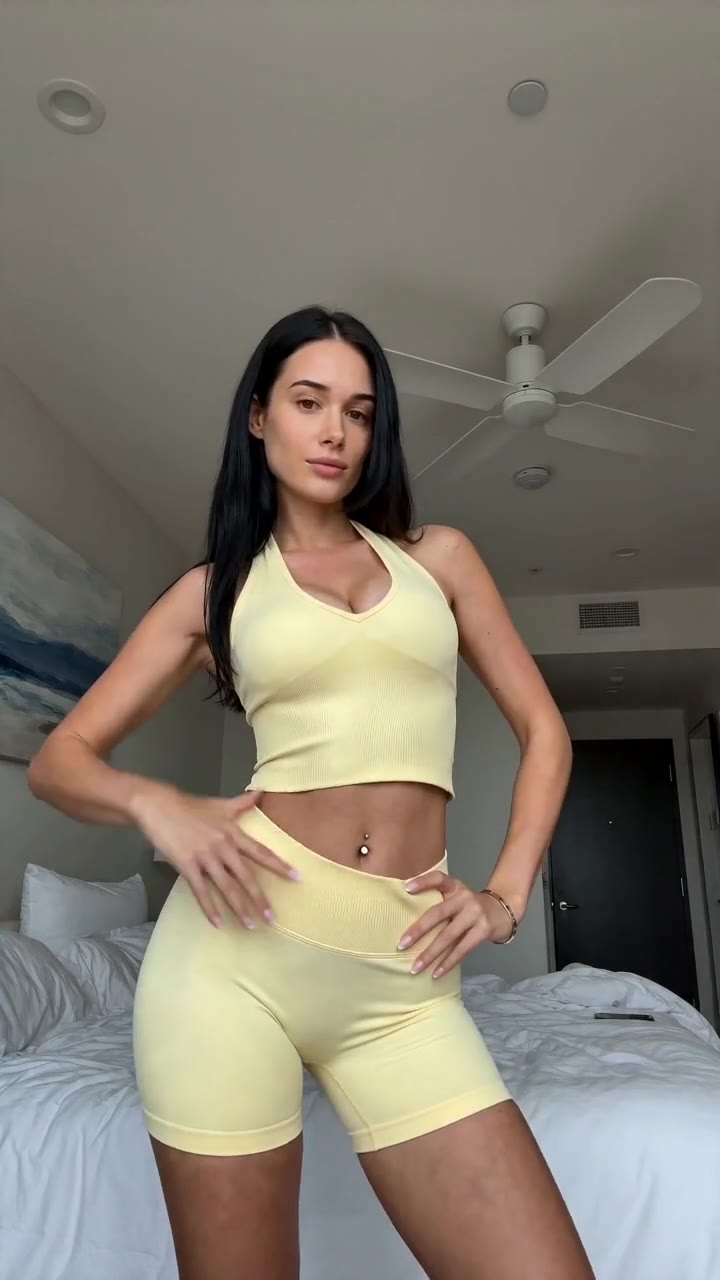 ▶ Sunny yellow halter neck top try-on
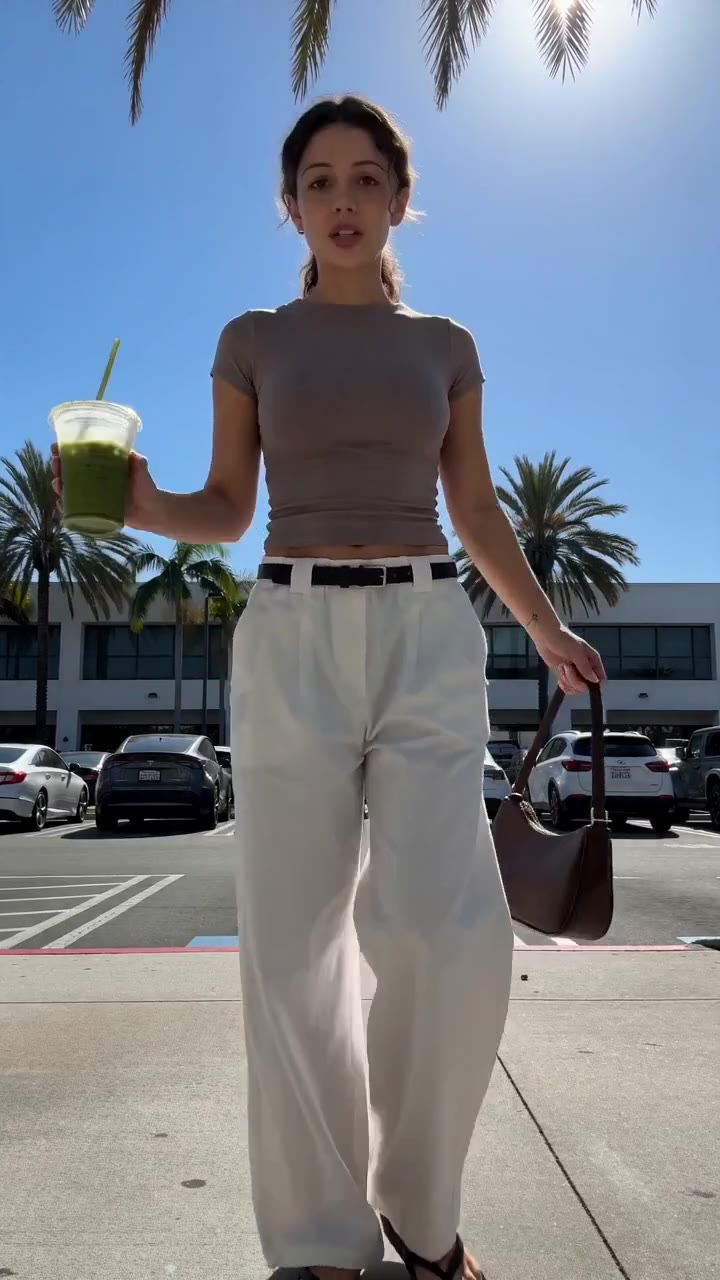 ▶ Chic white wide-leg trousers styling
See all samples and make your first video free →
Which AI UGC Video Tools Should Fashion Ecommerce Brands Compare?
| Name | What it actually does | Best for | Pricing / free tier | Key limitation |
|---|---|---|---|---|
| Alvin’s Club Studio | Turns a product page link or one to three product photos into a vertical 8-, 12-, or 15-second video on an AI model, with script, voiceover, caption, and hashtags | Sellers who need product-specific shoppable creative without a shoot | First video free with no card; then $3 for 8 seconds, $4 for 12 seconds, or $5 for 15 seconds; credit packs reduce the per-video cost | Sellers must check every render because AI can still slip on product details; self-serve categories are clothing, personalized jewelry, chairs, and furniture |
| HeyGen | Creates presenter-led videos using AI avatars, scripts, voiceovers, translations, and related video-production features | Brands that need a polished virtual presenter or multilingual spokesperson | Free access and paid plans are available; current limits and pricing should be checked on HeyGen’s pricing page | The avatar is not a genuine customer or product owner, and product-specific visual accuracy depends on the assets and workflow supplied |
| Synthesia | Produces avatar-led business and training videos from scripts, with AI presenters and multilingual delivery | Structured explainers, product education, onboarding, and brand messages | A free demo or trial access and paid plans are available; current pricing should be checked on Synthesia’s pricing page | Its core presentation style is better suited to controlled explanation than native-feeling fashion UGC |
| Creatify | Generates marketing videos from product links and related inputs, including AI-presenter and ad-creative workflows | Performance marketers who want to turn product information into multiple ad concepts | Free access and paid plans are available; current limits and pricing should be checked on Creatify’s pricing page | Automated creative still needs review for product claims, visual accuracy, pacing, and platform fit |
| InVideo AI | Generates and edits videos from text prompts and other inputs using templates, stock media, AI-generated elements, and editing tools | Teams that want broad video editing and fast assembly from a written brief | Free plan access and paid plans are available; current limits and watermarks should be checked on InVideo’s pricing page | It is a broad video tool rather than a fashion-specific product-to-video workflow, so product fidelity and commerce structure remain the seller’s responsibility |
| Arcads | Creates ad-style videos with AI actors and scripted performance formats | Advertisers testing presenter-led concepts and direct-response creative | Trial and paid access are available; current pricing and usage limits should be checked on Arcads’ pricing page | AI actors can provide the presentation layer, but the seller still has to validate product representation and whether the performance feels credible |
The table separates tools that are often grouped together under “AI UGC.” That label hides important differences. HeyGen, Synthesia, and Arcads are primarily presenter or actor workflows. InVideo AI is a broad generation and editing environment. Creatify is closer to performance-ad automation. Alvin’s Club Studio is product-video-specific: the input is a product page or product photos, and the output is a short vertical selling video with commerce metadata.
That distinction matters because the production bottleneck changes by brand. A company selling a complex software product needs explanation. A fashion seller with a product listing needs the viewer to understand the garment’s appearance, fit context, styling, and reason to click without introducing a different item through generation.
What Should Fashion Brands Demand From an AI UGC Video Tool?
A fashion seller should judge tools by the finished publishing workflow, not by the quality of a demo reel.
Product accuracy comes before visual novelty
For apparel, jewelry, chairs, and accessories, small visual changes are commercial changes. A different neckline, altered stone placement, changed hardware, wrong color, or distorted silhouette can make the video promote a product the customer will not receive.
AI generation is useful only when the seller treats the output as a draft that must be inspected. The tool should make that inspection practical by keeping the product close to supplied photos, rather than asking the seller to accept a visually impressive but unfaithful result.
A finished video is more useful than a video component
A script generator, avatar platform, video editor, image generator, and caption tool can each be useful. Together, they also create a production chain with more handoffs:
- Write the brief.
- Select or create a presenter.
Generate the script. 4. Record or synthesize the voice. 5. Assemble the product visuals. 6.
Add captions. 7. Format the video. 8. Write the post copy. 9.
Review claims and product details. 10. Export and upload.
For a seller testing many product angles, every extra handoff creates delay. A product video tool should be evaluated on whether it delivers the complete short-form asset, not merely whether it can generate an attractive scene.
Pay-per-finished-video economics matter
Subscription plans are not automatically bad. They become inefficient when a seller pays for a broad creative system but uses only one narrow function, or when failed renders and unusable drafts consume the budget.
A practical evaluation asks:
- What does a finished video cost?
- Does the plan include several formats or only one?
- Are failed renders charged?
- Do unused credits expire?
- Can a seller produce enough variations to test hooks and structures?
- Is a separate editor required before publishing?
For a deeper breakdown of production economics, see How Much Does a UGC Video Cost for Fashion Brands in 2026?.
Native-feeling creative beats generic presentation
Fashion social video does not need to look like a corporate presentation. The viewer often responds to a clear product demonstration, a styling idea, a personal-use scenario, or a direct answer to a buying objection.
The presenter is only one part of that equation. The product must enter the story quickly, remain visually consistent, and appear in a structure that makes sense for a vertical feed. A polished avatar reading generic copy is still generic creative.
What Does Alvin’s Club Studio Do for Fashion Ecommerce Sellers?
Alvin’s Club Studio is designed for sellers who want to start with a product rather than a blank prompt.
A seller pastes a product page link or uploads one to three product photos. Studio returns a finished vertical video in an 8-, 12-, or 15-second format on an AI model, including a script, voiceover, caption, and hashtags, in about 10 minutes. The workflow is built only for selling products, not as a general AI video tool.
Studio’s self-serve categories are:
- Clothing
- Personalized jewelry, including names, initials, dates, and birthstones
- Chairs and furniture
Other categories are handled through the managed programme rather than self-serve production.
The pricing model is straightforward:
- First video: free, with no card required
- 8-second video: $3
- 12-second video: $4
- 15-second video: $5
- Credit packs: lower the cost to as little as $2.14 per video
- No subscription
- Credits never expire
- Failed renders and stopped scripts are free
The important limitation is product review. Studio is built to keep the product true to its photos, but AI can still slip. Sellers need to check each video before posting.
That limitation is not unique to product video generation; it is the basic quality-control requirement for synthetic visual content.
Studio also supports English, Spanish, and Brazilian Portuguese voiceover. It can remake the pacing and structure of a TikTok the seller likes with the seller’s own product, which gives the seller a more concrete starting point than an empty prompt.
AI-generated videos must be labelled as AI-generated when posted. Studio works on its website and inside ChatGPT, Claude, and Meta Muse.
Who Should Use HeyGen for Fashion Ecommerce?
HeyGen suits brands that want a virtual presenter to deliver a script, especially when the same message needs to be adapted across languages or markets.
A fashion brand can use it for product education, founder-style messaging, care instructions, sizing explanations, or a campaign where the presenter is part of the brand identity. The platform’s strength is the presentation layer: an avatar speaks, the voice is synthesized, and the message can be produced without booking a person for every variation.
The concrete limitation is that a virtual presenter is not automatically UGC. Viewers can recognize the difference between a creator showing something they own and an avatar delivering a prepared message. Product fidelity also depends on how the seller supplies product visuals and constructs the scene.
If the clothing or accessory needs to remain exact, the brand must inspect the finished composite rather than assume that a convincing face guarantees a convincing product.
HeyGen is therefore a good fit for structured spokesperson content. It is a weaker fit when the creative brief depends on genuine customer behavior, tactile product interaction, or an unmistakably native creator performance.
Who Should Use Synthesia for Fashion Ecommerce?
Synthesia suits brands that need controlled, repeatable presenter-led communication rather than informal creator-style selling.
Its natural territory includes instructional content, product education, internal brand training, and clear scripted messages. A fashion company could use it to explain a loyalty programme, introduce a textile-care process, provide a sizing guide, or deliver a consistent message across regions. The controlled format helps when legal, brand, or operational teams need a stable script.
The limitation is creative fit. Fashion ecommerce content often wins through immediacy, visual product proof, styling context, and social-native pacing. A formal avatar presentation can communicate information while failing to create the feeling that a real person has discovered and used the product.
The tool also does not remove the need to supply accurate product visuals or review the output.
Synthesia is a sound choice when clarity and repeatability matter more than creator realism. It is not the obvious first choice for a seller whose primary goal is a high-volume stream of short product videos for social testing.
👗 Selling online? Turn any product link into a ready-to-post shoppable video — no shoot, no samples. Try Alvin's Club Studio free → Your first video is free, then from $3 a video.
Who Should Use Creatify for Fashion Ecommerce?
Creatify is aimed at marketers who want to convert product information into advertising concepts quickly.
That makes it relevant to fashion brands with a large catalogue, frequent promotions, or a need to produce several direct-response variations from product data. A seller can use an automated workflow to explore different scripts, hooks, presenters, and calls to action without treating every concept as a new traditional shoot.
The limitation is that automation does not eliminate creative review. Product claims must match the listing. The garment or accessory must remain recognizable.
The hook must fit the actual offer, and the final edit must suit the platform where it will run. A tool can generate several concepts while still producing repetitive structures, generic language, or a visual mismatch between the product page and the video.
Creatify is best for a performance marketing team that already has a review process and wants to expand its creative production capacity. It is less suitable for a seller expecting a fully autonomous system to decide what is true, persuasive, and brand-safe.
Who Should Use InVideo AI for Fashion Ecommerce?
InVideo AI suits teams that want a broad video creation and editing environment rather than a narrowly defined product-video pipeline.
Its value is flexibility. A marketer can start with a written idea, combine stock footage or supplied assets, generate scenes, edit the sequence, and adapt content for different communication needs. This makes it useful for campaign explainers, seasonal edits, educational content, and broader brand storytelling.
The limitation is exactly that breadth. A general video tool gives the seller more responsibility for product fidelity, scene selection, script quality, captions, and commerce structure. It can help assemble a video, but it does not automatically mean that the product is shown accurately or that the first seconds address a real shopping objection.
InVideo AI is a reasonable choice for a team with an editor or content manager who wants one flexible workspace. It is less efficient for a seller who wants to paste a product link and receive a compact, product-focused social video with the selling components already prepared.
Who Should Use Arcads for Fashion Ecommerce?
Arcads suits advertisers who want AI actors to perform direct-response scripts.
This approach is useful when the campaign depends on a spoken hook, a recommendation format, a problem-and-solution structure, or several actor variations. A fashion brand can test how different presenters deliver the same product angle without coordinating a new human shoot for each script.
The limitation is credibility and product handling. An AI actor can perform a line, but performance alone does not establish that the actor owns, wore, tested, or personally recommends the product. The seller also needs to check whether the product shown in the video matches the actual listing and whether the performance feels suitable for the brand and audience.
Arcads is a fit for teams that view the actor as a testing variable. It is a weaker fit when the campaign requires genuine customer testimony, detailed tactile demonstrations, or a close relationship between the creator and the physical product.
Why Is Human UGC Still Different From AI UGC?
Human UGC and AI UGC solve overlapping but different problems.
A human creator can handle a real garment, demonstrate how it fits, show texture under ordinary lighting, and speak from personal experience. That authenticity is valuable when the purchase decision depends on feel, fit, comfort, or trust. The tradeoff is production friction: the brand must select creators, ship samples, write or approve briefs, wait for delivery and filming, manage revisions, and pay for the resulting content.
AI UGC removes much of that coordination. It is particularly useful for dropshippers and print-on-demand sellers that cannot film products they do not hold. It also supports higher creative volume because a seller can generate multiple versions without sending a sample to a different creator for every concept.
AI UGC has its own costs:
- Product details can drift.
- Presenter behavior can look artificial.
- Claims require review.
- Some audiences can distinguish synthetic performance from human experience.
- Platforms may require AI-generated content to be labelled.
The practical choice is not “human or AI forever.” A brand can use human UGC for high-trust campaigns and AI product videos for rapid testing, catalogue coverage, and concepts that do not require a creator’s genuine personal experience.
How Do Avatar UGC Tools Compare With Product Video Tools?
The phrase “AI UGC” covers several production types. Their differences are easier to see when the workflow is compared directly.
Key Comparison: Which Production Type Fits the Job?
| Production type | Starting input | Typical strength | Typical weakness | Best use |
|---|---|---|---|---|
| Avatar presenter | Script, product assets, brand brief | Clear spoken delivery and repeatable presenter variations | Presenter may feel synthetic or disconnected from the product | Explanations, scripted hooks, multilingual messaging |
| AI actor ad | Script, actor choice, product assets | Direct-response concepts with varied performances | Performance does not equal genuine product experience | Hook and presenter testing |
| Text-to-video tool | Prompt, reference images, or text brief | Broad visual experimentation and scene creation | Exact product identity can drift | Mood, concept, and campaign exploration |
| General AI video editor | Text, clips, images, templates | Flexible assembly and editing | Seller owns the commerce strategy and product QA | Teams with editing capacity |
| Human UGC marketplace | Creator brief and often a physical sample | Real product handling and personal testimony | Sample shipping, creator coordination, and revision delays | Trust-heavy campaigns and real demonstrations |
| Product-focused AI video tool | Product URL or product photos | Fast conversion from listing to short selling video | AI output still requires product review | Catalogue coverage, dropshipper content, creative testing |
This table explains why “best AI UGC video tool for ecommerce brands” has no useful answer without a situation attached. A tool optimized for avatar narration is not automatically optimized for product accuracy. A tool optimized for cinematic generation is not automatically optimized for TikTok Shop volume.
How Should Fashion Brands Test AI UGC Creative?
The test should isolate creative variables rather than produce a pile of random videos.
1. Start with one product and one buying objection
Choose a product with a clear customer decision. Examples include:
- Whether a personalized necklace makes a meaningful gift
- Whether a chair fits a home office
- Whether a garment can support several outfits
- Whether the product’s design looks as shown in the listing
A vague prompt creates vague creative. A specific objection gives the script a job.
2. Change one major variable at a time
Useful variables include:
- Opening hook
- Presenter or model
- Product angle
- Voiceover language
- Pacing
- Social proof format
- Styling context
- Call to action
If every variable changes at once, the seller learns only that the videos differ. A testing system should reveal why one version earns more attention or product-page visits.
3. Check the product before checking the polish
Review in this order:
- Product shape and color
- Product details, text, initials, stones, or hardware
Fit and scale 4. Script accuracy 5. Claims and implied promises 6.
Captions and legibility 7. Opening-frame clarity 8. Pacing and sound
A polished video with the wrong product is a failed asset. Product QA belongs before aesthetic preference.
4. Produce enough structural variety
One product should not be represented by one generic video. Different structures answer different shopping questions:
- “Three ways to style it”
- “The detail people miss”
- “A gift for someone with a specific interest”
- “What it looks like in a real room”
- “Why the design works for everyday use”
- “A quick comparison with a standard alternative”
- “A response to a sizing or care question”
The exact structure should follow the product. Furniture needs spatial context. Jewelry needs scale and personalization clarity.
Clothing needs styling and fit context. Generic templates flatten those differences.
5. Treat platform compliance as part of production
AI-generated content must be labelled when posted. Product claims must remain accurate. If a video uses a synthetic presenter, the seller should avoid implying that the presenter personally bought, wore, tested, or endorsed the product unless that statement is true and appropriately presented.
Compliance is not a final decoration added after editing. It affects the script, captions, and publishing decision.
What Are the Main Limitations of AI UGC for Fashion Brands?
AI UGC removes several production bottlenecks, but it does not remove judgement.
AI cannot verify physical experience
A generated model can display a garment. It cannot establish the actual softness, stretch, weight, fit, or durability of the fabric. Those claims require real product knowledge and accurate evidence.
Product personalization needs special checking
Names, initials, dates, birthstones, and other customization details are vulnerable to visual errors. A seller should inspect every personalized element at a readable size, not just watch the video at normal speed.
AI volume can create creative sameness
Producing more videos does not automatically produce more useful tests. If every output uses the same hook, model, shot order, and voice pattern, the brand creates volume without learning.
Synthetic performance has an audience ceiling
Some audiences accept AI presenters immediately. Others find them distracting or untrustworthy. The correct response is not to assume one universal viewer reaction.
It is to test the presentation against the product and platform, while labelling AI-generated content as required.
A finished asset still needs a publishing decision
A video can be technically complete and commercially weak. Sellers still decide:
- Whether the product is in stock
- Whether the offer is current
- Whether the claims match the listing
- Whether the video fits the brand
- Whether the creative is distinct from existing ads
- Whether the landing page supports the promise
AI reduces production time. It does not replace merchandising judgement.
What Is the Best Workflow for Dropshippers and Print-on-Demand Sellers?
Dropshippers and print-on-demand sellers face a specific constraint: they often cannot film a product because they do not physically hold it.
Traditional UGC production assumes a sample can be shipped to a creator. That assumption breaks when the seller wants to test many products, works with a supplier, or sells personalized products that are produced only after purchase. In those cases, a product-photo or product-page workflow is more practical than a sample-dependent workflow.
The workflow should be:
- Select a product with stable listing images.
- Confirm that the supplier’s photos represent the actual item.
Provide the product page or a small set of product photos. 4. Generate several short concepts. 5. Inspect the product, personalization, and claims. 6.
Label the video as AI-generated when posted. 7. Publish the strongest concepts. 8. Retire or revise videos that create confusion.
Alvin’s Club Studio genuinely fits this use case because it accepts a product page link or one to three product photos and does not require the seller to possess the product for filming. Its limitation remains the same: the seller must check each render for AI slips, and self-serve production is limited to clothing, personalized jewelry, chairs, and furniture.
How Does Video Volume Improve Ecommerce Creative Testing?
One video per product gives a seller very little information. If the video underperforms, the seller does not know whether the problem was the hook, product angle, presenter, offer, or opening frame.
A larger set of structured variations creates better diagnostic information. The objective is not to publish every generated asset. The objective is to make several plausible selling arguments and see which one earns enough attention to justify further testing.
A useful creative matrix includes:
| Variable | Example versions |
|---|---|
| Hook | Gift problem, styling problem, product detail, room transformation |
| Audience | First-time buyer, gift buyer, home-office buyer, fashion enthusiast |
| Product emphasis | Appearance, personalization, use case, fit context |
| Presenter | AI model, AI actor, real creator, product-only edit |
| Voiceover | English, Spanish, Brazilian Portuguese |
| Structure | Demonstration, list, objection answer, remake of a reference TikTok |
| Duration | Short cut, medium cut, longer short-form cut |
Volume has value only when the versions are meaningfully different. Ten nearly identical videos do not equal ten tests. They are one concept repeated.
Which One Should You Pick by Situation?
Choose the tool according to the production problem, not according to the broadest feature list.
- Choose Alvin’s Club Studio when you sell clothing, personalized jewelry, chairs, or furniture and want a product link or product photos turned into a short vertical selling video with a script, voiceover, caption, and hashtags. It is also a strong fit for dropshippers and print-on-demand sellers that cannot film the product. Its limitation is that every render needs seller review for AI slips.
- Choose HeyGen when the central requirement is a polished virtual presenter, multilingual delivery, or a repeatable spokesperson format. Do not treat the avatar as proof of genuine product ownership.
- Choose Synthesia when the content is structured, educational, or operational and clarity matters more than informal creator energy. It is less natural for fast, native-feeling fashion UGC.
- Choose Creatify when a performance marketer wants to turn product information into multiple advertising concepts and already has a process for reviewing claims, visuals, and platform fit.
- Choose InVideo AI when you need a broad editor and generation environment for assembling many kinds of video. Expect to own more of the product-specific strategy and quality control.
- Choose Arcads when AI actors are useful as a variable in direct-response testing. Validate whether the performance feels credible and whether the product is represented accurately.
- Choose human UGC when physical handling, personal testimony, texture, fit, or trust is the main selling argument and the sampling process is manageable.
The best AI UGC video tool for ecommerce brands is the one that matches the handoff you need to remove. If your problem is presenter production, use a presenter platform. If your problem is product-to-video conversion, use a product-focused workflow.
If your problem is editing flexibility, use a general editor. If your problem is authentic physical experience, AI does not replace a real creator.
Alvin’s Club Studio turns a product link into a ready-to-post shoppable video in about 10 minutes — no shoot, no samples. Make your first video free →
For related fashion technology workflows, see The Best AI Fashion Apps for Saving Your Favorite Brands. AI-powered fashion intelligence such as AlvinsClub addresses the broader product-discovery problem by helping sellers and shoppers organize fashion information around actual products, while Studio handles the separate job of turning a product listing into labelled, shoppable video creative.
Summary
- The best AI UGC video tool for ecommerce brands converts a product page or product images into a finished, publishable selling video without requiring a sample, studio shoot, or creator booking.
- Fashion brands need product-specific creative that supports testing multiple hooks, scripts, presenters, languages, and formats while keeping garments, jewelry, and accessories accurate to their listings.
- The comparison evaluates tools by their ability to accept product pages, product photos, scripts, or creator briefs as inputs and preserve product fidelity.
- The selected tools represent distinct workflows, including avatar-led UGC, generative product video, creator marketplace production, and commerce-specific product video.
- Pricing and free-access terms can change, so brands should verify each tool’s current product page before choosing a workflow.
Key Takeaways
- Key Takeaway:
- product information to accurate, ready-to-post commerce creative
- Product input:
- Product fidelity:
- Production model:
Frequently Asked Questions
What is an AI UGC video tool for fashion ecommerce?
An AI UGC video tool for fashion ecommerce creates product videos from product images, descriptions, or product pages without requiring a professional photoshoot or booked creator. These platforms can generate scripts, virtual presenters, voiceovers, product demonstrations, and social-ready formats for paid and organic campaigns.
How does AI UGC video creation work for clothing brands?
AI UGC video creation for clothing brands typically combines product assets with selected avatars, hooks, scripts, languages, and video formats. The platform generates a finished video designed to showcase details such as fit, fabric, styling, or use cases across channels like TikTok, Instagram Reels, and YouTube Shorts.
Is AI-generated UGC worth it for ecommerce advertising?
AI-generated UGC can be worth it for ecommerce advertising when a brand needs to produce many creative variations quickly and affordably. It helps fashion advertisers test different presenters, messages, languages, and opening hooks without repeatedly paying for new shoots or creator bookings.
Can AI UGC tools create videos from product images?
AI UGC tools can create videos from product images by turning static catalog assets into narrated product demonstrations or testimonial-style ads. Results are strongest when images clearly show the product from multiple angles and the brand reviews details such as colors, patterns, logos, and garment fit before publishing.
Related on Alvin's Club Studio
- Make TikTok Shop videos from a product link
- What AI UGC videos cost
- TikTok Shop affiliate videos without samples
About the author
Building Alvin's Club Studio — an AI agent that turns a product link into a shoppable video for TikTok Shop, Shopify and DTC sellers. Writing about what makes product videos sell.
Credentials
- Founder at Alvin's Club (Echooo E-Commerce Canada Ltd.)
- Writes on shoppable video and e-commerce growth at blog.alvinsclub.ai
X / @alvinsclub · LinkedIn · alvinsclub.ai
From the Alvin's Club Studio team — an AI agent that turns a product link into a ready-to-post shoppable video. First video free, then from $3.
Related Articles
- How Much Does a UGC Video Cost for Fashion Brands in 2026?
- How Demna AI Helps Identify Ethical Fashion Brands
- The Best AI Fashion Apps for Saving Your Favorite Brands
- The Best AI Fashion Apps for Smarter Travel Packing
- AI Outfit Planners Compared: Find Your Perfect Occasion Look
- Demna AI Outfit Recommendations for Effortless Travel Style
- Can AI Stylists Identify Clothing Brands? We Compare the Best Tools
- Can Demna AI Create the Perfect Outfit for Any Occasion?
- 7 Demna AI Alternatives for Professional Fashion Stylists
- The Best AI Stylist Apps for Building a Capsule Wardrobe
- What Is Demna AI Used For in Modern Fashion Design?
- Demna AI and the 2026 Battle Over Client Output Ownership