Create TikTok Spark Ads by selecting an organic post from an authorized TikTok identity or adding a creator’s post authorization code in a manual or search campaign. Complete the destination and tracking settings, review the post, then publish.
Before creating the ad
You need an organic TikTok post and permission to use its TikTok account or post as the ad identity. TikTok documents three creative sources:
- Pull a post from an authorized account.
- Add a creator’s post code.
- Push Ads Manager creative to an identity authorized in Business Center.
TikTok Ads Manager requires a TikTok account as the Spark Ad identity. Account and post-level authorization differ: access to one creator post does not necessarily provide access to the account or other posts.
Confirm:
- The post shows the correct product and variant.
- The caption is final and accurate.
- The creator agreed to paid advertising use.
- Your agreement covers the authorization period and compensation.
- The destination page is live and appropriate.
- Claims, disclosures and music suit commercial use.
Agree commercial terms directly with the creator; a platform authorization code does not replace a written usage agreement.
Create a Spark Ad from your brand’s post
Use the pull workflow for a linked business account or an account authorized through TikTok Business Center. Follow TikTok’s Spark Ads creation guide:
- Sign in to TikTok Ads Manager and open Campaign.
- Select +Create, or create an ad in an existing campaign.
- Choose an objective and complete the campaign and ad-group settings.
- Under Ad creatives or Creative assets, select + Add videos or images.
- Open TikTok posts, select the brand post and click Confirm.
- Complete the ad details, destination and optional tracking.
- Review and click Publish all.
If the post is missing, select Add post and complete the applicable authorization process. Do not upload a duplicate and assume it will retain the original post identity.
Create one from a creator’s post code
Ask the creator to authorize the organic video. They can open it in the TikTok app, tap the three-dot menu, open Ad settings, and select Generate.
After receiving the code:
- Open the relevant manual or search campaign in TikTok Ads Manager.
- Choose the objective, if needed, and complete the campaign and ad-group settings.
- In the creative section, select + Add videos or images.
- Open TikTok posts, select Add post, and enter the code.
- Review the post and displayed authorization period, then confirm.
- Complete the ad details, destination and optional tracking.
- Review and select Publish all.
TikTok says advertisers can batch-authorize up to 20 video codes. Still inspect each post, destination and authorization period.
A video code can be deleted only after all ads using it have been deleted from TikTok Ads Manager. Include code management in campaign cleanup.
Use Content Suite for authorization
TikTok’s Content Suite instructions provide this workflow:
- Open Request authorization and select Request authorization beside the video.
- Write an invitation or use TikTok’s template, then confirm.
- After approval, open Authorized for Spark Ads.
- Review the authorization method and video.
- Sync it, use configured automatic synchronization, or copy its post code.
- In Ads Manager, add creative under Ad details.
- Filter the source to Content Suite and select the video, or choose Add post and paste its code.
- Complete and publish the ad.
Content Suite requests default to 365 days. Check the displayed authorization rather than assuming permission lasts for the campaign’s life.
Automatic synchronization is not on by default for videos authorized in Content Suite within TikTok One. TikTok says Sync All can edit or change automatic synchronization settings; this does not establish that it performs an unrestricted bulk-sync operation.
What cannot be changed after authorization?
An authorized post’s caption cannot be edited for the Spark Ad. Correct outdated prices, unsupported claims, wrong product names or unclear disclosures before authorization.
A private video becomes public when used in a campaign, and its privacy status cannot change while promoted. Ensure the account owner understands this.
Review:
- Footage and spoken claims
- Caption
- Product name and variant
- Creator or brand identity
- Public visibility
- Destination URL
- Call to action
- Authorization period
- Optional tracking
For substantial content changes, publish and authorize a corrected organic post.
Push a new creative
If the identity is authorized through Business Center:
- Open Your Library in the creative-selection drawer.
- Select the creative and click Confirm.
- Complete the identity, music, text, call to action, destination and optional tracking.
- Click Publish all.
A pulled Spark Ad uses an existing authorized post; a pushed creative starts in Ads Manager and is sent to the authorized identity.
Example: promoting a creator’s organic dress video
Hypothetical example
A merchant promoting a creator’s brown lace midi dress video:
- Verifies the brown variant, spoken description and product page.
- Agrees with the creator on paid use, authorization period and payment.
- Has the creator correct errors and generate a post code through Ad settings.
- Creates a manual campaign and completes campaign and ad-group settings.
- Opens TikTok posts, selects Add post, enters the code and checks the authorization period.
- Selects the video and adds the exact dress landing page rather than a general collection page.
- Configures optional tracking, previews and publishes.
If the caption calls the dress black, the creator must correct the organic content before authorization.
TikTok recommends vertical 9:16 video, at least 720p resolution, sound or music, and important content inside the interface-safe area. It also recommends introducing the proposition early and ending with a clear call to action; see creative best practices. These recommendations do not guarantee performance.
Case: check the underlying product video
This paired asset is an example, not evidence that every generated or creator-made video preserves every product detail.
Original product input
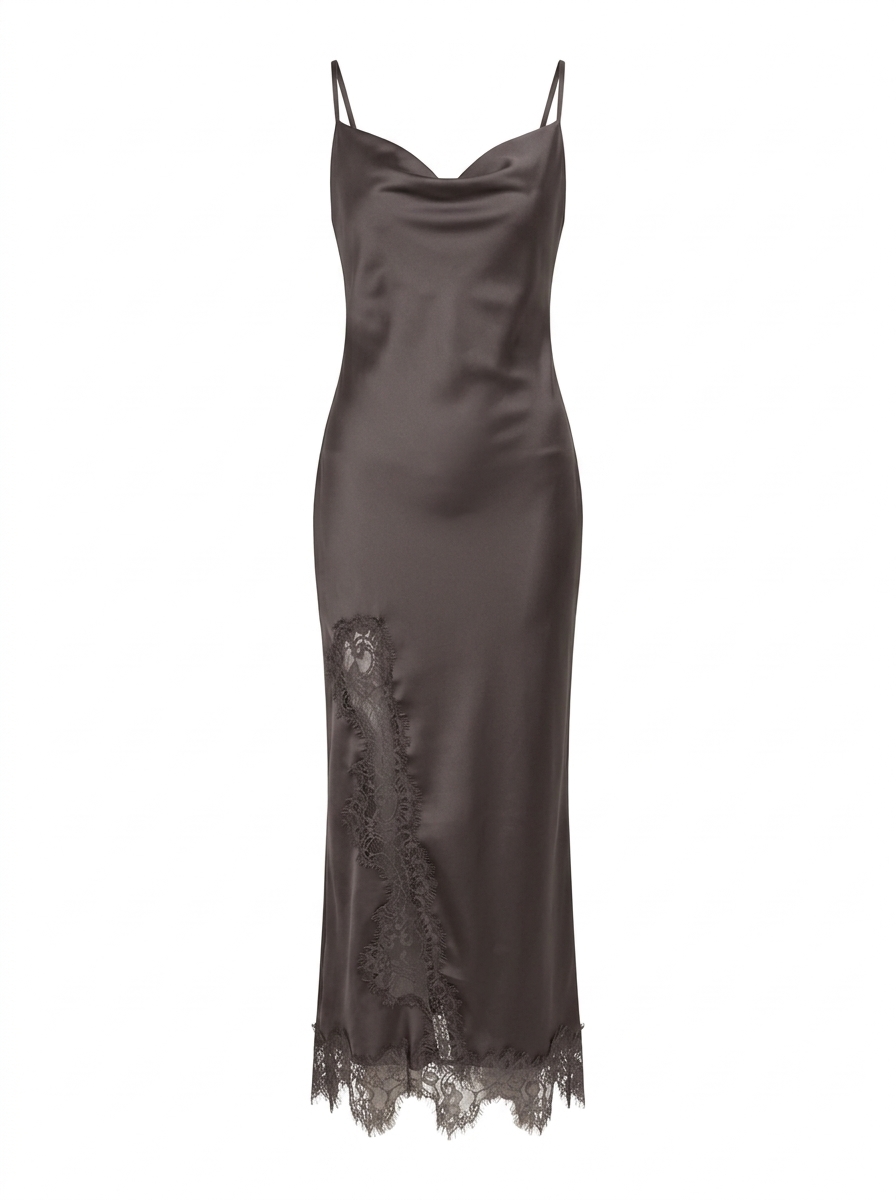
Caption: Original product image for the “Jeneva Lace Midi Dress – Brown.”
Completed video output
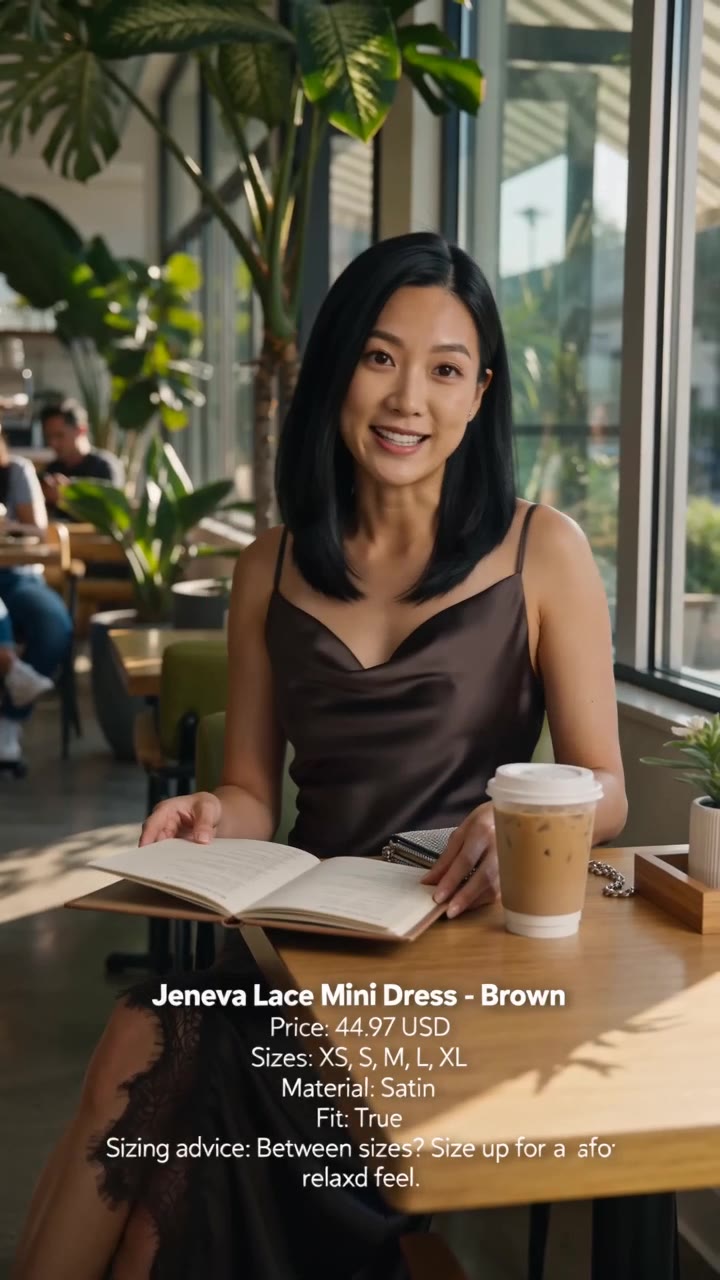
Caption: Completed short-video output based on the supplied dress image. Watch the video.
Compare the product with the entire video, not only its cover. Check color, neckline, lace pattern, sleeves, hem and shape. The thumbnail is a navigation aid, not proof every frame is accurate.
This is especially important for generated video or content made without a physical sample. Do not promote a version that materially changes what shoppers receive.
Troubleshoot missing posts
- Brand post: Confirm the linked business account or Business Center-authorized identity.
- Creator post: Add its authorization code or confirm Content Suite approval.
- Content Suite video: Check synchronization or use its copied post code.
- Authorization unavailable: Ask the creator to review the request or generate a new code.
- Wrong identity: Select the account associated with the post.
Do not download and re-upload a creator’s video without permission. It becomes a separate asset and does not preserve the authorized organic-post relationship.
Limitations
This workflow covers manual and search campaigns. TikTok provides separate Smart+ Spark Ads instructions.
It does not replace:
- Creator contracts or paid-usage agreements
- Product-claim review
- Disclosure and advertising compliance
- Destination-page preparation
- Campaign measurement
- Permission for music or third-party material
Authorization only makes the post available for the documented workflow. It does not establish accuracy, compliance or a particular commercial result.
FAQ
Can I edit a creator’s caption after adding the authorization code?
No. TikTok says it cannot be edited after authorization. Finalize it first.
Can I use a private TikTok video as a Spark Ad?
Yes, but it becomes public once used in a campaign, and its privacy status cannot change during promotion.
Do I need the creator’s whole account connected?
No. A creator can authorize one post with a post code; account-level authorization is optional for this workflow.
Does the authorization code replace a creator agreement?
No. It does not define compensation, usage scope, deliverables or other commercial terms.
Can I add several creator codes together?
Yes. TikTok permits up to 20, but review each post, authorization period and destination.
Can I remove a post code while ads still use it?
No. Delete all ads using the video in TikTok Ads Manager first.
Will a Spark Ad keep the organic post’s caption?
Yes. The authorized caption remains and cannot be edited.
Does authorization guarantee that the ad will run successfully?
No. Campaign review, delivery conditions, creative quality, audience, offer and destination remain separate considerations.
To create a short product asset before publishing and authorizing the organic post, Sunny, Alvin’s Club Studio turns a product link or photos into a short product video with voiceover and captions.
Related on Alvin's Club
About the author
- Founder building AI-native fashion commerce infrastructure. I design autonomous systems, agent workflows, and automation frameworks that replace manual retail operations. Currently focused on AI-driven commerce infrastructure, multi-agent systems, and scalable automation.
Comments
Join the discussionNo comments yet. Be the first to comment.