
Compare top tools for creating scroll-stopping product videos, automating content production, and boosting TikTok Shop conversions without expensive equipment.
A TikTok Shop seller needs a product-accurate video that is ready to post, not another blank prompt box.
Key Takeaway: The best AI product video generator for TikTok Shop sellers depends on the workflow: use an editor for existing product footage, a visualization tool for products you do not physically hold, and specialized solutions for clothing brands.
Best AI Product Video Generators for TikTok Shop Sellers
The right tool depends on the production problem you are solving. A seller who already has product footage needs editing and formatting; a dropshipper who never holds inventory needs product visualization; a clothing brand may need an AI model; and a high-volume store needs scripts, voiceover, captions, and repeatable output. “AI video generator” covers all of these workflows, but the tools do not solve the same job.
This comparison focuses on a practical question: can the tool turn a product asset into a usable TikTok Shop video without creating a second production bottleneck?
AI product video generator: A tool that uses artificial intelligence to create or assemble product-focused video from inputs such as a product link, photos, text, or existing footage. For TikTok Shop, the useful output is a finished vertical video that presents the product clearly and supports a purchase decision.
What should TikTok Shop sellers compare?
A product video generator should be judged against the actual work between a product page and a posted TikTok.
The important criteria are:
- Input: Can the seller start with a product link, product photos, existing footage, or only a text prompt?
- Product accuracy: Does the generated video preserve the product’s shape, color, material, branding, and details?
- Selling structure: Does it create a hook, product explanation, objection handling, and call to action?
- Human presentation: Does the tool provide an AI model, avatar, voiceover, or presenter?
- Editing control: Can the seller adjust timing, captions, shots, music, and format?
- Speed: Does it reduce production time, or does it simply move the work into prompting and revision?
- Testing volume: Can a seller produce multiple usable variations without paying for every failed experiment?
- Commercial readiness: Is the output close to something a seller can review and post?
- Pricing model: Is the seller paying per rendered video, paying for credits or a subscription, or paying for a managed service?
- Compliance workflow: Can the seller review the final video and label it as AI-generated where required?
A tool can perform well on one criterion and fail another. An avatar platform may present a polished spokesperson but require the seller to build the script and product scenes. A text-to-video model may produce visually interesting clips but change the product between shots.
An editor may be excellent when footage already exists but cannot help a dropshipper who has no samples.
The goal is not to find a universal winner. The goal is to match the production model to the seller’s constraint.
See it: real Alvin's Club Studio sample videos
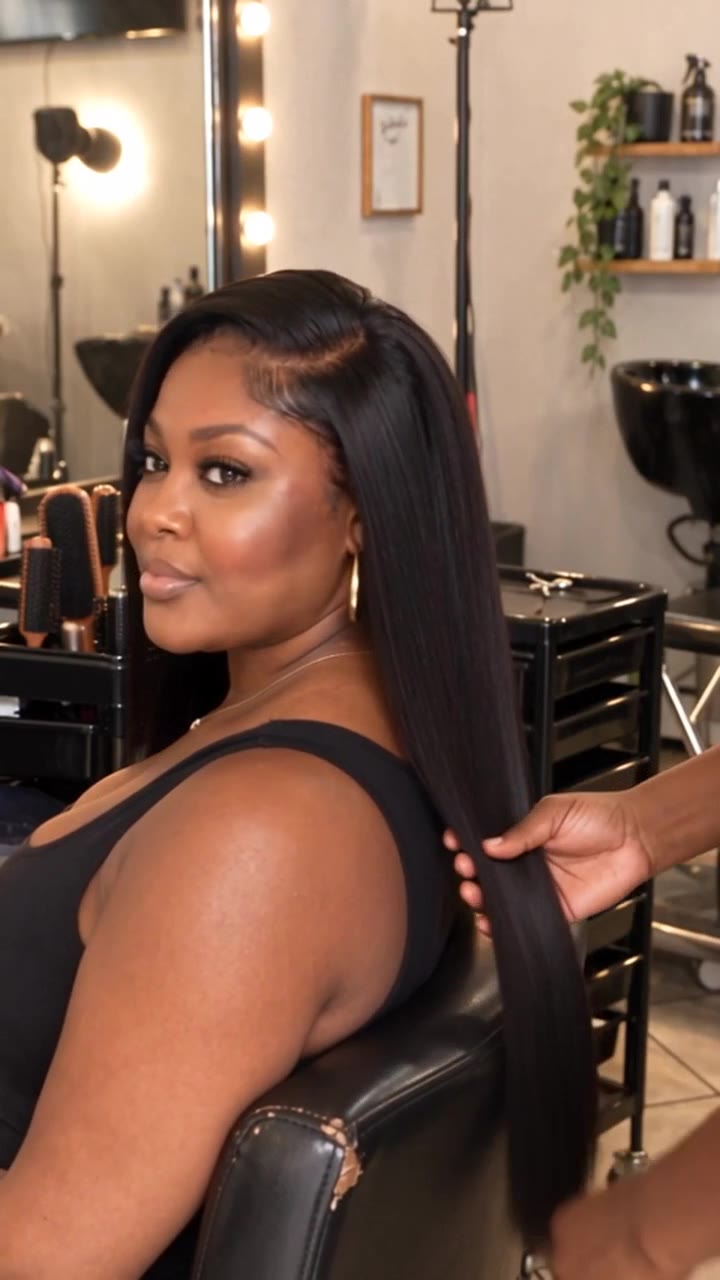 ▶ Silky straight lace wig, salon install (done-for-you sample)
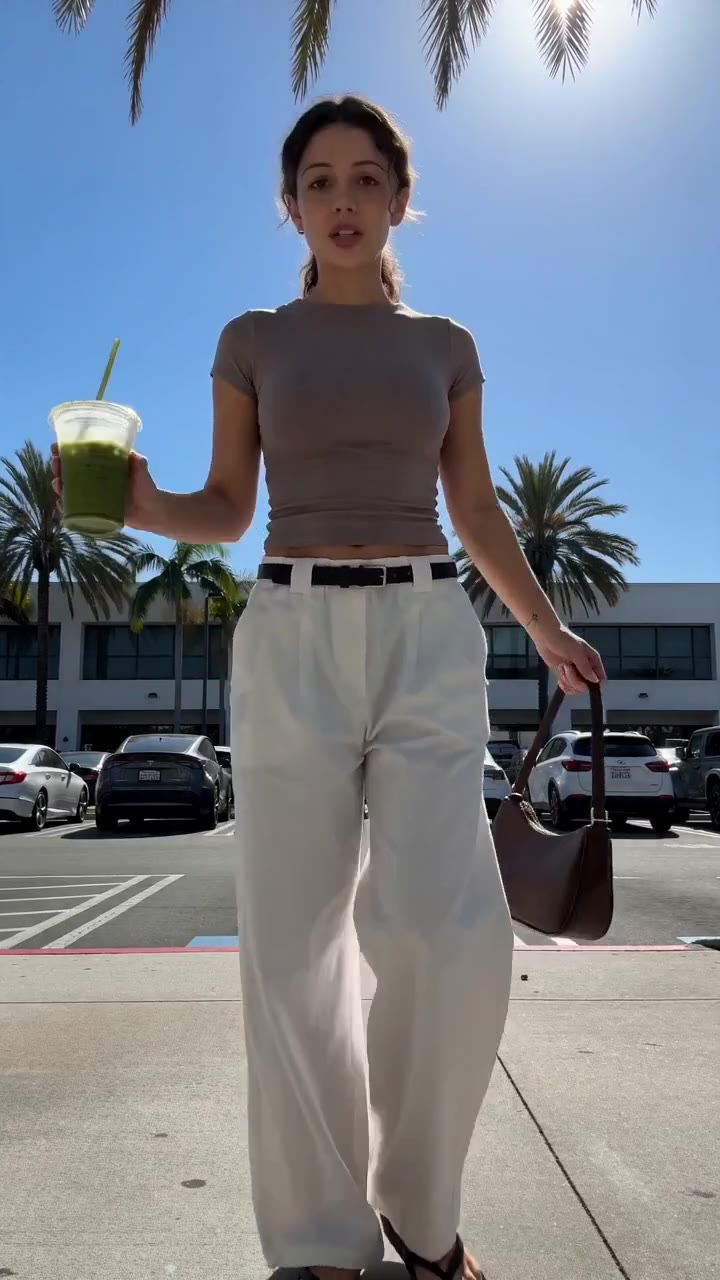 ▶ Chic white wide-leg trousers styling
See all samples and make your first video free →
Key comparison: AI product video generators for TikTok Shop sellers
| tool | what it does | dated price | limitation |
|---|---|---|---|
| Alvin’s Club Studio | Turns a product page link or one to three product photos into a finished vertical eight-, twelve-, or fifteen-second product video on an AI model, with script, voiceover, captions, and hashtags. | First video free for an eight-second video with a small watermark, email only, no card. Then $3 for eight seconds, $4 for twelve seconds, and $5 for fifteen seconds; credit packs reduce the cost to $2.14 per video. Pricing stated in the supplied product brief, accessed 2026-10-06. | AI can still slip, so the seller must check every video before posting. |
Self-serve categories are clothing, personalized jewelry, and home goods; other categories are handled through the done-for-you service. | | HeyGen | Creates presenter-led videos using AI avatars, voices, and scripts supplied by the user. | price not verified | The seller still needs to provide accurate product footage or build the product visuals separately; an avatar does not automatically prove what a physical product looks like. | | Synthesia | Produces presenter-style videos with AI avatars and generated voiceover for structured communication. | price not verified | It is built around avatar-led presentation rather than a product-link-to-TikTok-Shop workflow, so product scene creation and commerce-specific scripting remain separate tasks. | | Runway | Generates and edits AI video from creative prompts and supplied media. | price not verified | Prompt-based generation requires close product review because visual continuity and exact product details are not guaranteed. | | Adobe Express | Provides template-based social video creation and editing within Adobe’s broader creative toolset. | price not verified | It helps assemble and format content, but sellers still need product footage, product images, or a separate generation workflow. | | CapCut | Edits short-form videos with templates, captions, effects, transitions, and other social-video tools. | price not verified | It is primarily an editing workflow; it does not, by itself, turn a product page link into a complete product video with commerce-specific scripting and product presentation. |
The table separates production types, not just brands. Alvin’s Club Studio is a product-video workflow. HeyGen and Synthesia are presenter workflows.
Runway is a generative video workflow. Adobe Express and CapCut are assembly and editing workflows.
That distinction matters because the most common failure is buying an editing or avatar tool when the real problem is lack of product footage. If the seller already has strong footage, an editor may be enough. If the seller has only a product page, the seller needs a system that begins with the product asset and ends with a reviewed vertical video.
Prices for named tools other than Alvin’s Club Studio are marked as unverified here because no primary pricing source was supplied for this comparison. That is deliberate. Subscription prices, credit limits, regional pricing, and commercial-use terms change, so a price should not be presented as fact without a dated source.
How does Alvin’s Club Studio work for TikTok Shop sellers?
Alvin’s Club Studio suits sellers who want to begin with a product page link or a small set of product photos rather than arrange a shoot. The stated workflow accepts a product page link or one to three product photos and produces a finished vertical video in eight, twelve, or fifteen seconds. The package includes a script, voiceover, captions, and hashtags, with the product shown on an AI model.
The useful distinction is that Studio is built only for selling products, rather than being a general AI video tool. Self-serve categories include clothing, personalized jewelry such as names, initials, dates, and birthstones, and home goods including furniture, bedding, decor, and bath. Other categories, including wigs, are handled through the done-for-you service.
The limitation is product verification. AI can still slip, so sellers must inspect each video before posting. Studio also does not cover every category through self-serve.
Its self-serve model is paid per generated video: the first eight-second video is free with a small watermark, then the stated prices are $3 for eight seconds, $4 for twelve seconds, and $5 for fifteen seconds, with credit packs reducing the cost down to $2.14.
Studio also supports English, Spanish, and Brazilian Portuguese voiceover. It can remake the pacing and structure of a TikTok a seller likes using the seller’s own product. That helps with repeatable creative structures, but it does not remove the need to review claims, product details, and the final presentation.
For TikTok Shop sellers, the central tradeoff is straightforward: Studio reduces the work of going from product asset to finished selling video, but it is not a substitute for product review or platform compliance judgment. AI-generated videos should be labelled as AI-generated when posted, where the platform or applicable rules require that disclosure.
Who is HeyGen suited to?
HeyGen suits a seller who wants a presenter-led video and already has the product explanation, product assets, and desired structure. An AI avatar can deliver a script consistently across multiple videos, which is useful for educational product demonstrations, founder-style announcements, and repeated offer explanations.
The workflow is strongest when the presenter is the main communication layer. For example, a seller can write a script explaining who a product is for, what problem it addresses, and how to use it, then pair that narration with supplied visuals. This can reduce the need to record the same explanation repeatedly.
The concrete limitation is that an avatar does not automatically establish product accuracy. A presenter can say that a garment has a particular fit or that a piece of jewelry has a certain finish, but those claims still need accurate product media and careful scripting. If the seller has no usable footage, HeyGen does not by itself solve the entire product-scene problem.
This makes HeyGen a presentation tool rather than a complete product-page-to-TikTok-Shop pipeline. The seller still has to decide what shots appear, provide or create those shots, verify the script, and assemble a commercial-ready edit. It can be a fit for a seller with a product library and a clear messaging system, but less suitable for a seller whose main problem is never holding the product.
Who is Synthesia suited to?
Synthesia suits teams that need structured presenter videos with consistent narration and a repeatable format. Its avatar-led approach can work for product education, internal demonstrations, onboarding, and scripted explanations where the spoken presentation carries much of the message.
For a TikTok Shop seller, that can mean using an avatar to explain product features, sizing guidance, assembly steps, or common questions. A seller with existing product footage can place those visuals alongside the narration and then format the result for social use.
The concrete limitation is workflow fit. A presenter platform is not automatically a commerce production system. The seller still needs to create or supply product scenes, decide whether the video has enough visual evidence, and adapt the pacing to short-form shopping behavior.
A polished avatar does not solve weak hooks, unclear product differentiation, or missing proof.
Synthesia is therefore more appropriate when the seller needs a reliable digital presenter than when the seller needs a finished video generated from a product page. The distinction matters for dropshippers and print-on-demand sellers: if the seller does not hold the product, the key question is not only who presents the script but how the product itself appears accurately on screen.
Who is Runway suited to?
Runway suits creators who want generative control over visual scenes, motion, and creative treatments. It can be useful when a brand has a strong visual concept and wants to explore product-adjacent storytelling, atmosphere, transitions, or campaign imagery from prompts and supplied media.
For TikTok Shop, that can support a creative layer around a product launch. A seller might use it to create a visual opening, an environment, or a transition before showing a product image or existing product footage. It can also support experimentation for sellers who already understand how to review generated media closely.
The concrete limitation is exact product continuity. Prompt-based generation is not the same as preserving a physical product across every frame. Shape, color, material, logos, and small construction details need inspection.
A visually impressive clip can still be unusable if the item changes between shots or if the result implies a product feature that does not exist.
Runway is better treated as a creative generation and editing environment than as an automatic TikTok Shop product-video system. Sellers need a separate process for product truth, commercial claims, captions, and final assembly. It is a fit for teams with creative direction and review capacity, not for sellers looking to paste a product link and receive a complete selling video with minimal intervention.
Who is Adobe Express suited to?
Adobe Express suits sellers who already have product photos, clips, brand elements, and a clear idea of the final edit. Template-based creation can help turn those assets into vertical social content with consistent typography, layouts, and branding.
The advantage of an editor is control. Sellers can choose the exact product image, place captions where they want them, trim a clip, add a call to action, and maintain a recognizable visual system across products. That can be valuable for a brand with existing footage and a team member who knows how to assemble short-form content.
The concrete limitation is input dependency. Adobe Express helps assemble content, but the seller still needs product media or a separate generation system. It does not remove the need to write a strong script, decide which product proof belongs in the opening seconds, or generate accurate lifestyle footage for an item the seller has never held.
That makes Adobe Express a production editor rather than a full product-video generator for every seller. It fits a brand with assets and design requirements. It fits less well when the seller’s bottleneck is the absence of footage, presenters, voiceover, or a product-specific selling script.
Making TikTok Shop videos? Alvin's Club Studio turns a product link into a ready-to-post vertical video. See TikTok Shop sellers → Your first video is free, then from $3 a video.
Who is CapCut suited to?
CapCut suits sellers who already have footage and want to produce short-form edits with captions, transitions, templates, and social-video formatting. Its workflow is familiar to creators who want to cut clips quickly and adapt them for vertical platforms.
For TikTok Shop, CapCut can help turn raw demonstrations, creator clips, unboxings, and product close-ups into a tighter edit. It can also support rapid formatting when a seller is testing different openings or caption treatments from the same source footage.
The concrete limitation is that editing is not the same as product-video generation. CapCut does not, by itself, turn a product page link into a complete product presentation with a commerce-specific script, voiceover, product scenes, and hashtags. If a seller has no footage, the editing tools cannot fill the entire gap.
CapCut is therefore a strong consideration for sellers who already have material and need speed at the assembly stage. It is not a complete answer for a dropshipper, print-on-demand seller, or small store that has only product photos and wants the system to create the selling narrative as well as the edit.
Why do product-link workflows matter for TikTok Shop?
The starting asset determines how much work remains. A product link contains information about the item, but a link alone is not a finished video. The seller still needs to extract the product’s selling points, turn them into a short script, choose a visual structure, create or source product scenes, add narration or captions, and review the final output.
A product-link workflow compresses those steps into one production path. That matters for sellers with broad catalogues, dropshippers, and print-on-demand operators who cannot easily record every product. It also matters for testing because one polished video rarely answers every creative question.
A useful product video can test several variables:
- The first spoken or visual hook.
- The product use case.
- The order of feature demonstrations.
- The objection addressed.
- The presenter or visual style.
- The voiceover language.
- The call to action.
- The caption framing.
- The product angle or crop.
Testing does not mean producing random variations. Each version should isolate a meaningful creative decision. If the opening changes, keep the product proof and offer structure stable enough to learn from the result.
If the product demonstration changes, keep the hook and audience framing consistent.
This is where generic AI video tools often create hidden work. A seller can spend time writing prompts, generating many drafts, correcting product changes, and discarding unusable clips. The apparent speed of generation does not equal speed to a postable asset.
How should sellers evaluate product accuracy?
Product accuracy has several layers, and a video can pass one while failing another.
Visual identity: The item must retain its recognizable shape, color, pattern, branding, and key construction details.
Functional truth: The video must not show the product being used in a way it cannot support.
Scale and fit: Furniture, clothing, jewelry, and home goods need believable proportions. A distorted scale can create a misleading expectation.
Variant accuracy: If a product has multiple colors, sizes, initials, dates, or birthstones, the selected variant must match the video.
Claim accuracy: Captions and voiceover must not promise features, materials, outcomes, or compatibility that the product page does not support.
Context accuracy: A lifestyle scene should clarify the product, not imply a setting or use that the seller cannot substantiate.
AI can produce a smooth video while failing any of these checks. The seller’s review process should compare the output directly against the product page and approved product information. This is not optional quality control; it is part of publishing.
For personalized jewelry, the risk includes incorrect names, initials, dates, and birthstones. For clothing, it includes the garment’s cut, color, print placement, and fit. For furniture and bedding, it includes dimensions, texture, configuration, and the way the item is shown in a room.
How should a seller judge the script?
A product script should move the viewer from recognition to relevance to action. A short video does not need to explain every specification. It needs to make the product understandable quickly and give the viewer a reason to inspect the listing.
A practical structure is:
- Hook: Identify the audience, problem, use case, or unexpected product detail.
- Product reveal: Show the product clearly before the viewer has to infer what is being sold.
- Proof: Demonstrate a feature, material, fit, personalization option, or use.
- Objection handling: Address a likely concern such as size, styling, setup, or suitability.
- Call to action: Direct the viewer to inspect the product listing or available options.
The script must match the footage. A voiceover claiming “adjustable” is weak if the video never shows the adjustment. A caption claiming “personalized” is incomplete if the viewer cannot see where the name or date appears.
Product claims need visible support.
A reusable product-video block
- Hook: “Looking for a gift with their date on it?”
- Product shots: Show the personalized detail, scale, finish, and packaging or context where accurate.
- Proof: Demonstrate the selected personalization option and show the product from a second angle.
- Objection handling: Clarify the available personalization fields or relevant product detail.
- Call to action: “Open the product listing to choose the details.”
The exact language should come from the product page. Do not use the block as a license to invent benefits or specifications.
Which workflow fits a seller who has no samples?
A seller who does not hold inventory cannot rely on traditional filming. Sending samples to creators creates waiting time, coordination, and additional cost. Booking a studio shoot creates a different set of dependencies: models, photographers, props, editing, and reshoots.
The alternatives are not interchangeable:
| Workflow | Starting asset | Main strength | Main limitation |
|---|---|---|---|
| Human UGC | Product sample and creator brief | Natural human demonstration and personal delivery | Requires sample logistics, creator coordination, and review |
| Avatar video | Script plus supplied or separately created visuals | Consistent presenter and narration | Presenter does not prove product appearance or performance |
| Text-to-video | Prompt or concept | Fast creative exploration | Product identity and continuity require careful checking |
| Product editor | Existing photos or footage | Control over assembly and branding | Cannot create missing product evidence by itself |
| Product-link video workflow | Product page link or a small set of photos | Moves from catalog asset to structured selling video | AI output still requires product and claim review |
| Managed CPS programme | Product selection, production, posting, and tracking by a service team | Outsources more of the operating process | Merchant pays ad spend and uses a results-linked service model |
The question is not whether human UGC, avatars, text-to-video, or product-link generation is universally superior. The question is which missing input is blocking publication.
A seller with strong creator footage needs editing. A seller with no samples needs a way to represent the product without filming it. A brand with a trained spokesperson may need script and editing support rather than an AI presenter.
A catalogue seller needs repeatable output across many products.
What is the difference between paying per video and paying by results?
Pricing models change the seller’s risk and operating behavior.
Paid per video means the seller pays for each generated output. This is suitable when the seller wants control over product selection, creative testing, and publishing. The seller bears the cost of production whether or not the video generates sales.
Paid by results means the service combines a production cost with commission on sales. In the stated done-for-you model from Alvin’s Club Studio, the price is described as a very low basic production cost per successful video, plus commission on sales. The team picks products, makes and posts videos through its 2,000-plus creator partners, and tracks sales.
Ad spend remains the merchant’s responsibility.
These models should not be mixed. Self-serve Studio is paid per generated video, not paid by results. The done-for-you programme is the results-linked option.
Neither model promises a sales volume or ROAS.
For a seller deciding between them, the operational questions are:
- Does the seller want to choose every product and video?
- Does the seller have someone to review and post content?
- Is the main bottleneck production or distribution?
- Does the seller want to pay for each output or outsource more of the process?
- Can the seller fund ad spend separately?
- Is the seller prepared for results to vary by brand, product, and budget?
The right choice depends on who owns the work after the video is created.
What does “ready to post” actually mean?
A ready-to-post video is not merely a rendered file. It should pass a practical review:
- The product is identifiable immediately.
- The product shown matches the listing.
- The spoken claims match the product information.
- Captions are readable in a vertical feed.
- The hook earns attention without misleading the viewer.
- The product appears long enough to inspect.
- The call to action is clear.
- The file is in a suitable vertical format.
- Any required AI-generated-content disclosure is handled.
- The seller has checked personalization, variants, and product details.
Many tools help with one part of this sequence. An editor can make a file vertical. An avatar tool can make narration consistent.
A generative model can create a visual concept. None of those facts alone mean the video is ready for a TikTok Shop listing or post.
The strongest workflow reduces the number of separate handoffs. If the seller has to export from one tool, generate visuals in another, write the script in a third, record voiceover in a fourth, and add captions in a fifth, the total process may remain slow even if every individual tool is fast.
How much testing volume does a seller need?
One video per product gives the seller one creative interpretation. It does not reveal whether the product failed, the hook failed, the visual proof failed, or the audience framing failed.
Testing should be structured around hypotheses:
- Audience test: gift buyers versus practical users.
- Hook test: problem-led versus product-detail-led opening.
- Proof test: close-up detail versus lifestyle use.
- Presenter test: AI model, creator, voiceover, or text-led edit.
- Objection test: fit, personalization, setup, or material.
- Language test: English, Spanish, or Brazilian Portuguese where relevant to the intended audience.
The seller should avoid changing every element at once. If the hook, voice, product angle, caption, offer, and music all change, the result becomes difficult to interpret.
Volume also has a cost. A seller paying for every render should define a review gate before generating many variations. A seller using a subscription or credit system should understand whether failed generations consume credits and whether unused credits expire.
These terms affect the real cost of testing.
Alvin’s Club Studio states that scripts stopped in review and videos that fail to generate are free. Its credits do not expire, and the self-serve workflow charges per generated video rather than requiring a subscription. The seller still pays for videos that are generated and then needs to review each one.
What should sellers do before posting AI-generated product videos?
The seller should treat the generated video as a commercial asset requiring approval, not as an automatically truthful record.
A practical review checklist:
Product review
- Compare the product to the product page.
- Check color, shape, material, branding, and proportions.
- Verify every personalized field.
- Confirm that the shown variant exists.
- Check whether the AI model is wearing or using the product in a believable way.
Script review
- Remove unsupported claims.
- Confirm prices, discounts, sizes, materials, and delivery statements against current listing information.
- Make sure the narration matches the visible product.
- Replace generic praise with a specific product reason to care.
Platform review
- Check current TikTok Shop requirements and applicable disclosure rules.
- Label AI-generated content when posting where required.
- Review music, creator likeness, brand assets, and other rights issues.
- Do not assume that a generated video will pass platform review.
The point is not to eliminate all AI use. The point is to keep the seller accountable for the final commercial communication.
What do sellers usually get wrong when choosing a tool?
They choose a format before identifying the bottleneck
An avatar looks attractive when the real problem is missing product footage. An editor looks practical when the seller has no usable clips. A generative model looks flexible when the seller needs stable product identity.
They compare subscription prices instead of finished-video cost
The real cost includes setup time, failed generations, review, exports, editing, and the time required to turn a draft into a postable asset. A low entry price does not guarantee low cost per usable video.
They confuse a draft with a selling asset
A cinematic clip can still lack a clear product reveal, proof, or call to action. A presenter can speak fluently while the product remains visually unproven.
They test products instead of creative hypotheses
Publishing one video per product and moving on creates weak learning. Testing a small number of structured variations tells the seller more about why a video performed or failed.
They ignore the category
Clothing, personalized jewelry, and furniture have different accuracy requirements. A clothing video needs believable fit and fabric presentation. Personalized jewelry needs exact text and detail.
Furniture needs believable scale, dimensions, and configuration.
Which tool should you pick by situation?
Choose based on the input you have and the work you want to remove.
- You have a product link or one to three product photos and need a finished selling video: Alvin’s Club Studio fits this workflow for its stated self-serve categories. Review every output for product accuracy, and label AI-generated content when required.
- You have product footage and want an AI presenter to deliver a script: HeyGen or Synthesia may fit, but you remain responsible for the product visuals and commerce claims.
- You want to explore creative scenes or AI-generated visual treatments: Runway fits experimentation, with close review for product continuity and accuracy.
- You already have brand assets and need controlled assembly: Adobe Express fits a design-led editing workflow.
- You have raw short-form footage and need fast social edits: CapCut fits the assembly and captioning stage.
- You want a team to select products, make and post videos, and track sales: Alvin’s Club Studio’s done-for-you programme is the relevant model. It uses a very low basic production cost per successful video plus commission on sales; the merchant pays ad spend, and results vary by brand, product, and budget.
- You need human demonstrations and personal creator delivery: Human UGC remains the appropriate workflow when the product can be sampled and creator coordination is acceptable.
The important decision is not which tool has the most effects or the most impressive demo. It is whether the tool starts with the asset you actually have and produces the work you actually need.
How does Alvin’s Club Studio address this workflow?
Alvin’s Club Studio turns a product link into a ready-to-post shoppable video in about 10 minutes — no shoot, no samples. It accepts a product page link or one to three product photos and produces an eight-, twelve-, or fifteen-second vertical video with an AI model, script, voiceover, captions, and hashtags for its stated self-serve categories. The limitation remains material: sellers must check every video because AI can slip, and self-serve availability is limited by category. Make your first video free →
Summary
- The best AI product video generator for TikTok Shop sellers depends on whether they need editing, product visualization, AI models, or high-volume scripting and production.
- TikTok Shop video tools should accept practical inputs such as product links, photos, or existing footage rather than relying only on text prompts.
- Product accuracy is essential, including preserving the item’s shape, color, material, branding, and other purchase-relevant details.
- Sellers should evaluate whether an AI video generator produces finished vertical videos that clearly present products and support purchase decisions.
- The best AI product video generator for TikTok Shop sellers is the one that converts existing product assets into usable posts without creating another production bottleneck.
Key Takeaways
- Key Takeaway:
- AI product video generator:
- Input:
- Product accuracy:
- Selling structure:
Frequently Asked Questions
What is the best AI video generator for TikTok Shop product videos?
The best AI video generator for TikTok Shop product videos depends on whether you need product visualization, editing, avatars, or automated scripts and voiceovers. Choose a tool that preserves product details, supports vertical video, and exports content suitable for TikTok Shop listings and ads.
How do AI product video generators create TikTok Shop videos?
AI product video generators typically use product images, footage, text prompts, or catalog information to create scenes, motion, narration, captions, and transitions. Some tools focus on editing existing footage, while others generate product demonstrations for sellers who do not have physical inventory.
Can AI create TikTok Shop videos from product images?
AI can create TikTok Shop videos from product images by adding motion, backgrounds, camera effects, text, voiceover, and music. Sellers should review the finished video carefully because generated scenes may change packaging, colors, proportions, or other product details.
Is AI-generated video allowed on TikTok Shop?
AI-generated video is generally usable on TikTok Shop when it follows TikTok’s advertising, intellectual property, product claim, and disclosure requirements. Sellers should avoid deceptive demonstrations, unsupported claims, misleading testimonials, and visuals that do not accurately represent the product being sold.
Why does product accuracy matter in AI TikTok Shop videos?
Product accuracy matters because shoppers expect the video to match the item they receive, including its appearance, features, size, and included accessories. Inaccurate AI visuals can increase refunds, complaints, negative reviews, and enforcement risk for the seller.
What video format is best for TikTok Shop product listings?
A vertical 9:16 video with clear product visibility, readable captions, strong lighting, and a fast opening is usually best for TikTok Shop listings. Keep the main selling point near the center of the frame so interface elements do not cover important information.
How much does an AI product video generator cost for TikTok Shop sellers?
AI product video generator pricing ranges from free plans with watermarks or usage limits to subscription plans and pay-as-you-go credits. The most suitable option depends on monthly video volume, commercial usage rights, export quality, voiceover needs, and whether the tool generates or only edits footage.
Related on Alvin's Club Studio
- AI product video generators for TikTok Shop sellers, compared
- Make TikTok Shop videos from a product link
- Alvin's Club Studio: link in, video out
- How the done-for-you programme is paid by results
About the author
Building Alvin's Club Studio — an AI agent that turns a product link into a shoppable video for TikTok Shop, Shopify and DTC sellers. Writing about what makes product videos sell.
Credentials
- Founder at Alvin's Club (Echooo E-Commerce Canada Ltd.)
- Writes on shoppable video and e-commerce growth at blog.alvinsclub.ai
X / @alvinsclub · LinkedIn · alvinsclub.ai
From the Alvin's Club Studio team — an AI agent that turns a product link into a ready-to-post shoppable video. First video free, then from $3.
Related Articles
- How to Choose an AI Video Generator for TikTok Shop Fashion Sellers
- How to Choose an AI Product Video Tool for Clothing Brands
- Comparing AI Fashion Video Tools for Sample-Free TikTok Affiliates
- AI Tools That Turn Fashion Product Links Into Videos, Compared
- AI Video Tools for Fashion Dropshipping Ads, Compared
- How to Choose a Product Video Maker for Shopify Fashion Stores
- AI UGC Video Tools for Fashion Ecommerce Brands: A Buyer's Guide
- 7 Elements That Make a TikTok Shop Fashion Video Convert
- Turn Fashion Product Photos Into TikTok Shop Videos With AI
- What Is AI UGC? Traditional vs AI Product Videos for Brands
- AI Tools for Shoppable Fashion Videos, Compared
- How AI Is Changing Product Videos Without a Photoshoot in 2026
About the author
- Founder building AI-native fashion commerce infrastructure. I design autonomous systems, agent workflows, and automation frameworks that replace manual retail operations. Currently focused on AI-driven commerce infrastructure, multi-agent systems, and scalable automation.
Comments
Join the discussionNo comments yet. Be the first to comment.