# The Best AI Video Generators for TikTok Shop Fashion Sellers
*Compare tools for virtual try-ons, product demos, UGC-style clips, and conversion-focused TikTok Shop fashion campaigns.*
Best AI video generator for [TikTok Shop](https://blog.alvinsclub.ai/how-ai-helps-fashion-affiliates-create-tiktok-shop-videos-without-samples) sellers is a tool that creates short, vertical product videos with fashion-focused templates, virtual models, captions, voiceovers, and direct-response calls to action. For TikTok Shop fashion sellers, CapCut is the strongest overall choice because it combines TikTok-native editing, automated captions, product showcases, and 9:16 exports in one workflow; TikTok recommends videos up to 60 seconds for in-feed content.
The **best AI video generator for TikTok Shop sellers** is the one that turns an actual product listing into a finished, accurate, ready-to-post video while keeping production costs predictable.
> **Key Takeaway:** The best AI video generator for TikTok Shop sellers converts product listings into accurate, ready-to-post videos with product demonstrations, outfit context, selling points, vertical formatting, and predictable production costs.
TikTok Shop fashion sellers are not simply looking for text-to-video effects. They need product demonstrations, outfit context, spoken or on-screen selling points, vertical formatting, and enough creative variations to test different hooks. The right tool also needs to fit the seller’s inventory model: a brand holding stock has different options from a dropshipper, print-on-demand seller, or affiliate who cannot send samples to creators.
This comparison focuses on that practical job. It covers dedicated product-video platforms, avatar and UGC tools, general generative-video systems, and human-created UGC. Each approach solves a different part of production, and each has a clear limitation.
> **Best AI video generator for TikTok Shop sellers:** A tool that accepts a product link or product photos and produces a finished vertical selling video with product-focused scripting, voiceover, captions, and hashtags.
## What should a [TikTok Shop fashion video](https://blog.alvinsclub.ai/7-elements-that-make-a-tiktok-shop-fashion-video-convert) generator actually produce?
A useful tool should move beyond a moving product image. A TikTok Shop video has to present the item clearly, give the viewer a reason to care, and make the path to purchase obvious without making unsupported claims.
A practical output usually includes:
- A vertical video suitable for TikTok-style feeds
- A product shown with consistent color, shape, and details
- A short script built around the product rather than generic lifestyle language
- Voiceover or readable captions
- A hook in the opening seconds
- A clear demonstration, styling idea, or use case
- A call to action that does not misrepresent the product
- Hashtags or other posting support
- A repeatable workflow for making multiple versions
The distinction between **video creation** and **finished commerce creative** matters. General AI video tools can generate attractive clips, but the seller still has to write prompts, choose scenes, check product fidelity, add a sales script, edit the result, and prepare it for posting.
That work is where many “one-click” workflows become multi-step production tasks.
For a deeper breakdown of hooks, product presentation, proof, and calls to action, see [7 Elements That Make a TikTok Shop Fashion Video Convert](https://blog.alvinsclub.ai/7-elements-that-make-a-tiktok-shop-fashion-video-convert).
### See it: real Alvin's Club Studio sample videos
[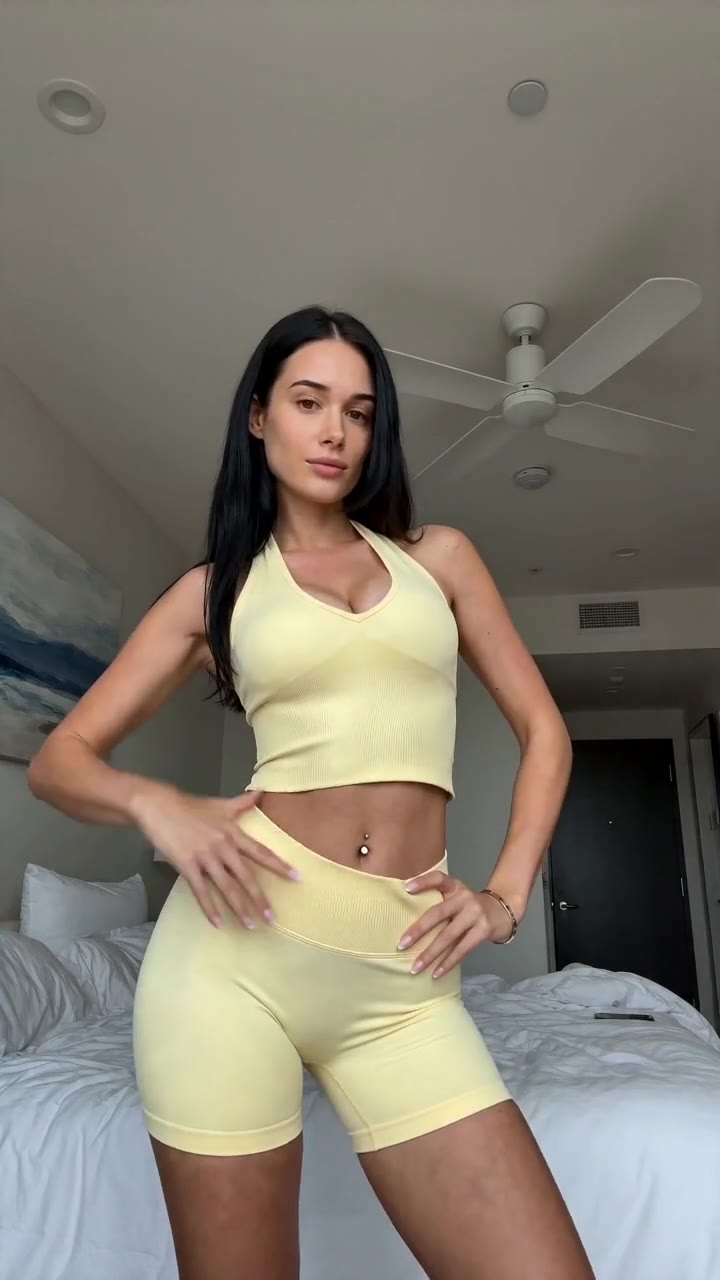](https://studio.alvinsclub.ai/examples/apparel-3-b438de8f.mp4)
*▶ Sunny yellow halter neck top try-on*
[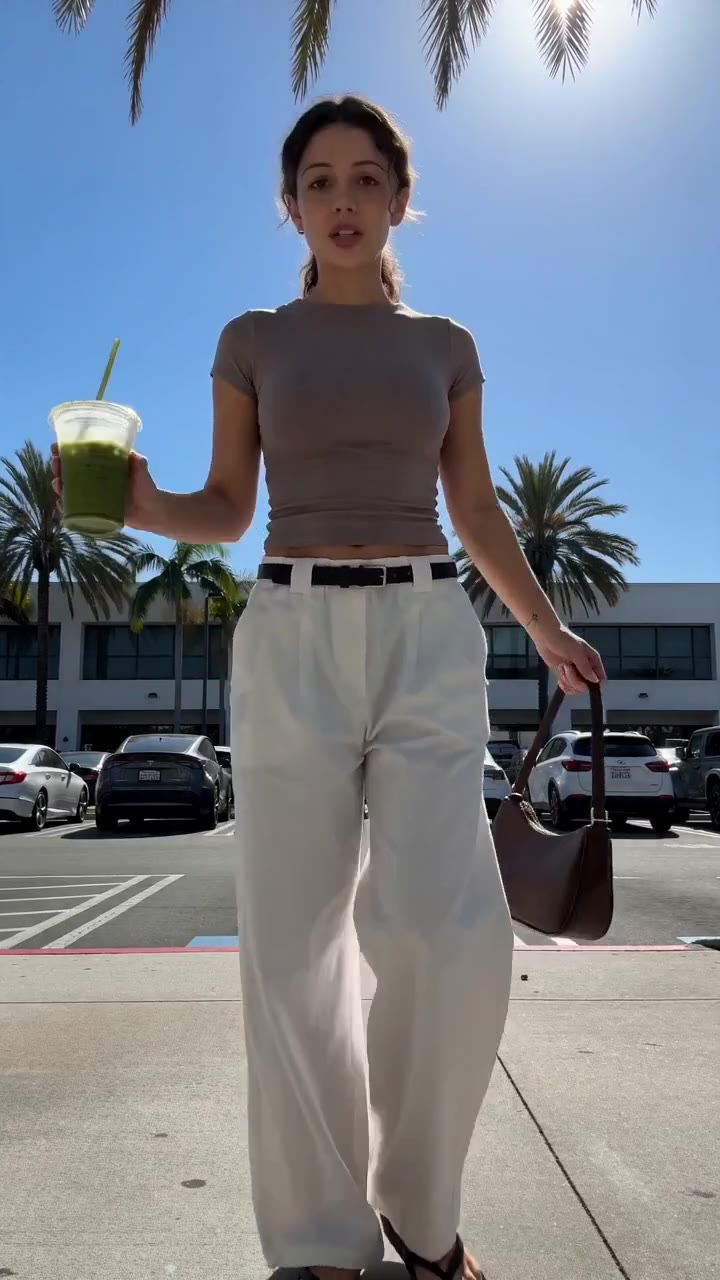](https://studio.alvinsclub.ai/examples/apparel-1-7a18676b.mp4)
*▶ Chic white wide-leg trousers styling*
[See all samples and make your first video free →](https://studio.alvinsclub.ai/samples?utm_source=hashnode&utm_medium=blog&utm_campaign=studio)
## How do the main options compare?
The table below compares tools and production approaches by their strongest use case, publicly stated pricing where available, and the limitation a TikTok Shop seller should plan around.
| Tool or approach | What it does best | What it costs | The one thing it is bad at |
|---|---|---|---|
| **Alvin’s Club Studio** | Turning a product link or 1–3 [product photos into](https://blog.alvinsclub.ai/turn-fashion-product-photos-into-tiktok-shop-videos-with-ai) a finished vertical product video with an AI model, script, voiceover, caption, and hashtags | First video free; then $3 for 8 seconds, $4 for 12 seconds, or $5 for 15 seconds; credit packs reduce the per-[video cost](https://blog.alvinsclub.ai/how-much-does-a-ugc-video-cost-for-fashion-brands-in-2026), down to $2.14 | AI can still alter product details, so sellers must check every render before posting |
| **Creatify** | Generating marketing videos from product URLs with AI presenters and ad-style workflows | Pricing changes by plan and offer; check the current pricing page before purchase | The workflow is built broadly for marketing videos, so fashion sellers may still need to refine product accuracy and creative direction |
| **HeyGen** | Presenter-led videos, avatar explainers, and multilingual business content | Pricing changes by plan; check the current pricing page | Avatar presentation is not the same as a tactile fashion try-on or detailed garment demonstration |
| **Synthesia** | Structured presenter videos for training, internal communication, and business explainers | Pricing changes by plan; check the current pricing page | Its strongest format is a polished presenter speaking to camera, not rapid fashion creative testing around physical products |
| **Runway** | Creative generative video, image-to-video, and visual experimentation | Pricing changes by plan and generation model; check the current pricing page | It is a general creative tool, so sellers must manage prompting, product consistency, editing, and commerce scripting |
| **CapCut** | Editing, captions, templates, effects, and final assembly for short-form video | Offers free and paid features; current availability and pricing vary by market and plan | It is primarily an editor and template platform, not a complete product-link-to-selling-video system |
| **Canva** | Fast social design, simple video editing, templates, and branded assets | Offers free and paid plans; check the current pricing page | It still leaves the seller responsible for creating persuasive product footage and a strong product-specific script |
| **Human UGC creators** | Natural demonstrations, personal reactions, styling, and lived-in product presentation | Rates vary by creator, brief, usage rights, revisions, and production requirements | Samples, scheduling, creator quality, and revisions make output slower and less predictable |
| **An in-house or hired product-video studio** | Controlled shoots with real garments, models, lighting, and physical product handling | Quote-based; costs vary by production scope | Each new concept requires production coordination, and scaling many creative variations is expensive |
Pricing is especially difficult to compare across categories. Some tools sell monthly plans, some charge by credits, some bundle editing with generation, and human creators quote per deliverable or usage package. A low subscription price does not automatically mean a low **cost per finished video**.
For TikTok Shop, that distinction is central. A seller may need multiple creative concepts for the same product: a close-up feature video, an outfit styling video, a fit-focused video, a gift-oriented version, and a problem-solution hook. The useful unit is not “access to a tool.” It is **one approved video ready to post**.
## Which tool is best when the product link should become a finished video?
### Alvin’s Club Studio
Alvin’s Club Studio suits fashion sellers who want a direct product-video workflow rather than a general AI video workspace. The seller pastes a product page link or uploads one to three product photos, selects an 8-, 12-, or 15-second output, and receives a vertical video featuring the product on an AI model. The output includes a script, voiceover, caption, and hashtags.
Voiceover is available in English, Spanish, or Brazilian Portuguese.
The pricing model is pay per video: the first video is free with no card required, followed by $3 for 8 seconds, $4 for 12 seconds, or $5 for 15 seconds. Credit packs reduce the per-video cost, with the stated lowest rate down to $2.14. Credits do not expire, and failed renders or stopped scripts are free.
The concrete limitation is product fidelity. Studio is built to keep the item true to its photos, but AI can still slip by changing a detail, color, shape, or personalization. Sellers need to inspect every finished video before posting.
That review requirement is not optional for clothing, jewelry, furniture, or any product where a small visual difference creates a customer expectation problem.
Studio is particularly relevant for dropshippers, print-on-demand sellers, affiliates, and small brands that cannot arrange a physical shoot for every SKU. It also supports recreating the pacing and structure of a TikTok a seller likes with their own product, which gives the workflow a useful creative reference without requiring a traditional shoot.
It is available on the website and inside ChatGPT, Claude, and Meta Muse. It is built only for selling products, not as a general-purpose AI video tool.
### Creatify
Creatify suits sellers who want to generate product-focused marketing videos from a product URL and experiment with ad-style formats. Its appeal is the URL-first workflow: instead of starting with a blank timeline, the user gives the system a product page and works from product information and visual assets.
This approach is useful when the seller wants several concepts without filming each one. A product can be framed through a problem-solution script, a testimonial-style presentation, a feature explanation, or a short promotional structure. The tool’s broader marketing orientation also makes it relevant beyond TikTok Shop, including paid social creative.
The limitation is that a broad marketing-video platform still requires seller judgment about fashion accuracy and platform fit. A generated presenter can deliver a script, but that does not guarantee that a garment’s drape, fit, texture, print placement, or proportions remain correct. Sellers also need to verify whether the selected plan, generation limits, and export workflow match their intended volume.
Creatify is a sensible option for teams that want a general product-ad generator and are prepared to edit or review its outputs. It is less suitable for a seller looking for a narrowly defined “product link in, short commerce video out” workflow with simple per-video pricing.
### HeyGen
HeyGen suits sellers and marketing teams that want presenter-led videos, avatar explainers, localized messaging, or business content. Its strength is the speaking presenter: an avatar can deliver a prepared script in a polished, repeatable format without coordinating a human presenter for every version.
That makes it useful for product education, brand introductions, store announcements, and videos where the main job is explaining an offer or process. A seller operating in multiple markets can also consider its language and localization capabilities when creating versions for different audiences.
The limitation is format fit for fashion commerce. A presenter standing or speaking beside a product does not automatically demonstrate fabric hand, fit, silhouette, stretch, construction, or styling. The tool can help communicate product information, but the seller still needs convincing visual evidence of the clothing itself.
HeyGen is therefore stronger for **presenter communication** than for fashion-specific product visualization. It can be part of a content system, especially when the seller has product footage or images to combine with narration, but it does not remove the need to source or create those product visuals.
For fashion sellers, the key question is whether the video needs a person to explain the product or a product-centered visual that makes the item easy to judge. HeyGen addresses the first problem more directly.
### Synthesia
Synthesia suits organizations that need structured presenter videos with consistent visual identity, controlled scripts, and repeatable delivery. Its most natural use cases include training, internal communication, onboarding, product education, and corporate explainers.
A fashion seller could use a presenter-led format for care instructions, sizing guidance, brand policies, or explanations of a personalization process. It can also help a larger team standardize how information is delivered across many videos, particularly when the content is informational rather than performance-driven.
The limitation is that Synthesia’s presenter format is not designed around the sensory evidence shoppers expect from fashion. A viewer deciding whether to buy a jacket, dress, bracelet, or chair needs to see the item in a useful context. A polished person delivering lines does not replace close-ups, styling, motion, scale, or real-world use.
That makes Synthesia a weaker fit for rapid product-creative testing on TikTok Shop. It can communicate a message clearly, but the seller has to solve the product demonstration problem separately.
The tool is best considered when the seller’s goal is **consistent spoken communication**. It is not the most direct choice when the goal is to transform a product listing into multiple short shopping videos.
### Runway
Runway suits creative teams that want control over generative video experimentation. Its image-to-video and text-to-video capabilities are useful for producing atmospheric motion, transitions, stylized scenes, and concept development. A fashion brand can use it to explore mood, campaign direction, or visual treatments before committing to a more expensive production.
It is also relevant when the seller already has strong product images and wants to animate or extend them. A still image of a garment can become the starting point for a moving scene, while a brand team can experiment with backgrounds, camera movement, or visual narrative.
The limitation is workflow complexity. Runway is a general creative-generation environment, not a dedicated TikTok Shop product-selling pipeline. The seller must manage prompts, scene selection, product consistency, scripting, narration, captions, editing, and final platform preparation.
Generative motion can also introduce visual changes that are unacceptable for a product listing.
Runway is a strong choice for **visual ideation and creative production**, especially for people who already understand generative-video workflows. It is less efficient for a seller who wants a repeatable commerce output with the selling script and posting assets included.
The difference is not image quality. It is how much work remains after the first generation.
### CapCut
CapCut suits sellers who already have footage, creator clips, product photos, or generated scenes and need to turn them into fast short-form edits. Its strengths include timeline editing, captions, effects, transitions, templates, and social-video assembly.
For TikTok Shop sellers, that makes CapCut useful at the final production stage. A seller can trim an opening, add readable captions, synchronize a voiceover, emphasize a product feature, and create alternate cuts from the same source footage. It is also useful when creators deliver raw clips that need editing before posting.
The limitation is that CapCut does not solve the entire product-video sourcing problem. An editor can make existing assets clearer and faster, but it does not automatically provide a product-specific selling concept, a reliable AI model presentation, or a product page-to-video workflow. The seller still needs footage, images, a script, or all three.
CapCut is best paired with a content source rather than treated as the source itself. It can be the final editing layer after human UGC, a product shoot, or AI-generated scenes.
For a seller who already has usable footage, CapCut may be enough. For a seller who has only a product URL and needs a finished video, it leaves too many production steps unresolved.
### Canva
Canva suits small teams that need branded social assets without a specialist editing workflow. Its template library, simple video tools, text animation, design controls, and brand features make it useful for creating consistent product announcements, promotional graphics, catalog-style slides, and supporting social content.
A fashion seller can use Canva to assemble product photos, size information, care instructions, pricing messages, and brand elements into a short vertical post. It is particularly practical when the content is graphic-led or when a team needs a shared design environment.
The limitation is that templates do not automatically create convincing product behavior. A clothing video still benefits from movement, scale, styling, and a clear explanation of why the item matters. Canva can arrange assets attractively, but the seller remains responsible for the hook, product demonstration, voiceover, pacing, and proof.
Canva is a strong option for **design-led content production**. It is less direct for sellers who want AI-generated fashion models or a complete short-form selling script created from a product listing.
A useful workflow is to use Canva for brand consistency and supporting assets while using a dedicated product-video tool or human footage for the core demonstration.
### Human UGC creators
Human UGC creators suit brands that need natural delivery, real reactions, physical handling, and personal styling. A creator can show how a garment fits, how a bag is organized, how jewelry looks in ordinary lighting, or how furniture works in a lived-in setting. That human context often answers questions that a product image cannot.
Human UGC is especially valuable for products where touch, movement, comfort, fit, or personal identity drives the buying decision. A creator can also adapt the brief to their own presentation style, which may produce a more believable demonstration than a standardized avatar.
The limitation is production coordination. The seller has to identify a suitable creator, send a sample or arrange access to the product, write or approve a brief, manage deadlines, review the draft, request revisions, and clarify usage rights. Creator output also varies, and one video does not necessarily provide enough creative variety for testing.
Human UGC remains a strong choice when authenticity and physical demonstration are central. It is a poor fit when the seller needs many concepts quickly, cannot send samples, or wants a predictable per-video cost.
The cost question also includes more than the creator’s fee. Samples, shipping, revisions, whitelisting or usage rights, and coordination all affect the total production burden. This is why comparing AI video costs with creator costs requires comparing finished deliverables, not just headline rates.
The discussion in [How Much Does a UGC Video Cost for Fashion Brands in 2026?](https://blog.alvinsclub.ai/how-much-does-a-ugc-video-cost-for-fashion-brands-in-2026) addresses that production question directly.
### In-house or hired product-video studios
A product-video studio suits brands that need controlled physical production. Real garments, real models, real lighting, and real camera movement provide evidence that AI-generated visuals cannot always guarantee. A studio can produce close-ups, fit shots, fabric movement, product handling, and campaign-quality footage.
This approach is particularly strong for hero products, launch campaigns, premium positioning, and items where product accuracy is non-negotiable. It also gives a brand a library of original assets that can support multiple channels.
The limitation is scalability. Each new product or concept can require samples, scheduling, models, location or studio space, photography, videography, editing, approvals, and reshoots. A seller with a large catalog may find that the production process creates a bottleneck before creative testing begins.
A studio is usually best when the content needs high control and a long usable life. It is less efficient for creating many short variations around a broad inventory range.
This approach is not obsolete because AI exists. It solves a different problem: producing verified physical footage. The practical decision is whether every product needs that level of production or whether selected products deserve studio treatment while the rest use a faster video workflow.
> 👗 **Selling online? Turn any product link into a ready-to-post shoppable video** — no shoot, no samples. [Try Alvin's Club Studio free →](https://studio.alvinsclub.ai/?utm_source=hashnode&utm_medium=blog&utm_campaign=studio) Your first video is free, then from $3 a video.
## What is the cost difference between subscriptions, credits, and production fees?
The most useful comparison is the cost of an approved video, not the advertised entry price of a platform.
### Subscription tools
Subscription tools can make sense for teams producing content frequently. The fixed monthly payment may be efficient when the included generation or export limits match the seller’s real usage.
The problem appears when the seller pays for capacity that goes unused. A low monthly plan can also become expensive if the tool produces many unusable drafts before one is approved. The seller should calculate:
- Monthly platform cost
- Included generations or credits
- Export restrictions
- Editing time
- Review time
- Cost of failed or unusable outputs
- Additional tools required for captions, voiceover, or formatting
### Credit-based tools
Credit systems are useful when the seller wants to pay according to output rather than commit to a subscription. They can fit seasonal sellers, affiliates, and brands that produce in bursts.
The risk is credit waste. If a seller needs many attempts to preserve a product’s identity, the stated generation price does not equal the final approved-video price. Credit expiration and failed-render policies also matter.
Studio uses a pay-per-video model after the first free video. The listed prices are $3 for 8 seconds, $4 for 12 seconds, and $5 for 15 seconds, with credit packs reducing the per-video cost down to $2.14. Credits never expire, and failed renders or stopped scripts are free.
The seller still reviews the result for product accuracy before posting.
### Human production fees
Human UGC and studio production often involve costs that are not visible in a simple per-video quote. These can include:
- Product samples
- Shipping
- Creator fees
- Usage rights
- Revisions
- Creative direction
- Editing
- Reshoots
- Scheduling
- Talent or location costs
The output may be more physically credible, but the seller should compare it with the value of speed, volume, and creative variety. One polished video can be useful; one polished video alone does not establish which hook or presentation will perform.
## How should sellers judge product accuracy?
Product accuracy is not a cosmetic concern in fashion commerce. It determines whether the viewer sees the item they will actually receive.
Accuracy has several layers:
1. **Identity:** Is the generated item the same garment, accessory, or furniture product?
2. **Color:** Does the shade remain consistent across frames?
3. **Shape:** Are proportions, silhouette, and construction preserved?
4. **Details:** Do buttons, seams, logos, clasps, stones, initials, and prints remain correct?
5. **Fit and drape:** Does the product appear on the body in a way that matches its real behavior?
6. **Personalization:** Are names, initials, dates, birthstones, and other custom details represented correctly?
7. **Context:** Does the scene imply a use case the product can actually support?
General text-to-video tools are often weakest when many of these constraints must hold simultaneously. A visually attractive clip can still be unusable if a handbag changes shape, a necklace gains the wrong pendant, or a printed garment loses its design.
Dedicated product-video workflows reduce the amount of prompting and editing required, but they do not remove review. Alvin’s Club Studio explicitly positions product fidelity as a design goal while acknowledging that AI can still slip. The appropriate operating procedure is simple: inspect every video against the original product page before publishing.
For personalized jewelry, the check must include the exact personalization. For clothing, it must include color, print, silhouette, and visible construction. For chairs and furniture, it must include dimensions implied by the scene, material appearance, and structural details.
## How does creative volume affect TikTok Shop testing?
One video per product limits what the seller can learn. A single video mixes together several variables:
- Opening hook
- Presenter style
- Product angle
- Script structure
- Background
- Caption treatment
- Voiceover
- Call to action
- Audience context
If the video performs poorly, the seller does not know which variable caused the result. A second or third creative concept creates a better basis for learning.
This is why a seller should distinguish between **creative volume** and **random variation**. Making many nearly identical clips does not create meaningful testing. Useful variation changes the reason the viewer should care.
### Example creative matrix for [one clothing](https://blog.alvinsclub.ai/best-ai-outfit-generators-for-styling-one-clothing-item) product
| Creative angle | Opening idea | What the video demonstrates |
|---|---|---|
| Fit | “The cut changes the whole outfit.” | Silhouette, length, and styling |
| Material | “This is the detail you notice up close.” | Texture, finish, or construction |
| Versatility | “One piece, three ways to wear it.” | Outfit combinations |
| Problem-solution | “Your everyday outfit needs this layer.” | Practical use case |
| Gift | “A personalized gift without guessing their size.” | Customization and gifting context |
| Comparison | “The difference is in the finishing.” | Detail that separates the item from alternatives |
A tool that generates a video but leaves every script and edit decision to the seller has not fully solved the volume problem. It has reduced one production task.
Studio’s narrow positioning is relevant here: the seller receives a short vertical video with script, voiceover, caption, and hashtags from a product link or product photos. Its limitation remains the need for product review, and its short durations mean the seller must choose the most important selling point rather than explain every feature.
## What role do scripts, captions, and voiceovers play?
A fashion video script should make the product easier to understand, not merely decorate the footage.
A useful short script answers three questions:
1. What is the item?
2. Why should this viewer care?
3.
What should the viewer do next?
For a clothing product, the answer may focus on styling, fit, texture, or occasion. For personalized jewelry, the strongest point may be the meaning of the name, initial, date, or birthstone. For furniture, the script may focus on how the piece changes a room or serves a practical purpose.
Captions matter because viewers may watch without sound. They also create structure: a hook, feature, proof point, and call to action can remain visible even when the voiceover is missed.
Voiceover adds pacing and explanation, but it should not make unsupported claims. The seller should check:
- Whether the spoken words match the listing
- Whether the voiceover claims a feature the product does not have
- Whether the pronunciation is correct
- Whether the captions match the audio
- Whether the script fits the video duration
- Whether the call to action accurately reflects the store experience
Studio includes script, voiceover, caption, and hashtags in the generated output. That makes it more complete than an image animator or editing-only tool. It does not eliminate seller responsibility: the listing remains the source of truth.
## Do AI models replace human UGC for fashion sellers?
AI models replace a portion of the production need, not every reason to use human creators.
### AI-generated model videos work best when:
- The seller cannot send samples
- The product exists primarily as listing images
- The catalog contains many products
- The seller needs multiple short creative concepts
- The seller wants predictable per-video pricing
- The product can be represented accurately from available photos
- The goal is rapid creative testing
### Human UGC works best when:
- Fit and physical movement are central
- The product needs a real tactile demonstration
- The creator’s identity is part of the appeal
- The brand needs a personal review or reaction
- The item is already available for filming
- The seller can manage samples, rights, and revisions
The strongest operating model can use both. AI-generated product videos can provide broad catalog coverage and fast testing, while human UGC or studio production can support priority products, launch campaigns, and products where physical proof matters most.
AI-generated videos should be labelled as AI-generated when posted. Sellers should also ensure that the final video does not imply a real person handled, wore, tested, or endorsed the product when that did not happen.
## What should sellers check before posting an AI-generated fashion video?
A short review checklist prevents the most damaging errors.
### Product review checklist
- Compare the item against the original product listing.
- Check color in every scene.
- Check garment shape, length, and visible construction.
- Check prints, logos, buttons, clasps, stones, and personalization.
- Confirm that the AI model is not wearing a materially different version.
- Remove scenes that imply an unsupported use or feature.
- Confirm the script matches the product page.
- Check captions for spelling and timing.
- Check voiceover pronunciation and language.
- Confirm the video is vertical and readable on a small screen.
- Label the content as AI-generated when posting.
- Review the final caption and hashtags before publishing.
The more specialized the product, the more important this review becomes. Personalized jewelry is not approved merely because the necklace looks attractive; the exact name, initials, date, or birthstone must be correct. Clothing is not approved merely because the model looks polished; the garment must retain the listed design.
## Which tool should a seller pick by situation?
There is no useful single winner across every production need. The right choice follows the seller’s constraint.
### Pick Alvin’s Club Studio when the seller needs:
- A product link or product photos converted into a finished selling video
- AI-model presentation without sending samples
- Script, voiceover, caption, and hashtags in the output
- Short 8-, 12-, or 15-second vertical videos
- Pay-per-video pricing rather than a subscription
- English, Spanish, or Brazilian Portuguese voiceover
- Multiple concepts for clothing, personalized jewelry, chairs, or furniture
- A workflow available through the website, ChatGPT, Claude, or Meta Muse
The limitation is mandatory product review because AI can still change product details.
### Pick Creatify when the seller needs:
- A broader marketing-video workflow from product URLs
- Ad-style creative concepts
- Presenter-based and promotional formats
- A general tool that extends beyond [fashion product](https://blog.alvinsclub.ai/7-steps-in-demnas-ai-workflow-for-fashion-product-development) videos
The limitation is that the seller may need additional refinement to make the output accurate, platform-ready, and specifically suited to fashion shopping behavior.
### Pick HeyGen when the seller needs:
- An avatar to explain a product, offer, or brand message
- Presenter-led communication
- Repeatable spoken content and localization
The limitation is that an avatar does not automatically demonstrate fabric, fit, texture, or physical product behavior.
### Pick Synthesia when the seller needs:
- Structured presenter videos
- Brand-controlled explanations
- Training, education, or operational content connected to commerce
The limitation is that its polished presenter format is less suited to fast, product-centered fashion creative testing.
### Pick Runway when the seller needs:
- Generative visual experimentation
- Image-to-video motion
- Campaign concepts and stylized scenes
- More control over creative direction
The limitation is that the seller owns the prompting, product-fidelity checks, scripting, editing, and commerce packaging.
### Pick CapCut when the seller already has:
- Creator footage
- Product photography
- AI-generated scenes
- A script and voiceover
- Raw clips that need fast editing
The limitation is that editing software does not provide the entire product-link-to-video workflow.
### Pick Canva when the seller needs:
- Branded social graphics
- Product-photo videos
- Simple templates
- Supporting content around a product launch or promotion
The limitation is that the seller still needs convincing product footage and a product-specific selling idea.
### Pick human UGC when the seller needs:
- Real product handling
- Natural delivery
- Styling or fit demonstrations
- Personal reactions
- Creator-led trust signals
The limitation is slower, less predictable production involving samples, scheduling, rights, revisions, and creator availability.
### Pick a product-video studio when the seller needs:
- Physical accuracy
- High-control footage
- Hero-product campaigns
- Real models, materials, and environments
- Long-lived brand assets
The limitation is production coordination and reduced speed for large catalogs or frequent testing.
## Why does the best AI video generator for TikTok Shop sellers depend on the production bottleneck?
A seller should choose the tool that removes the largest current bottleneck.
If the bottleneck is **getting any usable footage**, use a product-focused AI workflow or human UGC depending on whether the product can be sampled. If the bottleneck is **editing existing footage**, use CapCut. If the bottleneck is **brand layout and supporting content**, use Canva.
If the bottleneck is **creative visual experimentation**, use Runway. If the bottleneck is **structured spoken communication**, use HeyGen or Synthesia.
If the bottleneck is turning a product listing into a complete short selling video without a shoot, Alvin’s Club Studio directly addresses that job. It accepts a product page link or one to three product photos and produces a short vertical video with an AI model, script, voiceover, caption, and hashtags in about 10 minutes. It is not a general AI video tool, and its limitation is clear: the seller must verify every video because generated product details can still slip.
The best AI video generator for TikTok Shop sellers is therefore not the tool with the most visual effects. It is the tool that leaves the fewest unfinished commerce tasks after generation.
## How can AI-powered fashion intelligence support this workflow?
AI-powered fashion intelligence, such as [AlvinsClub](https://studio.alvinsclub.ai/), addresses the product-content problem by connecting product information with shoppable creative production. Alvin’s Club Studio turns a product link into a ready-to-post shoppable video in about 10 minutes — no shoot, no samples. [Make your first video free →](https://studio.alvinsclub.ai/?utm_source=hashnode&utm_medium=blog&utm_campaign=studio)
## Summary
- The best AI video generator for TikTok Shop sellers converts product listings or photos into accurate, ready-to-post vertical selling videos.
- TikTok Shop fashion videos should combine clear product demonstrations, outfit context, selling points, captions, voiceover, and purchase-focused messaging.
- The best AI video generator for TikTok Shop sellers should create multiple creative variations so sellers can test different hooks and formats.
- Product-video platforms, avatar and UGC tools, general generative-video systems, and human-created UGC each offer different benefits and limitations.
- The right tool depends on the seller’s inventory model, including whether they hold stock, dropship, use print-on-demand, or promote products as an affiliate without samples.
## Key Takeaways
- **best AI video generator for TikTok Shop sellers**
- **Key Takeaway:**
- **Best AI video generator for TikTok Shop sellers:**
- **video creation**
- **finished commerce creative**
## Frequently Asked Questions
### What is the best AI video generator for TikTok Shop fashion sellers?
The best AI video generator for TikTok Shop fashion sellers creates accurate product videos from listing images, descriptions, or uploaded clips. It should support vertical video, outfit demonstrations, product details, captions, voiceovers, and multiple creative variations for testing.
### How does AI video generation help TikTok Shop clothing sellers?
AI video generation helps TikTok Shop clothing sellers turn product assets into engaging videos without filming every item manually. Sellers can create outfit showcases, styling ideas, product explainers, and promotional clips faster while maintaining a consistent publishing schedule.
### Can AI video generators create outfit videos for TikTok Shop products?
AI video generators can create outfit videos using product photos, model images, avatars, or uploaded footage, depending on the platform. Sellers should review each result carefully to ensure the clothing fit, colors, patterns, proportions, and product details remain accurate.
### Is AI-generated video worth it for TikTok Shop sellers?
AI-generated video is worth considering for TikTok Shop sellers who need frequent content and want to reduce filming, editing, or creator costs. The investment is most valuable when a tool produces several usable variations from existing product assets and supports measurable creative testing.
### Why does product accuracy matter in AI videos for TikTok Shop?
Product accuracy matters because viewers expect the item shown in a video to match the product they receive. Incorrect colors, logos, textures, sizing details, or garment shapes can reduce customer trust, increase returns, and create compliance concerns.
### What features should fashion sellers look for in an AI video maker?
Fashion sellers should look for product-image uploads, realistic apparel rendering, vertical templates, captions, voiceovers, multilingual support, brand customization, and batch creation. Analytics integrations, commercial usage rights, predictable pricing, and easy editing are also important for scaling TikTok Shop content.
## Related on Alvin's Club Studio
- [Make TikTok Shop videos from a product link](https://studio.alvinsclub.ai/for/tiktok-shop-sellers?utm_source=hashnode&utm_medium=blog&utm_campaign=studio)
- [What AI UGC videos cost](https://studio.alvinsclub.ai/learn/ai-ugc-video-pricing?utm_source=hashnode&utm_medium=blog&utm_campaign=studio)
- [TikTok Shop affiliate videos without samples](https://studio.alvinsclub.ai/learn/tiktok-shop-affiliate-videos-without-samples?utm_source=hashnode&utm_medium=blog&utm_campaign=studio)
---
### About the author
Building Alvin's Club Studio — an AI agent that turns a product link into a shoppable video for TikTok Shop, Shopify and DTC sellers. Writing about what makes product videos sell.
**Credentials**
- Founder at Alvin's Club (Echooo E-Commerce Canada Ltd.)
- Writes on shoppable video and e-commerce growth at blog.alvinsclub.ai
[X / @alvinsclub](https://x.com/alvinsclub) · [LinkedIn](https://www.linkedin.com/company/alvin-s-club/) · [alvinsclub.ai](https://www.alvinsclub.ai)
---
*From the [Alvin's Club Studio](https://studio.alvinsclub.ai/?utm_source=hashnode&utm_medium=blog&utm_campaign=studio) team — an AI agent that turns a product link into a ready-to-post shoppable video. First video free, then from $3.*
---
## Related Articles
- [7 Elements That Make a TikTok Shop Fashion Video Convert](https://blog.alvinsclub.ai/7-elements-that-make-a-tiktok-shop-fashion-video-convert)
- [Turn Fashion Product Photos Into TikTok Shop Videos With AI](https://blog.alvinsclub.ai/turn-fashion-product-photos-into-tiktok-shop-videos-with-ai)
- [How Much Does a UGC Video Cost for Fashion Brands in 2026?](https://blog.alvinsclub.ai/how-much-does-a-ugc-video-cost-for-fashion-brands-in-2026)
- [How AI Helps Fashion Affiliates Create TikTok Shop Videos Without Samples](https://blog.alvinsclub.ai/how-ai-helps-fashion-affiliates-create-tiktok-shop-videos-without-samples)
- [Best AI Outfit Generators for Styling One Clothing Item](https://blog.alvinsclub.ai/best-ai-outfit-generators-for-styling-one-clothing-item)
- [The Best AI Fashion Apps for Smarter Travel Packing](https://blog.alvinsclub.ai/the-best-ai-fashion-apps-for-smarter-travel-packing)
- [The Best AI Wardrobe Apps for Shopping Your Closet](https://blog.alvinsclub.ai/the-best-ai-wardrobe-apps-for-shopping-your-closet)
- [AI Outfit Planners Compared: Find Your Perfect Occasion Look](https://blog.alvinsclub.ai/ai-outfit-planners-compared-find-your-perfect-occasion-look)
- [Demna AI Outfit Recommendations for Effortless Travel Style](https://blog.alvinsclub.ai/demna-ai-outfit-recommendations-for-effortless-travel-style)
- [The Best AI Outfit Generators That Check the Weather](https://blog.alvinsclub.ai/the-best-ai-outfit-generators-that-check-the-weather)
- [Can Demna AI Create the Perfect Outfit for Any Occasion?](https://blog.alvinsclub.ai/can-demna-ai-create-the-perfect-outfit-for-any-occasion)
- [7 Demna AI Alternatives for Professional Fashion Stylists](https://blog.alvinsclub.ai/7-demna-ai-alternatives-for-professional-fashion-stylists)