# AI Tools That Turn Fashion Product Links Into Videos, Compared
*Compare leading platforms for transforming product pages into polished fashion videos, complete with visuals, motion, voiceovers, and conversion-focused workflows.*
Best AI tool to turn a product link into a video: Creatify is an AI video-generation platform that converts a product URL into a ready-to-publish marketing video by extracting product details, images, and pricing, then generating a script, voiceover, and scenes. It supports videos up to 60 seconds and is optimized [for fashion product](https://blog.alvinsclub.ai/7-steps-in-demnas-ai-workflow-for-fashion-product-development) ads on platforms such as TikTok, Instagram, and YouTube Shorts.
The **best AI tool to turn a product link into a video** is one that accepts a product page, preserves the product’s appearance, writes a selling script, and delivers a finished vertical video without requiring a shoot.
> **Key Takeaway:** The right AI tool to turn a product link into a video should import product details, preserve the item’s appearance, generate a sales-focused script, and create a ready-to-publish vertical video without a photoshoot.
This comparison focuses on tools that are real, commercially available products with documented capabilities. Entries were selected for relevance to fashion and ecommerce product-video workflows, not for general popularity: each tool had to support product images, video generation or editing, or an adjacent workflow a seller could actually use. Pricing and free access change frequently, so verify the current plan on each linked product page before purchasing.
| Name | What it actually does | Best for | Pricing / free tier | Key limitation |
|---|---|---|---|---|
| [Alvin’s Club Studio](https://studio.alvinsclub.ai/?utm_source=hashnode&utm_medium=blog&utm_campaign=studio) | Turns a product-page link or 1–3 [product photos into](https://blog.alvinsclub.ai/turn-fashion-product-photos-into-tiktok-shop-videos-with-ai) a finished vertical video with an AI model, script, voiceover, caption and hashtags | Sellers who want link-in, ready-to-post [product video](https://blog.alvinsclub.ai/the-best-ai-product-video-tools-for-clothing-brands) | First video free without a card; then $3 for 8 seconds, $4 for 12 seconds, or $5 for 15 seconds; credit packs reduce the per-[video cost](https://blog.alvinsclub.ai/how-much-does-a-ugc-video-cost-for-fashion-brands-in-2026) | AI can still introduce visual slips, so every video needs a seller review before posting |
| [Creatify](https://creatify.ai/) | Converts product URLs into short-form marketing videos using generated scripts, avatars, voiceovers and visual scenes | Marketers testing many ad concepts from product pages | Offers a free trial or free access depending on the current plan; paid plans vary | Generated presenters and scenes can require editing and checking for product accuracy |
| [HeyGen](https://www.heygen.com/) | Creates avatar-led videos from scripts, with AI presenters, voices and translation features | Brands that need spokesperson or presenter videos | Has a free plan with limits; paid plans are subscription-based | It is primarily a presenter-generation platform, not a dedicated product-link-to-product-video workflow |
| [Synthesia](https://www.synthesia.io/) | Produces scripted avatar videos with AI presenters, voices and multilingual delivery | Training, explainers and structured brand communication | Paid subscription plans; current availability and limits depend on the plan | It is less suited to fast fashion product testing and visual product demonstration |
| [CapCut](https://www.capcut.com/) | Edits short-form videos with templates, captions, effects, AI-assisted tools and ecommerce-friendly formats | Sellers who already have product footage or images and want to edit quickly | Offers free tools plus paid Pro features; pricing varies by region and platform | It does not turn a product URL into a complete selling video by itself |
| [Canva](https://www.canva.com/) | Combines product images, text, templates, animation, voice and editing into social videos | Merchants creating branded product clips from prepared assets | Free plan available; Pro adds premium features and assets | Its output depends heavily on the seller’s copy, layout and source media |
| [InVideo AI](https://invideo.io/) | Generates videos from text prompts and can assemble scripts, stock media, voiceovers and scenes | Content teams producing concept-led marketing videos | Free access with limits; paid plans are subscription-based | Product fidelity is difficult when the workflow relies on generated or stock visuals rather than controlled product assets |
No single tool wins every product-video job. A clothing seller with only a product URL has a different requirement from a brand with a video team, existing footage, or a need for a multilingual presenter.
The practical buying criteria are straightforward:
- **Product accuracy:** Does the garment, jewelry piece, chair or accessory remain faithful to the source photos?
- **Link-in workflow:** Can a seller start with a product page rather than a blank timeline?
- **Finished output:** Does the tool return a postable vertical video, or only assets that still need assembly?
- **Selling structure:** Does the video include a product-focused hook, benefit, call to action and caption?
- **Testing volume:** Can the seller create several distinct concepts without booking new production?
- **Cost control:** Does the seller pay for finished outputs, a recurring subscription, or unused generation capacity?
- **Human review:** Does the workflow make it easy to check the final result before publishing?
These criteria matter because a [product video](https://blog.alvinsclub.ai/the-best-product-video-maker-for-shopify-fashion-stores) is not just a moving product image. It is a compact sales argument: the viewer needs to understand what the product is, why it matters, and what action to take. A tool that creates attractive motion but changes a necklace’s pendant, invents a jacket pocket, or buries the product under generic lifestyle footage has produced an editing problem, not a finished selling asset.
For a broader view of the category, see [AI Product Video Tools for Clothing Brands](https://blog.alvinsclub.ai/the-best-ai-product-video-tools-for-clothing-brands). The comparison below focuses specifically on what happens when a seller starts with a product link or a small set of product images.
## What does Alvin’s Club Studio do with a product link?
Alvin’s Club Studio is designed for sellers who want a direct route from product information to a short vertical selling video. A seller pastes a product-page link or uploads one to three product photos, selects an 8-, 12-, or 15-second output, and receives a video built around an AI model, script, voiceover, caption and hashtags.
That makes Studio different from a general text-to-video tool. The intended input is already a product listing, and the intended output is a product video rather than an open-ended cinematic clip.
Studio suits fashion sellers, personalized jewelry merchants, and furniture businesses that need more creative variations without sending samples to creators or organizing a shoot. It also fits dropshipping and print-on-demand workflows, where the seller may not physically hold every product and cannot easily film it.
The pricing is usage-based. The first video is free without a card. After that, individual pricing is $3 for 8 seconds, $4 for 12 seconds and $5 for 15 seconds, with credit packs reducing the price to as low as $2.14 per video.
There is no subscription, credits do not expire, and failed renders or stopped scripts are free.
The limitation is product fidelity. Studio is built to keep products true to their photos, but AI can still slip. A seller must inspect every finished video before posting, especially for personalized products where a changed name, initial, date or birthstone makes the creative unusable.
Studio also does not remove the need for creative judgment. Sellers still need to choose which products to promote, review the visual result, and test different hooks. Its strength is reducing the distance between a product page and a usable first creative, not guaranteeing that every generated concept will sell.
### See it: real Alvin's Club Studio sample videos
[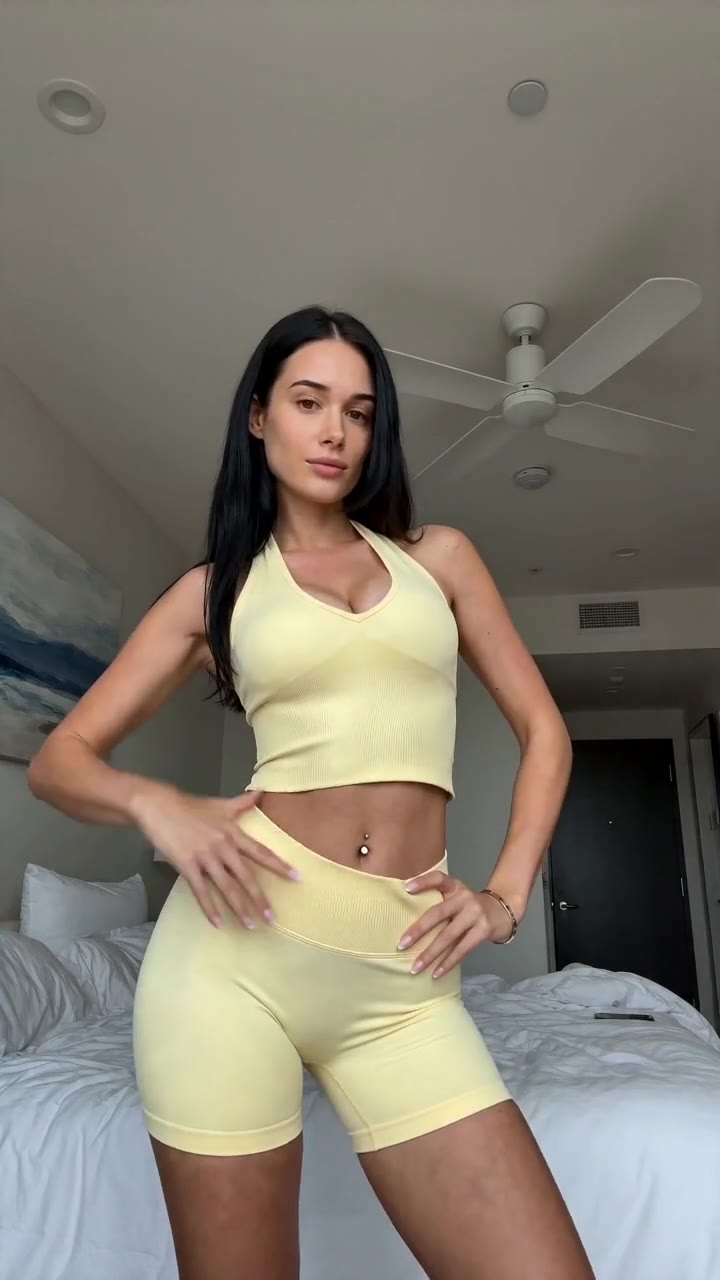](https://studio.alvinsclub.ai/examples/apparel-3-b438de8f.mp4)
*▶ Sunny yellow halter neck top try-on*
[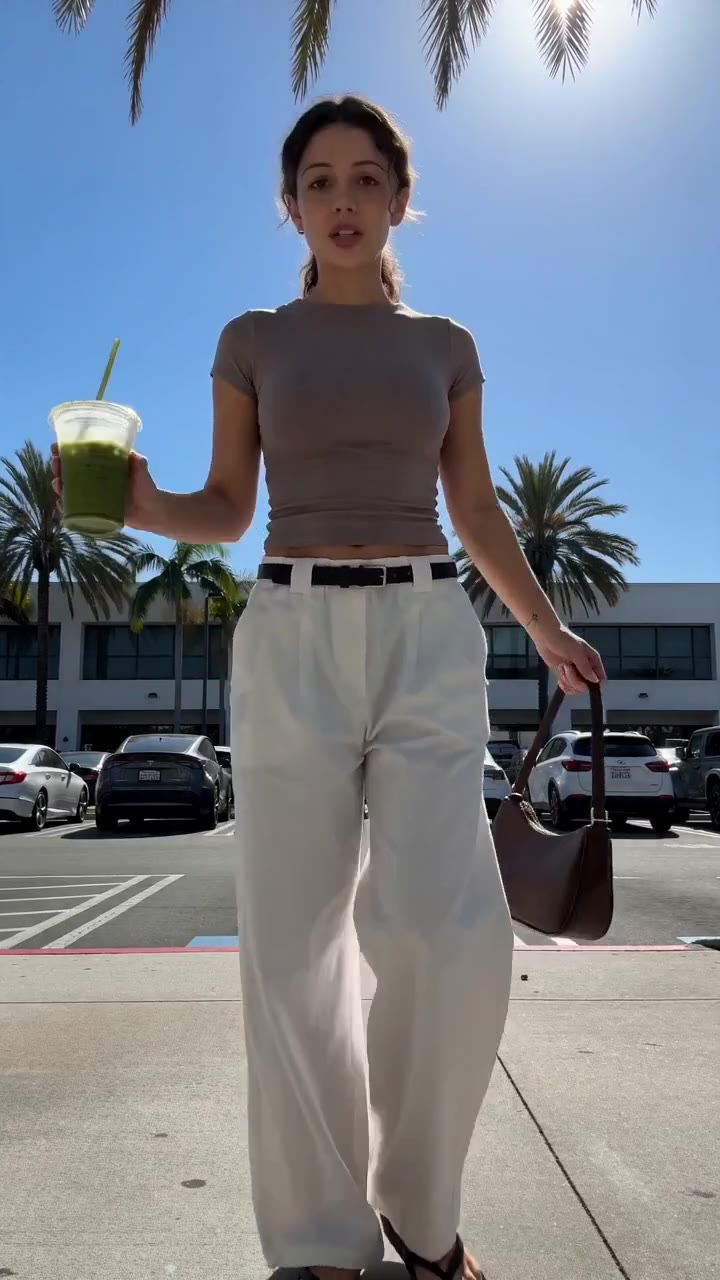](https://studio.alvinsclub.ai/examples/apparel-1-7a18676b.mp4)
*▶ Chic white wide-leg trousers styling*
[See all samples and make your first video free →](https://studio.alvinsclub.ai/samples?utm_source=hashnode&utm_medium=blog&utm_campaign=studio)
## How does Creatify turn product URLs into marketing videos?
Creatify is aimed at performance marketers who want to create short-form advertising concepts from product information. Its workflow includes URL-based video generation, scripts, AI avatars, voiceovers and assembled scenes, which makes it relevant to sellers who want several ad angles without producing every asset manually.
It suits ecommerce teams that want to test direct-response concepts such as problem-and-solution, product demonstration, testimonial-style narration or feature breakdowns. The tool is more useful when a marketer wants to vary the presenter, script and structure across multiple ads rather than create one polished brand film.
Creatify’s main advantage is concept velocity. A seller can move from a product page to several possible creative directions without starting with a blank editor. That is valuable when one video is not enough and the real requirement is a testing library.
The limitation is that URL extraction does not guarantee visual truth. A page may contain multiple images, variant information, shipping copy, reviews and unrelated recommendations. The generated script can also emphasize the wrong benefit if the product page is unclear.
Presenters and scenes need checking, and product images may still need manual placement or replacement.
Pricing changes by plan and usage, and the platform has offered free access or trials at different points. Sellers should confirm the current limits directly on Creatify’s pricing page rather than assume that a free account includes unrestricted exports.
Creatify is a strong fit when the seller wants an ad-generation workspace with multiple presentation styles. It is less direct when the only requirement is a controlled, product-first vertical video from a link.
## Who should use HeyGen for ecommerce [product videos](https://blog.alvinsclub.ai/how-ai-is-changing-product-videos-without-a-photoshoot-in-2026)?
HeyGen is an AI video platform centered on digital avatars, scripted delivery and multilingual video production. A seller supplies the script, chooses a presenter and voice, and creates a presenter-led video without filming a human spokesperson.
This suits fashion brands that need a founder message, product explainer, size-guide narration, launch announcement or localized presenter video. It is particularly useful when the communication task depends on a person speaking clearly rather than on a model wearing or demonstrating the product.
HeyGen’s presenter format can help a brand maintain a consistent spokesperson across many videos. A team can create several language versions or update the script without reshooting a human presenter. That is a practical benefit for education-heavy products or brands with repeated product explanations.
The limitation is workflow fit. HeyGen does not primarily function as a product-page-to-finished-fashion-video system. The seller generally needs to prepare the script, product visuals and scene structure, then combine the avatar with the product assets in a way that keeps the item prominent.
That distinction matters for apparel and jewelry. A presenter can talk about a dress, but the seller still needs strong visuals that show the dress accurately. A talking avatar is not a substitute for product presentation.
HeyGen’s free and paid access depends on the current plan. The free tier is useful for testing the interface, but sellers should check export restrictions, watermarks, video duration and commercial-use terms before building a production workflow.
Choose HeyGen when the message needs a spokesperson. Choose a dedicated product-video workflow when the product itself needs to carry the video.
## What is Synthesia best at?
Synthesia is built for structured avatar videos, especially explainers, internal communications, training and business content. A user writes or imports a script, selects an AI presenter, chooses a voice and produces a polished talking-head format without a camera crew.
For ecommerce, Synthesia fits use cases such as care instructions, product education, onboarding for wholesale buyers, brand policy explanations or a narrated overview of a collection. It can also help a fashion company create consistent communication across languages and markets.
Its strength is controlled presentation. The format is predictable, the script is central, and the presenter delivers the information clearly. That makes it useful when the goal is explanation rather than rapid creative experimentation.
The limitation is that Synthesia is not optimized around product-link ingestion and high-volume social commerce testing. A seller still needs to prepare the product story, gather visual assets and decide how the item will appear alongside the presenter. The result can feel like an explainer with a product inserted rather than a product video built around the item.
Subscription pricing also changes by plan and usage. Sellers should verify the current commercial terms, export options and video limits before committing.
Synthesia is appropriate for structured brand communication. It is not the first choice for a merchant who wants to paste a product URL and receive a short, model-led video with a sales-oriented script.
## When is CapCut the right choice?
CapCut is a short-form video editor with templates, captions, effects, transitions, audio tools and AI-assisted features. It is widely used for social video production because it lets sellers assemble existing footage and images quickly in a vertical format.
CapCut suits a seller who already has the raw material: a try-on clip, flat-lay photos, creator footage, product demonstrations or a recorded voiceover. It is useful for adapting one source video into multiple cuts, adding captions, resizing content and matching familiar short-form editing patterns.
Its biggest advantage is control. The seller decides where the product appears, when the price or benefit is shown, which moments get captions and how fast the edit moves. That is valuable when the source footage is accurate and the problem is editing rather than generation.
The limitation is the starting point. CapCut does not, by itself, turn a product-page link into a complete product-selling video. A merchant still needs to write the script, select the assets, build the story and check whether the finished sequence actually explains the product.
CapCut offers free tools and paid Pro features, with availability and pricing varying by region and platform. Sellers should confirm which AI tools, exports and commercial-use features are included in the current account type.
CapCut is the right choice when a seller has footage and wants an efficient editor. It is the wrong expectation if the seller wants link-in, video-out automation.
## What can Canva do for fashion product videos?
Canva is a design and content-creation platform with presentation, image, video, animation and template workflows. For ecommerce sellers, it can turn product photos into branded social videos using text, layouts, motion, music and simple scene changes.
Canva suits small brands that need consistency more than automation. A seller can create a reusable visual system with a logo position, type hierarchy, color palette, product-card format and recurring call to action. That is useful for collection announcements, sale assets, product feature cards and catalog-style clips.
The platform is strongest when the seller has clear assets and a defined brand direction. It gives more layout control than a fully automated generator and is accessible to teams that do not have professional editing software.
The limitation is that Canva does not remove the creative workload. The seller must choose the hook, write the copy, arrange the product images and decide how the video should move. Templates can also produce generic-looking content if the brand does not customize them carefully.
Canva has a free plan, while Pro adds premium assets and features. Plan details can change, and sellers should check licensing terms for stock content, music and commercial use.
Canva is a good choice for branded assembly from prepared assets. It is not a dedicated product-link-to-video agent, and it will not automatically solve product storytelling or high-volume creative testing.
> 👗 **Selling online? Turn any product link into a ready-to-post shoppable video** — no shoot, no samples. [Try Alvin's Club Studio free →](https://studio.alvinsclub.ai/?utm_source=hashnode&utm_medium=blog&utm_campaign=studio) Your first video is free, then from $3 a video.
## How does InVideo AI fit product-link video creation?
InVideo AI generates videos from text prompts and can assemble scripts, scenes, stock media, voiceovers and captions. It is designed for people who want to describe a video concept and receive an editable draft rather than build every scene manually.
For ecommerce, InVideo AI suits marketers creating concept-led videos: a fashion trend explanation, a styling guide, a product category overview or a narrated campaign idea. It can help a team move quickly from a brief to a rough video structure.
Its advantage is breadth. A prompt can produce a sequence with narration, visual suggestions and editing elements, which gives the user a starting point for review. That is helpful when the marketer has a clear message but limited editing time.
The limitation is product control. General-purpose scene generation and stock-media assembly are not the same as preserving a specific garment, handbag or piece of jewelry from a product listing. The seller may need to replace scenes, insert exact product images, correct claims and rebuild the pacing around the real item.
InVideo AI offers free access with limits and paid subscription plans. Sellers should check watermarking, generation credits, export resolution and commercial-use terms before relying on it for paid advertising.
InVideo AI is a useful drafting tool for campaign concepts. It needs more supervision when product accuracy and product-specific visual proof are the main requirements.
## Why are general AI video tools not the same as product-video agents?
A general AI video tool begins with a prompt. A product-video agent begins with a product.
That difference changes the workflow. In a general tool, the seller may need to describe the item, specify its appearance, write the script, generate scenes, reject inaccurate outputs, add captions, select a voice, and assemble the final edit. In a product-focused workflow, the product page supplies the commercial context and the system is built around producing a sellable asset.
The distinction is easiest to see across the main tool categories:
| Approach | Starting input | What the seller still has to do | Main risk |
|---|---|---|---|
| Avatar UGC platform | Script and product assets | Write claims, place product visuals and review the presenter delivery | The presenter receives more attention than the product |
| Text-to-video generator | Prompt | Describe the product precisely and replace inaccurate scenes | Product shape, color or details drift |
| Human UGC | Product sample and brief | Send samples, brief creators, wait for delivery and manage revisions | Slow production and per-post creator costs |
| Traditional product-video studio | Product, shot list and production brief | Coordinate studio, models, photographer, editor and reshoots | High coordination cost and limited testing volume |
| Product-video agent | Product link or product photos | Review the finished video and choose what to post | AI can still make visual mistakes |
The best approach depends on the bottleneck. If the bottleneck is presenting a long explanation, an avatar platform is useful. If the bottleneck is editing existing footage, CapCut is practical.
If the bottleneck is turning a product catalog into multiple short-form concepts without a shoot, a product-video agent is the closer match.
This is also why a tool’s headline AI capability can be misleading. “Generates video” covers everything from an animated text card to a fully assembled product ad. The seller should judge the completed workflow, not the existence of an AI button.
## Does a product link automatically create a good selling video?
No. A product link gives the system source material; it does not guarantee a persuasive creative.
A strong product video still needs four decisions:
1. **The opening claim:** What should the viewer understand immediately?
2. **The product proof:** Which visual shows the feature or benefit?
3. **The reason to care:** Why does this product solve a problem or fit a desire?
4. **The next action:** What should the viewer do after watching?
For a clothing item, the opening could focus on a styling problem, silhouette, fabric behavior or occasion. For personalized jewelry, the video needs to make customization legible: the name, initial, date or birthstone must appear correctly. For furniture, the creative may need to show scale, room context, comfort or use.
Automation is valuable because it reduces production friction, not because it eliminates judgment. A seller should treat the generated video as a candidate creative that must pass a product check and a selling check.
### What should sellers check before posting?
- Is the product the same color, shape and material as the listing?
- Are names, initials, dates and other personalization details correct?
- Does the model wear or hold the correct product?
- Does the voiceover describe a feature the product actually has?
- Are captions readable on a mobile screen?
- Does the first moment show a reason to keep watching?
- Is the call to action consistent with the destination?
- Is the video labelled as AI-generated where required by the platform or applicable rules?
The review step is not optional. AI can preserve product details well enough to accelerate production while still making an error that damages trust. Sellers should inspect every output before publication.
## How should sellers compare cost across these tools?
Sticker price alone is a poor comparison. The relevant cost is the cost of a finished, usable video.
A subscription editor may appear inexpensive but still require a seller or freelancer to write the script, assemble the scenes and produce multiple revisions. An avatar platform may create a polished presenter but leave the seller responsible for product integration. A human creator may deliver authentic footage but require samples, fees, briefing and scheduling.
A more useful cost model is:
**Total creative cost = software cost + production labor + source-asset cost + revision cost + failed-output cost.**
The equation is operational rather than accounting advice. It helps a seller compare workflows that charge in different ways.
For a pay-per-video tool, the direct fee is visible. Studio, for example, charges per finished duration after the first free video: $3 for 8 seconds, $4 for 12 seconds and $5 for 15 seconds, with lower rates in credit packs. The seller does not pay a subscription, credits do not expire, and failed renders or stopped scripts are free.
For a subscription editor, the direct fee may be easier to justify when the team produces videos regularly. The hidden cost is the time required to create each output. If a seller is already comfortable editing, that may be acceptable.
If the seller wants to test many products and hooks, the labor becomes the limiting factor.
For human UGC, the production cost includes creator fees and samples. The output can be valuable, particularly when authentic human demonstration is central to the product, but the workflow is not instant and does not guarantee a useful first take.
The right question is not “Which tool has the lowest plan price?” It is “Which workflow gives this seller the lowest cost per reviewed, postable creative?”
## Which tool suits testing many [fashion video](https://blog.alvinsclub.ai/7-elements-that-make-a-tiktok-shop-fashion-video-convert) concepts?
Testing volume favors tools that reduce the time between product selection and finished creative.
A single product rarely has only one viable message. A dress can be positioned around fit, occasion, styling, fabric or comfort. A necklace can be shown as a gift, a personalized keepsake, a layering piece or a birthstone product.
A chair can be framed around posture, home-office setup, space efficiency or appearance.
The seller does not need every concept. The seller needs enough distinct concepts to learn which message earns attention and action.
A practical testing matrix can vary:
- **Hook:** question, problem, visual reveal or benefit
- **Presenter:** AI model, avatar, hands-only product view or voiceover
- **Pacing:** rapid cuts, steady demonstration or detail-led sequence
- **Proof:** close-up, on-body view, room context or customization reveal
- **Language:** English, Spanish or Brazilian Portuguese where relevant
- **Caption:** feature-led, benefit-led or occasion-led
Studio supports English, Spanish and Brazilian Portuguese voiceover and can remake the pacing and structure of a TikTok a seller likes with the seller’s own product. That is useful when the seller has identified a format worth adapting but does not want to copy the original product or manually recreate the entire edit.
The limitation remains review and selection. More generated videos do not automatically create better testing. The seller still needs a clean hypothesis for each variation and a way to compare results.
The production problem is often not “we need one perfect video.” It is “we need enough credible videos to learn which angle deserves more attention.”
## How do you choose the right tool for dropshipping and print-on-demand sellers?
Dropshippers and print-on-demand sellers face a specific production constraint: they often cannot film products they do not physically hold.
That eliminates many conventional workflows. A human creator needs a sample. A studio shoot needs a physical product.
A product demonstration needs someone to handle the item. A seller can still use supplier images, mockups and customer content, but the available creative material is limited.
A product-link or product-photo workflow fits this situation better because it starts from assets the seller already has. Studio accepts a product page or one to three product photos, which makes it relevant to merchants who cannot organize a shoot for every SKU.
The product limitation is especially important here. Supplier imagery can be inconsistent, incomplete or digitally rendered. If the source material does not show the product clearly, the AI system has less reliable information to work from.
The seller must check that generated scenes do not add details that the listing cannot support.
Dropshippers should also avoid unsupported claims about shipping, materials, guarantees or performance. A generated script should be checked against the actual product page and fulfillment terms.
For print-on-demand, personalization requires extra care. Names, initials, dates and birthstones need visual verification because a small text error can make the entire video misleading.
The best tool in this situation is the one that creates a credible product-first draft without requiring a physical sample, while making final review simple. That is a narrower requirement than “best AI video generator.”
## How should a clothing seller choose between avatar video and AI model video?
The difference is the role the person plays.
An avatar is usually a presenter. The person speaks to the viewer, explains the product and delivers a script. An AI model is usually part of the product presentation.
The model wears the clothing, establishes context and helps the viewer imagine the item in use.
Avatar video suits:
- Brand explanations
- Founder or spokesperson messages
- Size and care guidance
- Collection overviews
- Multilingual narration
- Product education
AI-model product video suits:
- Apparel presentation
- Jewelry styling
- Outfit combinations
- Lifestyle context
- Visual product reveals
- Social commerce hooks
Neither format is universally better. The choice should follow the viewer’s information need. If the customer needs to see how a garment looks on a person, a presenter talking beside the item is weaker than a product-centered model shot.
If the customer needs an explanation of material care, the talking presenter may be more efficient.
The seller should also judge whether the generated person distracts from the product. A visually polished presenter can still reduce performance if the audience remembers the face but not the item.
That is why product accuracy and product prominence belong in the buying criteria. The tool should serve the product story, not replace it.
## Which tool suits a brand that already has product footage?
If a brand already has accurate footage, the right tool is usually an editor rather than a product generator.
CapCut and Canva are practical choices for assembling footage, adding captions, changing aspect ratios and creating variants. CapCut gives more editing-oriented control for short-form content. Canva gives stronger layout and brand-system control for teams that want reusable design templates.
HeyGen can add a presenter layer when the brand needs a spokesperson, but the seller still has to integrate the product footage. InVideo AI can help draft a structure, but the brand should replace generic scenes with its own footage.
A product-link agent may still be useful for generating additional concepts, but it should not replace source material that is already accurate and on-brand. The goal is not to use AI everywhere. The goal is to remove the specific production bottleneck.
A useful decision rule is:
- **Have footage, need editing:** use CapCut.
- **Have images, need branded assembly:** use Canva.
- **Have a script, need a presenter:** use HeyGen or Synthesia.
- **Have a product link, need a finished product video:** use Studio or another URL-oriented workflow.
- **Have a campaign idea, need a rough draft:** use InVideo AI.
This situation-based approach is more reliable than choosing the tool with the broadest feature list.
## What are the limitations every AI product-video tool shares?
Every tool in this category has limitations, even when the output looks polished.
### Product truth is not guaranteed
AI systems can alter small details. Clothing seams, jewelry stones, logos, printed text, furniture proportions and colors require inspection. The risk is higher when the source photos are low quality or inconsistent.
### The script can overstate the product
A generated script may infer a benefit that the listing does not support. Sellers should remove claims about performance, materials, fit, delivery or guarantees unless the product information confirms them.
### Visual variety can become repetition
Generating many videos from the same product photos can produce similar camera movement, hooks and pacing. Sellers need to vary the creative brief, not simply press generate repeatedly.
### A finished file is not a performance guarantee
A video can be accurate and postable without producing sales. Performance depends on the product, offer, audience, distribution, account history and creative fit. No tool can remove that uncertainty.
### Platform rules still apply
AI-generated videos should be labelled as AI-generated when posted where required. Sellers also need to follow advertising disclosures, music licensing terms, product-claim rules and platform policies.
### Human judgment remains part of the workflow
The strongest tools reduce repetitive production work. They do not replace product selection, claim verification, creative review or testing decisions.
These limitations are not reasons to avoid AI video. They are reasons to judge the workflow honestly.
## Which one should you pick by situation?
**Pick Alvin’s Club Studio** when you have a product page or a small set of product photos and want a short, vertical, product-first video with the script, voiceover, caption and hashtags included. It is especially suited to clothing, personalized jewelry, chairs and furniture, with other categories handled through the managed programme. Its key limitation is that every output needs a visual review because AI can still slip.
**Pick Creatify** when you want to turn product information into multiple advertising concepts involving scripts, avatars, voiceovers and assembled scenes. It suits marketers who want a broader ad-creation workspace. Its limitation is that product accuracy and final scene quality still require supervision.
**Pick HeyGen** when the main job is a spokesperson, presenter or multilingual talking video. It is not the most direct option for product-link-to-fashion-video production.
**Pick Synthesia** when the content is a structured explanation, training asset or brand communication video. It is less suited to rapid product creative testing.
**Pick CapCut** when you already have footage and need fast short-form editing. It will not provide a complete product-link workflow by itself.
**Pick Canva** when your team needs branded videos from product images, layouts and reusable templates. It requires more manual creative assembly.
**Pick InVideo AI** when you need a text-led draft with narration, stock media and scenes. Replace generic visuals with verified product assets before publishing.
The right AI tool to turn a product link into a video is not automatically the broadest video platform. It is the tool that matches the seller’s starting material and removes the largest production bottleneck.
For a seller starting with a product page, Alvin’s Club Studio turns a product link into a ready-to-post shoppable video in about 10 minutes — no shoot, no samples. [Make your first video free →](https://studio.alvinsclub.ai/?utm_source=hashnode&utm_medium=blog&utm_campaign=studio)
## How does AI-powered fashion intelligence fit this workflow?
AI-powered fashion intelligence, such as AlvinsClub, addresses the layer before video production: identifying product opportunities, understanding fashion demand and connecting product information with content decisions. Used alongside a product-video workflow, it helps sellers move from choosing what to promote to creating a video that presents it, while keeping the seller responsible for accuracy and final approval.
## Summary
- The **best AI tool to turn a product link into a video** should extract product details, preserve the product’s appearance, generate a sales script, and produce a finished vertical video without a photo shoot.
- Alvin’s Club Studio converts a product-page link or up to three product photos into a vertical video with an AI model, script, voiceover, captions, and hashtags.
- Alvin’s Club Studio offers a first video free without a card, followed by $3 for 8 seconds, $4 for 12 seconds, or $5 for 15 seconds, though sellers should review outputs for visual errors.
- Creatify converts product URLs into short-form marketing videos with generated scripts, avatars, voiceovers, and visual scenes, making it suitable for marketers testing ecommerce creatives.
- Pricing and free tiers for AI product-video tools change frequently, so users should verify current plans on each tool’s official product page before purchasing.
## Key Takeaways
- **best AI tool to turn a product link into a video**
- **Key Takeaway:**
- **Product accuracy:**
- **Link-in workflow:**
- **Finished output:**
## Frequently Asked Questions
### How do you choose the right AI tool for creating fashion product videos from a URL?
The best tool is one that can read a product page, extract images and details, write a sales-focused script, and generate a vertical video. [For fashion ecommerce](https://blog.alvinsclub.ai/the-best-ai-ugc-video-tools-for-fashion-ecommerce-brands), product accuracy, realistic styling, captions, and platform-ready exports are more important than generic text-to-video effects.
### How does AI turn a fashion product link into a video?
AI tools analyze the product URL, collect available images and descriptions, and use that information to create a storyboard or script. The platform then combines product visuals with generated scenes, voiceovers, captions, transitions, and music to produce a finished video.
### Can AI create TikTok videos from fashion product pages?
AI can create TikTok-style videos from fashion product pages when the tool supports product URLs, vertical formats, short scripts, and social captions. The strongest options also provide attention-grabbing openings, fast pacing, readable subtitles, and exports sized for TikTok.
### Is AI product video generation worth it for ecommerce brands?
AI product video generation can be worthwhile for ecommerce brands that need many creative variations without arranging photo or video shoots. It can reduce production time and cost, although brands should review the final video to confirm that colors, fit, materials, and product details remain accurate.
### Why does product accuracy matter in AI-generated fashion videos?
Product accuracy matters because shoppers expect the clothing, accessories, colors, and textures shown in a video to match the item they receive. Incorrect details can reduce trust, increase returns, and create misleading advertising concerns.
### What features should fashion brands look for in an AI product video generator?
Fashion brands should look for URL importing, product-image preservation, automated scripts, realistic motion, vertical video templates, captions, voiceovers, and commercial-use licensing. Batch generation, brand controls, and easy editing are also valuable for testing multiple ads across social platforms.
### Can AI generate model videos using clothing product images?
AI can generate model-style videos from clothing product images, depending on the platform’s support for virtual models, image animation, or product compositing. Results vary, so brands should check whether the clothing’s shape, pattern, fit, and logos stay consistent throughout the video.
### How do you choose the right format for AI-generated fashion product videos?
Vertical 9:16 video is usually the best format for fashion product videos intended for TikTok, Instagram Reels, YouTube Shorts, and mobile advertising. Short videos with a strong opening, clear product benefits, on-screen text, and a direct call to action are generally easier for mobile shoppers to watch and understand.
## Related on Alvin's Club Studio
- [What AI UGC videos cost](https://studio.alvinsclub.ai/learn/ai-ugc-video-pricing?utm_source=hashnode&utm_medium=blog&utm_campaign=studio)
- [TikTok Shop affiliate videos without samples](https://studio.alvinsclub.ai/learn/tiktok-shop-affiliate-videos-without-samples?utm_source=hashnode&utm_medium=blog&utm_campaign=studio)
- [Product videos without a photoshoot](https://studio.alvinsclub.ai/learn/product-videos-without-a-photoshoot?utm_source=hashnode&utm_medium=blog&utm_campaign=studio)
---
### About the author
Building Alvin's Club Studio — an AI agent that turns a product link into a shoppable video [for TikTok Shop](https://blog.alvinsclub.ai/the-best-ai-video-generators-for-tiktok-shop-fashion-sellers), Shopify and DTC sellers. Writing about what makes product videos sell.
**Credentials**
- Founder at Alvin's Club (Echooo E-Commerce Canada Ltd.)
- Writes on shoppable video and e-commerce growth at blog.alvinsclub.ai
[X / @alvinsclub](https://x.com/alvinsclub) · [LinkedIn](https://www.linkedin.com/company/alvin-s-club/) · [alvinsclub.ai](https://www.alvinsclub.ai)
---
*From the [Alvin's Club Studio](https://studio.alvinsclub.ai/?utm_source=hashnode&utm_medium=blog&utm_campaign=studio) team — an AI agent that turns a product link into a ready-to-post shoppable video. First video free, then from $3.*
---
## Related Articles
- [AI Product Video Tools for Clothing Brands](https://blog.alvinsclub.ai/the-best-ai-product-video-tools-for-clothing-brands)
- [How AI Is Changing Product Videos Without a Photoshoot in 2026](https://blog.alvinsclub.ai/how-ai-is-changing-product-videos-without-a-photoshoot-in-2026)
- [AI UGC Video Tools for Fashion Ecommerce Brands](https://blog.alvinsclub.ai/the-best-ai-ugc-video-tools-for-fashion-ecommerce-brands)
- [Product Video Maker for Shopify Fashion Stores](https://blog.alvinsclub.ai/the-best-product-video-maker-for-shopify-fashion-stores)
- [AI Tools for Shoppable Fashion Videos, Compared](https://blog.alvinsclub.ai/the-best-ai-tools-for-shoppable-fashion-videos-compared)
- [AI Video Generators for TikTok Shop Fashion Sellers](https://blog.alvinsclub.ai/the-best-ai-video-generators-for-tiktok-shop-fashion-sellers)
- [7 Elements That Make a TikTok Shop Fashion Video Convert](https://blog.alvinsclub.ai/7-elements-that-make-a-tiktok-shop-fashion-video-convert)
- [Turn Fashion Product Photos Into TikTok Shop Videos With AI](https://blog.alvinsclub.ai/turn-fashion-product-photos-into-tiktok-shop-videos-with-ai)
- [How to Import Your Clothes Into an AI Wardrobe](https://blog.alvinsclub.ai/how-to-import-your-clothes-into-an-ai-wardrobe)
- [AI Stylist Apps That Link Looks to Online Purchases](https://blog.alvinsclub.ai/the-best-ai-stylist-apps-that-link-looks-to-online-purchases)
- [How Demna Uses AI to Turn Fashion Sketches Into Clothing](https://blog.alvinsclub.ai/how-demna-uses-ai-to-turn-fashion-sketches-into-clothing)
- [How Much Does a UGC Video Cost for Fashion Brands in 2026?](https://blog.alvinsclub.ai/how-much-does-a-ugc-video-cost-for-fashion-brands-in-2026)