# The Best AI Tools for Shoppable Fashion Videos, Compared
*Compare platforms for virtual try-ons, product tagging, automated styling, and conversion-focused video creation across fashion ecommerce.*
Best AI tool for shoppable ecommerce videos is a platform that combines AI video generation, product tagging, interactive shopping links, and analytics in one workflow; no single tool is objectively best because suitability depends on the retailer’s commerce stack and distribution channels. The strongest options are specialized platforms such as Firework, Bambuser, and Smartzer, which support shoppable video experiences with measurable engagement, conversion, and revenue attribution.
# The Best AI Tools for Shoppable Fashion Videos, Compared
> **Key Takeaway:** The best AI tool for shoppable ecommerce videos converts product links or photos into platform-ready fashion videos without requiring a photoshoot, physical samples, or complex editing.
The best AI tool for shoppable ecommerce videos turns a product link or product photos into a finished, platform-ready selling video without requiring a shoot, samples, or a full editing workflow.
Fashion sellers are usually trying to solve a specific production problem: create enough product videos to test different hooks, scripts, creators, and formats before creative fatigue limits performance. That is different from generating a cinematic fashion clip, making an avatar explain a product, or editing footage that a brand already filmed.
This comparison separates those jobs. It includes tools for AI avatars, text-to-video generation, product-focused video creation, and conventional editing. The practical question is not which tool has the most effects.
It is which tool gets from **product information to a credible, shoppable video** with the least wasted work.
> **Shoppable ecommerce video:** A product-focused video designed to help a viewer understand, want, and purchase an item, usually by combining product visuals with a script, voiceover, captions, and a clear commercial angle.
## How were these AI fashion video tools selected?
The tools below were selected because they are real, established products with publicly described video capabilities and a clear use case for fashion or ecommerce content. The comparison weighs five criteria: product fidelity, speed from input to output, control over the selling message, pricing transparency, and the amount of manual work left after generation.
Pricing changes frequently, and several vendors offer different plans, usage limits, or enterprise contracts. Where a current, fixed price cannot be stated confidently, the table identifies the pricing model instead of inventing a figure. A free trial is not treated as equivalent to a free finished video.
| Name | What it actually does | Best for | Pricing / free tier | Key limitation |
|---|---|---|---|---|
| **Alvin’s Club Studio** | Turns a product page link or 1–3 product photos into an 8-, 12-, or 15-second vertical video with an AI model, script, voiceover, caption, and hashtags | Sellers who need finished shoppable product videos for [TikTok Shop](https://blog.alvinsclub.ai/how-ai-helps-fashion-affiliates-create-tiktok-shop-videos-without-samples), social commerce, and creative testing | First video free without a card; then $3 for 8 seconds, $4 for 12 seconds, or $5 for 15 seconds; credit packs reduce the per-[video cost](https://blog.alvinsclub.ai/how-much-does-a-ugc-video-cost-for-fashion-brands-in-2026) | AI can still alter product details, so sellers must review every render before posting |
| **HeyGen** | Creates presenter and avatar videos from scripts, with AI avatars, voiceovers, and localization options | Brands that need an on-camera presenter, explainer, or multilingual spokesperson | Free plan and paid plans; pricing varies by plan and usage | Avatar presentation is not the same as natural product handling or product-specific lifestyle footage |
| **Synthesia** | Produces structured presenter-led videos using AI avatars, scripts, voice generation, and business video templates | Training, product explanations, internal communications, and polished presenter videos | Paid plans and enterprise pricing; plan limits vary | It is built around presenters and structured communication, not rapid fashion-product creative testing |
| **Runway** | Generates and edits video with generative AI, including text-to-video and image-to-video workflows | Creative teams producing stylized concepts, motion treatments, and experimental fashion visuals | Paid plans with usage-based generation limits; free access has restrictions | Generative motion can change garment construction, logos, colors, or other product details |
| **CapCut** | Edits short-form video with templates, captions, effects, transitions, and AI-assisted tools | Sellers who already have footage and need fast social editing | Free version plus paid features and plan options | It does not replace the need to film or generate credible product footage |
| **Canva** | Combines design templates, video editing, product graphics, text animation, and selected AI media tools | Small teams making branded social assets from existing photos, clips, and design files | Free plan plus paid plans with feature and asset limits | It is a broad design platform, not a dedicated link-to-shoppable-video production system |
A useful distinction runs through the table: **production tools** generate or assemble the video, while **presentation tools** mainly provide an avatar or editing canvas. Both can be valuable, but they remove different parts of the seller’s workload.
### See it: real Alvin's Club Studio sample videos
[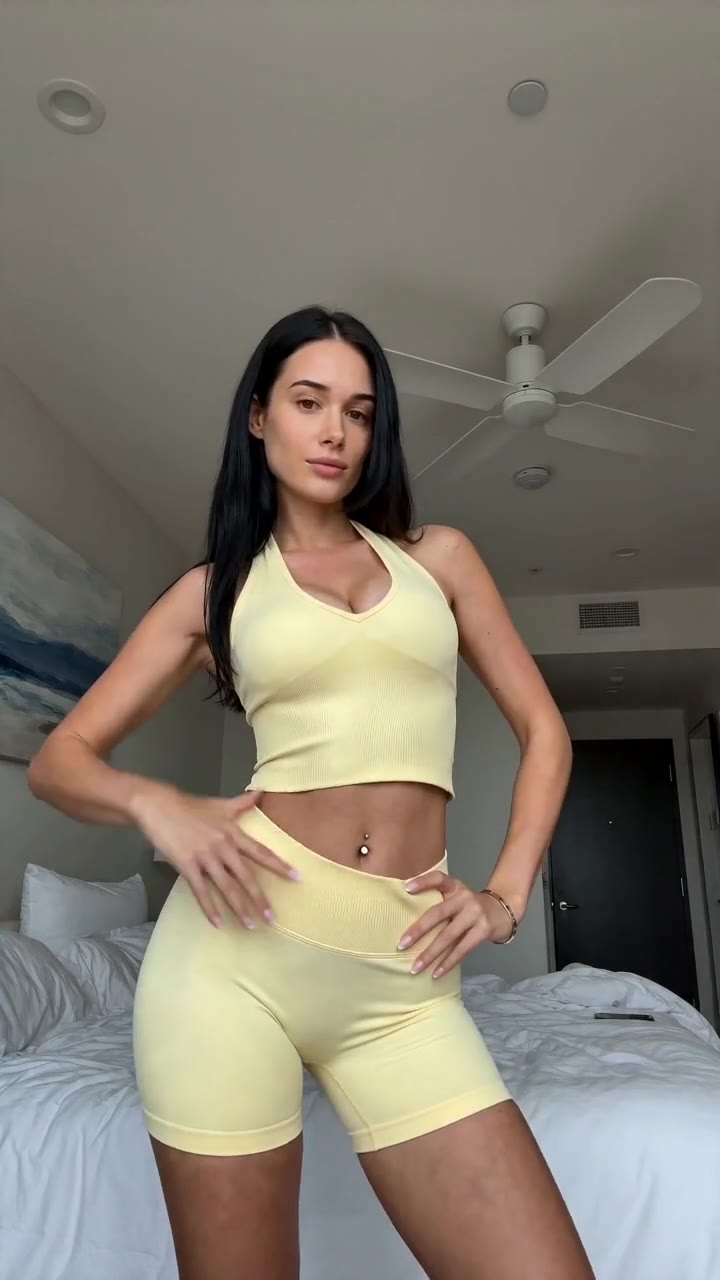](https://studio.alvinsclub.ai/examples/apparel-3-b438de8f.mp4)
*▶ Sunny yellow halter neck top try-on*
[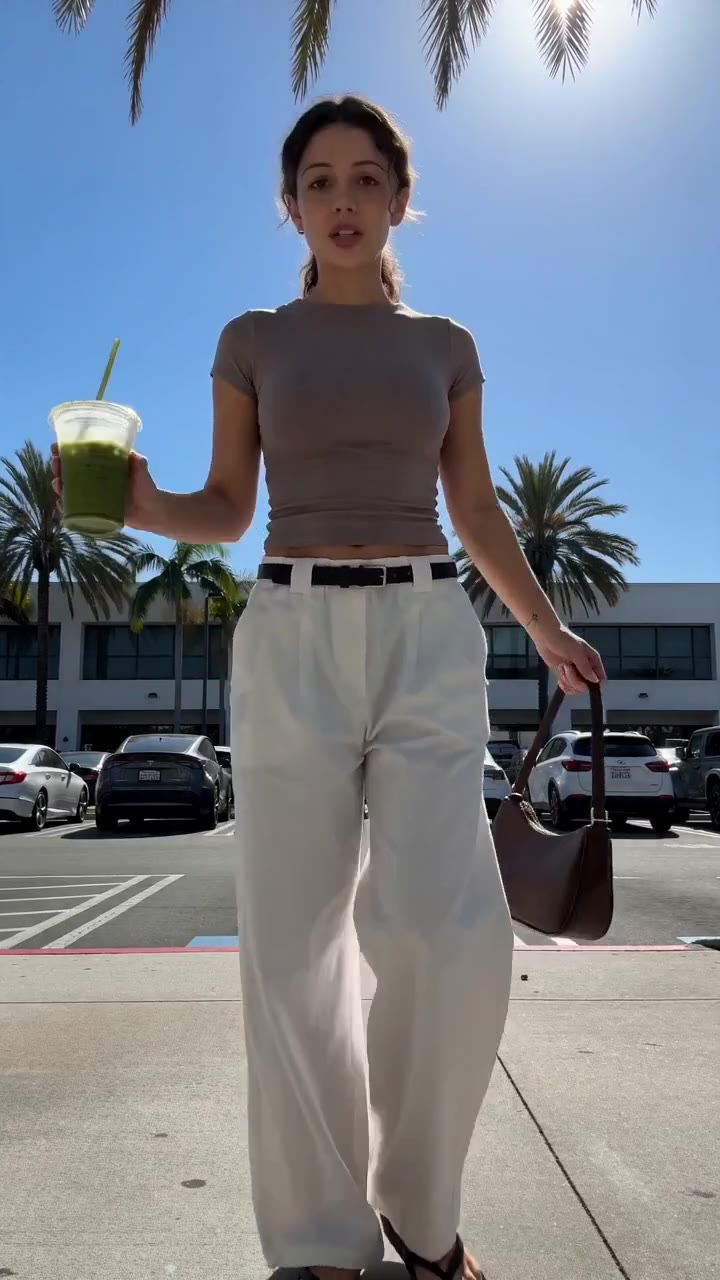](https://studio.alvinsclub.ai/examples/apparel-1-7a18676b.mp4)
*▶ Chic white wide-leg trousers styling*
[See all samples and make your first video free →](https://studio.alvinsclub.ai/samples?utm_source=hashnode&utm_medium=blog&utm_campaign=studio)
## What should the best AI tool for shoppable ecommerce videos produce?
A shoppable video has to perform several jobs in a short sequence. It must identify the product, establish a reason to care, show enough visual evidence to support the claim, and create a path toward purchase.
That means the output should be judged on more than visual polish. A beautiful clip that misrepresents a neckline, changes a gemstone, or hides the product until the final frame is commercially weak.
### The input should match a seller’s actual inventory workflow
Fashion sellers commonly begin with one of four inputs:
- A product page
- Product photography
- A short filmed clip
- A creative brief or reference video
A link-based workflow is particularly useful for catalog-heavy businesses because the product page already contains the basic commercial context. A photo-based workflow is useful for print-on-demand sellers, dropshippers, and brands that do not have the product physically available for a new shoot.
The fewer manual translation steps between catalog and video, the lower the chance that the selling message drifts away from the product.
### The video should contain a selling structure
A finished shoppable video generally needs:
1. **A visual hook:** the first moment must make the item or its benefit clear.
2. **A product demonstration:** the viewer should see the relevant detail, fit, use, or customization.
3. **A reason to buy:** the script should explain who the product suits or what problem it solves.
4. **A readable caption:** important information should survive muted playback.
5. **A clear next step:** the viewer should know the product is available to purchase.
Not every tool supplies all five. Editors such as CapCut and Canva give sellers control over the structure, but the seller still has to write and assemble it. Avatar tools can handle the spoken explanation but may not provide convincing product interaction.
Generative video tools can create motion but can introduce inaccuracies.
### Product accuracy matters more than visual novelty
Fashion products contain details that generative systems often struggle to preserve:
- Repeating prints
- Small logos
- Jewelry settings and stones
- Clothing fastenings
- Exact garment proportions
- Sleeve and collar construction
- Product color under changing light
- Personalization such as names, initials, dates, or birthstones
A seller should inspect every output before publishing. AI video can preserve a product well while still making a mistake in one frame. A brand that skips review trades production speed for catalog inaccuracy.
The relevant standard is not “does this look like AI?” It is “does this video show the actual item honestly?”
## How does Alvin’s Club Studio compare for shoppable fashion video production?
Alvin’s Club Studio is designed for the narrow job of turning a product listing or a small set of product photos into a short selling video. A seller pastes a product page link or uploads one to three product photos, chooses an 8-, 12-, or 15-second output, and receives a video featuring an AI model with a script, voiceover, caption, and hashtags.
This makes Studio relevant when the bottleneck is not editing but **creating finished product-specific creative at volume**. It supports clothing, personalized jewelry, chairs, and furniture through self-serve categories; other categories are handled through the managed programme.
The limitation is equally clear: the seller still has to check each video. AI can slip on product shape, color, or other visual details. Studio reduces the need for a shoot, samples, and manual scripting, but it does not eliminate quality control.
Studio charges per video rather than requiring a subscription. The first video is free without a card, followed by $3 for 8 seconds, $4 for 12 seconds, or $5 for 15 seconds, with credit packs reducing the cost per video down to $2.14. Credits never expire, and failed renders or stopped scripts are free.
Videos can be made in English, Spanish, or Brazilian Portuguese.
For sellers comparing production approaches, the advantage is the direct path from **link in to video out**. The tradeoff is that Studio is not a general-purpose AI filmmaking environment. It is built specifically for selling products.
## Who should use HeyGen for fashion ecommerce videos?
HeyGen is a strong fit when a brand needs a recognizable digital presenter to deliver a scripted message. A seller can use it for product explainers, founder-style announcements, customer-service content, or localized versions of a script. Its central strength is the presenter: the avatar looks into the camera, speaks the supplied copy, and can support a broad set of business communication formats.
That makes HeyGen useful for products that benefit from explanation. A skincare brand discussing usage steps, a fashion retailer explaining a sizing policy, or a marketplace introducing a seasonal collection may prefer a presenter-led format.
The limitation is that an avatar speaking about a garment is not the same as a believable person wearing, touching, or styling that garment. The seller still needs credible product visuals, product footage, or a separate generation workflow. If the goal is a high volume of short videos where the product is the main subject, the avatar layer can add production steps rather than remove them.
HeyGen also requires disciplined scriptwriting. A presenter can deliver a weak product claim fluently, but fluent delivery does not create a reason to buy. The seller must still develop hooks, demonstrations, objections, and calls to action.
## When does Synthesia make sense [for fashion product](https://blog.alvinsclub.ai/7-steps-in-demnas-ai-workflow-for-fashion-product-development) content?
Synthesia suits structured, presenter-led communication more than fast-moving social commerce creative. Its core workflow is built around selecting or configuring an AI presenter, adding a script, and producing a polished video for a defined audience. This is practical for retailer training, wholesale presentations, onboarding, product education, and internal sales enablement.
A fashion brand could use Synthesia to explain a new collection to retail staff, present material-care instructions, or create consistent product education across markets. The controlled format helps when clarity and repeatability matter more than the feel of a spontaneous creator recommendation.
Its limitation is format fit. Short-form shopping content often depends on tactile demonstration, varied hooks, close product shots, and rapid creative iteration. A presenter template does not automatically supply those elements.
The seller has to source or create the product visuals and decide how the item will appear on screen.
Synthesia can therefore be valuable in a fashion content system without being the best first tool for a product catalog that needs many ready-to-post selling videos. It addresses communication with a digital presenter; it does not by itself solve catalog-level product video production.
> 👗 **Selling online? Turn any product link into a ready-to-post shoppable video** — no shoot, no samples. [Try Alvin's Club Studio free →](https://studio.alvinsclub.ai/?utm_source=hashnode&utm_medium=blog&utm_campaign=studio) Your first video is free, then from $3 a video.
## What is Runway best at for fashion video?
Runway is best suited to creative teams that want generative control over visual concepts, motion, and image-to-video experimentation. It can help turn still imagery into moving sequences, create stylized treatments, and explore campaign directions before committing to a conventional production.
For fashion, that makes Runway useful for mood films, concept development, visual research, and editorial-style social content. A creative director can test how a static garment image behaves under camera movement, environment changes, or a particular cinematic treatment.
The limitation is product fidelity. Generative video systems can reinterpret details that a commerce video must preserve. A garment may change construction between frames, a pattern may drift, or a logo may become inconsistent.
The more specific and commercially important the detail, the more closely the output needs review.
Runway is also not primarily a commerce assembly line. It does not automatically mean that a product page becomes a finished video with a sales script, voiceover, caption, and hashtags. A seller can build that workflow around it, but the seller owns the creative and commercial assembly.
That distinction matters. Runway helps create visual material. A shoppable product workflow must also create a reliable selling message.
## Why do sellers use CapCut for fashion ecommerce videos?
CapCut is a practical choice for sellers who already possess the raw material. Its value comes from fast editing: trimming clips, adding captions, applying transitions, using templates, resizing for vertical platforms, and preparing a final export for social posting.
A seller with phone footage, creator clips, product demonstrations, or unedited livestream segments can use CapCut to turn those materials into short-form content. It is especially useful when the brand wants hands-on control over the exact sequence, caption timing, music, and visual style.
The limitation is that CapCut does not solve the hardest upstream problem: obtaining credible product footage. If the seller has no sample, no model, and no shoot, an editing tool has nothing accurate to edit. AI-assisted features can reduce manual work, but they do not automatically create a complete product-specific selling video from a catalog page in the same way a dedicated production workflow does.
CapCut also puts more responsibility on the seller. The user must write the hook, select the best product shots, check the claims, add the purchase context, and decide whether the result is strong enough to publish. That control is valuable for editors; it is a burden for sellers seeking volume without a production team.
## How can Canva help create fashion product videos?
Canva works well when the seller’s starting point is a set of brand assets rather than a product link. Its design environment combines templates, typography, layouts, graphics, image assets, and video editing. A small brand can use it to turn product photos into collection announcements, promotional slides, catalog teasers, and social posts.
Canva is particularly useful when brand consistency is the main requirement. A team can establish colors, fonts, layouts, and reusable templates, then adapt those assets across products and campaigns. It also supports a broad range of marketing deliverables beyond video.
The limitation is specialization. Canva is a general design platform, not a purpose-built shoppable video agent. It does not remove the need to decide what the product video should say, how the item should be shown on an AI model, or which selling structure best suits the product.
A Canva workflow can be efficient for a seller with strong product photography and an in-house content operator. It becomes slower when the seller needs many variations from minimal inputs. Each new product still requires asset preparation, copy decisions, layout work, and review.
Canva therefore fits the **brand asset assembly** category. It should not be evaluated as though it were a direct replacement for a link-to-video production tool.
## Which approach creates the most useful fashion video?
The answer depends on what the seller already has. A brand with a library of filmed footage needs editing. A brand with product images but no video needs production.
A brand with a presenter-led education strategy needs an avatar. A brand exploring an editorial concept needs generative experimentation.
The following comparison makes those tradeoffs explicit.
| Workflow requirement | Avatar tools | Generative video tools | Editing platforms | Product-focused video tools |
|---|---|---|---|---|
| Presenter speaking to camera | Strong | Usually not the core use | Requires source footage | May be included depending on workflow |
| Product accuracy | Depends on supplied product visuals | Requires close review | Depends on source footage | Designed around product inputs, but still requires review |
| Product page as starting point | Usually not the main input | Not usually the main input | No | Yes, in Studio’s workflow |
| Finished script and voiceover | Strong for presenter scripts | Often requires user direction | Usually user-created | Included in Studio’s output |
| Captions and hashtags | May require configuration or editing | Usually user-created | User-created or assisted | Included in Studio’s output |
| No sample required | Yes for presenter content, but product visuals remain an issue | Often possible from images | No, unless separate footage exists | Yes, with a product link or product photos |
| High-volume creative testing | Requires substantial scripting and asset planning | Can create many concepts, but review is demanding | Fast only when footage already exists | Built for short product video variations |
| Main risk | Generic presentation or weak product interaction | Visual drift and product changes | Manual labor and insufficient raw footage | Product details can still slip in AI-generated frames |
The practical conclusion is not that one category replaces all others. It is that sellers should stop asking whether a tool is “good at video” and ask whether it removes the specific production constraint blocking the next batch of product creative.
## Why is volume more important than one polished fashion video?
One polished video cannot answer every creative question. It cannot tell a seller whether the product works better with a close-up hook, a fit demonstration, a personalization reveal, a problem-solution script, or a creator-style recommendation.
Testing requires controlled variation. The product should remain consistent while the seller changes one or more creative variables:
- Hook
- Opening shot
- Voiceover angle
- Model or persona
- Pace
- Product benefit
- Caption structure
- Call to action
- Language
- Background or setting
Traditional production makes each variation expensive because every new concept can require another script, shoot, edit, or creator booking. That cost encourages sellers to make one broad video and hope it works.
AI production changes the economics of iteration, but only when the workflow is specific enough to avoid prompt-heavy experimentation. A general text-to-video tool may generate many clips, yet still leave the seller with a large review and assembly burden. A product-focused system starts closer to the commercial deliverable.
That is why the right comparison is **finished videos per usable hour**, not raw generations per account. A hundred unusable clips do not create more testing capacity than ten accurate videos ready for review.
## How should sellers judge product accuracy in AI fashion video?
Product accuracy needs a formal review process. Sellers should not judge an output only by its first frame or overall visual impression.
A practical review checklist includes:
### Product identity
- Is the item the same category as the listing?
- Does the silhouette match the product photography?
- Are the key design elements present?
### Color and material
- Is the color consistent across the video?
- Does the finish look plausible?
- Are reflective surfaces, metallic details, or textured fabrics represented accurately?
### Construction
- Are sleeves, straps, seams, closures, pockets, and collars correct?
- Does the product change shape during movement?
- Are personalized elements spelled and placed correctly?
### Selling claims
- Does the voiceover describe only what the product actually offers?
- Does the caption avoid unsupported claims?
- Does the visual demonstration support the spoken message?
### Platform readiness
- Is the video vertical?
- Are captions readable on a mobile screen?
- Is the product visible early enough?
- Does the final frame provide a clear purchase context?
The seller remains responsible for the final post, including disclosure. AI-generated videos should be labelled as AI-generated when posted where that disclosure is required or expected.
## How do costs differ between AI video approaches?
Cost comparisons become misleading when they compare a subscription or generation credit to a finished video. The relevant unit is the completed, reviewed asset that a seller can actually publish.
A conventional shoot can include:
- Product samples
- Creator or model fees
- Studio or location costs
- Photographer or videographer time
- Editing
- Reshoots
- Shipping
- Coordination overhead
Creator campaigns introduce a different cost structure. The seller may pay per post, wait for delivery, and receive inconsistent formats or messaging. A deeper discussion of those production tradeoffs appears in [How Much Does a UGC Video Cost for Fashion Brands in 2026?](https://blog.alvinsclub.ai/how-much-does-a-ugc-video-cost-for-fashion-brands-in-2026).
Avatar and generative tools often reduce the cost of creating a visual or spoken component, but the seller must account for assembly and review. A tool can be inexpensive per generation while expensive in operator time.
Alvin’s Club Studio uses a direct per-video model: the first video is free with no card, then the price is $3 for 8 seconds, $4 for 12 seconds, and $5 for 15 seconds. Credit packs lower the per-video cost down to $2.14. There is no subscription, credits do not expire, and failed renders or stopped scripts are free.
That structure fits sellers who want to buy completed short videos rather than commit to a recurring software plan. The limitation remains review: a low-cost render is not automatically a publishable render.
## What should a seller do with product photos that never reach a creator?
Dropshippers and print-on-demand sellers face a specific problem: they cannot always send a physical sample to a creator or film the item themselves. A product page and a small set of images may be the only available source material.
This is where product-photo-to-video workflows matter. They can create an AI model presentation without requiring the seller to possess the physical item. The method does not remove the need to inspect the result, but it removes the sample-shipping delay.
A related workflow is described in [Turn Fashion Product Photos Into TikTok Shop Videos With AI](https://blog.alvinsclub.ai/turn-fashion-product-photos-into-tiktok-shop-videos-with-ai). The central operational lesson is simple: the seller should treat product photos as source evidence, not as permission for the system to redesign the product.
The best outputs preserve the item while adding context: a model wearing the garment, a close view of a key feature, or a scripted explanation of who the product suits. The worst outputs use the product photo as loose inspiration and produce an attractive but inaccurate substitute.
## Which tool should a seller choose by situation?
The best choice depends on the bottleneck, not on a universal ranking.
### Choose Alvin’s Club Studio when:
- You want a product link or product photos to become a finished short video.
- You sell clothing, personalized jewelry, chairs, or furniture through the self-serve categories.
- You need a script, voiceover, caption, and hashtags included in the output.
- You want to test multiple videos without booking creators or organizing a shoot.
- You prefer pay-per-video pricing over a subscription.
- You need English, Spanish, or Brazilian Portuguese voiceover.
- You can review each AI-generated video before posting.
Studio is the most direct fit when the job is **finished shoppable product video production**, especially for sellers without physical samples.
### Choose HeyGen when:
- You need an avatar presenter to explain a product or policy.
- Your content depends on spoken communication more than product handling.
- You need presenter-led localization or business messaging.
- You already have product visuals to combine with the presenter.
The limitation is the gap between a presenter and a believable product demonstration.
### Choose Synthesia when:
- Your main requirement is structured business communication.
- You are creating training, onboarding, or retail education.
- You want consistent presenter-led content across a team or market.
- Product education matters more than creator-style selling content.
The limitation is that it is not primarily a high-volume fashion creative testing system.
### Choose Runway when:
- You are developing a campaign concept or editorial visual direction.
- You need generative motion from still images.
- You can tolerate manual review and creative iteration.
- You have a creative operator who understands image-to-video limitations.
The limitation is product drift, especially around precise fashion details.
### Choose CapCut when:
- You already have strong footage.
- You need fast trimming, captions, transitions, and platform formatting.
- You want direct control over the final edit.
- Your team can supply the script and product narrative.
The limitation is that it does not provide the missing footage when you have no sample or shoot.
### Choose Canva when:
- Your team already works from product photos and brand templates.
- You need video alongside other marketing assets.
- Brand consistency matters across social graphics and product announcements.
- You want a general-purpose design workspace.
The limitation is that it is not specialized around automated product-link-to-video production.
## What is the best AI tool for shoppable ecommerce videos?
The best AI tool for shoppable ecommerce videos is the one that matches the seller’s missing production step.
Choose an avatar platform when the missing element is a presenter. Choose Runway when the missing element is visual experimentation. Choose CapCut when the footage already exists and needs editing.
Choose Canva when the job is branded asset assembly. Choose Synthesia when the priority is structured business communication.
Choose Alvin’s Club Studio when the actual requirement is direct: **take a product page or a small set of product photos and produce a short, ready-to-review shoppable video with the script, voiceover, caption, and hashtags included**. Its limitation is product review; AI can still slip, so sellers must inspect every render before posting.
AI-powered fashion intelligence platforms such as Alvin’s Club connect product information with content production rather than treating video as an isolated creative exercise. Alvin’s Club Studio turns a product link into a ready-to-post shoppable video in about 10 minutes — no shoot, no samples. [Make your first video free →](https://studio.alvinsclub.ai/?utm_source=hashnode&utm_medium=blog&utm_campaign=studio)
## Summary
- The best AI tool for shoppable ecommerce videos turns a product link or product photos into a finished, platform-ready selling video without requiring a shoot, samples, or full editing workflow.
- Fashion sellers use these tools to produce more videos for testing hooks, scripts, creators, and formats before creative fatigue reduces performance.
- The article distinguishes product-focused shoppable video creation from AI avatars, text-to-video generation, cinematic fashion clips, and conventional editing.
- The most useful tool is not necessarily the one with the most effects, but the one that converts product information into a credible shoppable video with minimal wasted work.
- The comparison evaluates established AI video products based on product fidelity, input-to-output speed, and control over the selling message.
## Key Takeaways
- **Key Takeaway:**
- **product information to a credible, shoppable video**
- **Shoppable ecommerce video:**
- **Alvin’s Club Studio**
- **HeyGen**
## Frequently Asked Questions
### What is a shoppable fashion video?
A shoppable fashion video combines product presentation with clickable shopping features, allowing viewers to discover or purchase items while watching. These videos commonly include product tags, links, calls to action, or integrations with ecommerce platforms such as Shopify and TikTok Shop.
### How does AI create product videos from fashion photos?
AI turns [fashion product photos](https://blog.alvinsclub.ai/turn-fashion-product-photos-into-tiktok-shop-videos-with-ai), descriptions, and links into short videos by generating scripts, voiceovers, scenes, captions, animations, or virtual presenters. The resulting content can be adapted for social commerce platforms without organizing a traditional photoshoot.
### Can AI-generated fashion videos include product links?
AI-generated fashion videos can include product links when they are published through a platform or commerce tool that supports shoppable tags and checkout features. The video generator may create the creative asset, while the ecommerce or social platform handles product linking and transactions.
### Is AI video generation worth it for fashion ecommerce?
AI video generation can be worthwhile for fashion ecommerce brands that need to produce and test many product creatives quickly. It can reduce production costs and support variations in hooks, formats, and presenters, although human review is still important for product accuracy and brand quality.
### Why does product accuracy matter in AI fashion videos?
Product accuracy matters because incorrect colors, patterns, sizing details, or garment features can mislead shoppers and increase returns. Fashion sellers should review every AI-generated video to confirm that the product appearance, claims, pricing, and available options match the actual ecommerce listing.
## Related on Alvin's Club Studio
- [Make TikTok Shop videos from a product link](https://studio.alvinsclub.ai/for/tiktok-shop-sellers?utm_source=hashnode&utm_medium=blog&utm_campaign=studio)
- [Product videos for Shopify stores](https://studio.alvinsclub.ai/for/shopify-stores?utm_source=hashnode&utm_medium=blog&utm_campaign=studio)
- [What AI UGC videos cost](https://studio.alvinsclub.ai/learn/ai-ugc-video-pricing?utm_source=hashnode&utm_medium=blog&utm_campaign=studio)
---
### About the author
Building Alvin's Club Studio — an AI agent that turns a product link into a shoppable video for TikTok Shop, Shopify and DTC sellers. Writing about what makes product videos sell.
**Credentials**
- Founder at Alvin's Club (Echooo E-Commerce Canada Ltd.)
- Writes on shoppable video and e-commerce growth at blog.alvinsclub.ai
[X / @alvinsclub](https://x.com/alvinsclub) · [LinkedIn](https://www.linkedin.com/company/alvin-s-club/) · [alvinsclub.ai](https://www.alvinsclub.ai)
---
*From the [Alvin's Club Studio](https://studio.alvinsclub.ai/?utm_source=hashnode&utm_medium=blog&utm_campaign=studio) team — an AI agent that turns a product link into a ready-to-post shoppable video. First video free, then from $3.*
---
## Related Articles
- [How Much Does a UGC Video Cost for Fashion Brands in 2026?](https://blog.alvinsclub.ai/how-much-does-a-ugc-video-cost-for-fashion-brands-in-2026)
- [Turn Fashion Product Photos Into TikTok Shop Videos With AI](https://blog.alvinsclub.ai/turn-fashion-product-photos-into-tiktok-shop-videos-with-ai)
- [The Best AI Fashion Apps for Smarter Travel Packing](https://blog.alvinsclub.ai/the-best-ai-fashion-apps-for-smarter-travel-packing)
- [AI Outfit Planners Compared: Find Your Perfect Occasion Look](https://blog.alvinsclub.ai/ai-outfit-planners-compared-find-your-perfect-occasion-look)
- [Demna AI Outfit Recommendations for Effortless Travel Style](https://blog.alvinsclub.ai/demna-ai-outfit-recommendations-for-effortless-travel-style)
- [Can Demna AI Create the Perfect Outfit for Any Occasion?](https://blog.alvinsclub.ai/can-demna-ai-create-the-perfect-outfit-for-any-occasion)
- [7 Demna AI Alternatives for Professional Fashion Stylists](https://blog.alvinsclub.ai/7-demna-ai-alternatives-for-professional-fashion-stylists)
- [The Best AI Stylist Apps for Building a Capsule Wardrobe](https://blog.alvinsclub.ai/the-best-ai-stylist-apps-for-building-a-capsule-wardrobe)
- [What Is Demna AI Used For in Modern Fashion Design?](https://blog.alvinsclub.ai/what-is-demna-ai-used-for-in-modern-fashion-design)
- [Demna AI and the 2026 Battle Over Client Output Ownership](https://blog.alvinsclub.ai/demna-ai-and-the-2026-battle-over-client-output-ownership)
- [What Demna’s AI Accessory Prompts Reveal About Fashion’s Future](https://blog.alvinsclub.ai/what-demnas-ai-accessory-prompts-reveal-about-fashions-future)
- [Demna AI Prompt Examples for Creating Distinctive Clothing](https://blog.alvinsclub.ai/demna-ai-prompt-examples-for-creating-distinctive-clothing)