# Comparing AI Fashion Video Tools for Sample-Free TikTok Affiliates
*Evaluate leading platforms by avatar realism, product visualization, editing speed, compliance features, and conversion potential for sample-free affiliate campaigns.*
Best TikTok Shop affiliate video tool without samples is an AI fashion video generator that creates product-style promotional videos from listing images, links, or text prompts, eliminating the need to possess physical inventory. The strongest tools automate virtual try-ons, motion effects, captions, and short-form formatting, typically producing 9:16 videos optimized for TikTok’s feed.
**The best TikTok Shop affiliate video tool without samples is one that turns a product link or photos into a ready-to-post video while keeping the product recognizable.**
> **Key Takeaway:** The best TikTok Shop affiliate video tool without samples converts product links or photos into ready-to-post videos while preserving product accuracy, saving affiliates the cost and time of physical product shoots.
TikTok Shop affiliates are usually trying to solve a specific production problem: promote products they do not physically own without ordering samples, arranging a shoot, hiring creators, or waiting for footage. The useful comparison is not “which AI video app looks most impressive?” It is “which tool can move from product page to credible selling video, at a predictable cost, without changing the item?”
This guide compares specific tools by workflow, pricing model, output, and limitations. It focuses on tools that can help with sample-free affiliate content, while separating **avatar UGC**, **text-to-video**, **editing**, and **product-focused video generation**. Those categories solve different problems.
## What should a sample-free TikTok Shop affiliate video tool do?
A sample-free workflow starts with assets the affiliate already has:
- A TikTok Shop product page
- Product photos
- Product title and description
- Seller-provided product claims
- Existing product footage, when available
- A reference TikTok whose pacing or structure is worth studying
The tool then needs to produce more than a moving slideshow. A useful affiliate video normally requires:
1. A clear opening hook
2. Product-focused visuals
3.
A short script
4. Voiceover or on-screen text
5. A reason to care about the product
6.
A direct connection between the visual and the product listing
7. Captions and hashtags
8. A vertical file ready for posting
That is where many general AI video tools fall short. They can generate attractive scenes, but they are not necessarily designed to preserve a garment’s cut, jewelry details, chair shape, or product color. They can also leave the affiliate with the difficult parts: writing the script, checking the output, editing the timing, and producing enough variations to test.
For a deeper explanation of the sample-free workflow, see [How AI Helps Fashion Affiliates Create TikTok Shop Videos Without Samples](https://blog.alvinsclub.ai/how-ai-helps-fashion-affiliates-create-tiktok-shop-videos-without-samples).
> **Sample-free TikTok Shop affiliate video tool:** A software tool that helps an affiliate create product-focused short-form video from a product link, product photos, or seller-provided assets without physically receiving the item.
### See it: real Alvin's Club Studio sample videos
[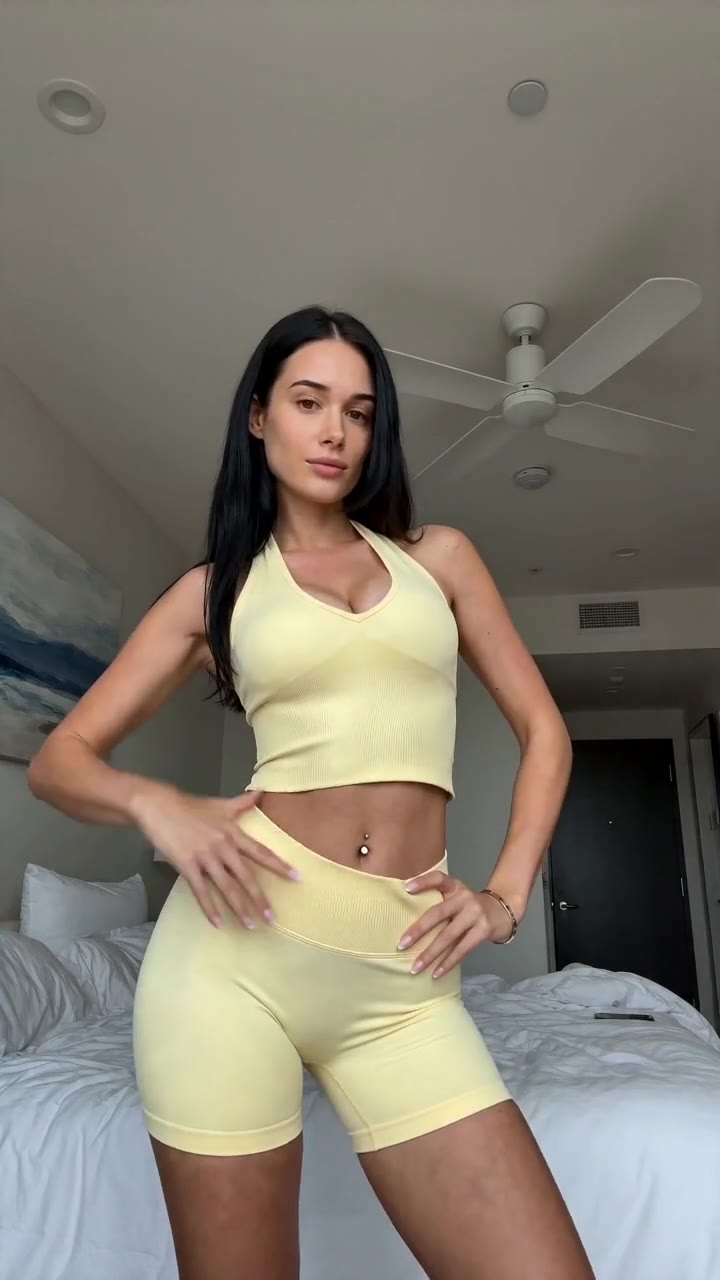](https://studio.alvinsclub.ai/examples/apparel-3-b438de8f.mp4)
*▶ Sunny yellow halter neck top try-on*
[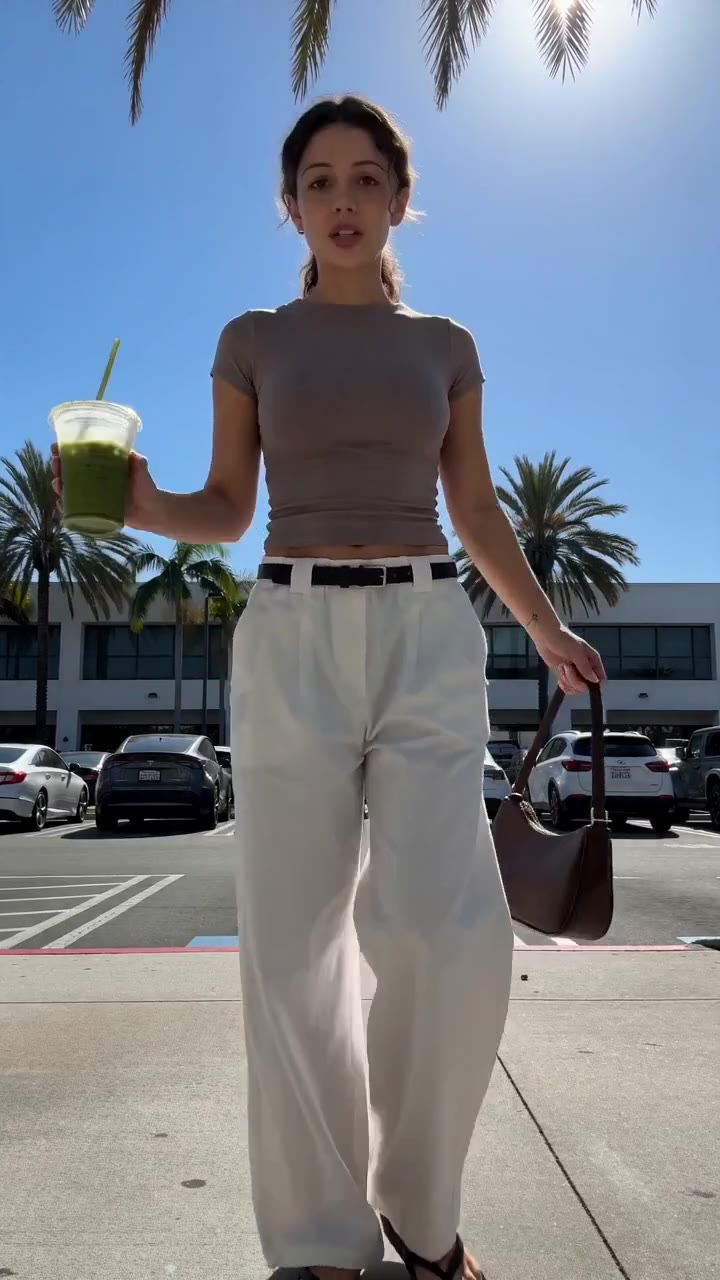](https://studio.alvinsclub.ai/examples/apparel-1-7a18676b.mp4)
*▶ Chic white wide-leg trousers styling*
[See all samples and make your first video free →](https://studio.alvinsclub.ai/samples?utm_source=hashnode&utm_medium=blog&utm_campaign=studio)
## Key comparison: which TikTok Shop affiliate video tools fit a sample-free workflow?
The table below separates what each tool is built to do from what an affiliate still has to handle.
| Tool | What it does best | What it costs | The one thing it is bad at |
|---|---|---|---|
| **Alvin’s Club Studio** | Turns a product page link or 1–3 [product photos into](https://blog.alvinsclub.ai/turn-fashion-product-photos-into-tiktok-shop-videos-with-ai) a short AI-model [product video](https://blog.alvinsclub.ai/the-best-product-video-maker-for-shopify-fashion-stores) with script, voiceover, captions, and hashtags | First video free; then $3 for 8 seconds, $4 for 12 seconds, or $5 for 15 seconds; credit packs reduce the cost to as low as $2.14 per video | AI can still slip on product details, so every render needs a seller check |
| **HeyGen** | Creates presenter-led videos using AI avatars and translated or generated scripts | Pricing changes by plan and usage; check the current pricing page before subscribing | An avatar presenter does not solve accurate product demonstration when the creator has no sample |
| **Synthesia** | Produces structured presenter videos for training, business communication, and scripted narration | Pricing changes by plan and usage; check the current pricing page before subscribing | It is designed around AI presenters and scenes, not TikTok Shop product-specific affiliate creative |
| **Runway** | Generates and edits AI video from prompts and visual references | Pricing changes by plan and credits; check the current pricing page before generating at scale | Prompt-based generation can alter product appearance and does not automatically produce a complete affiliate package |
| **Pika** | Creates short AI-generated clips and visual effects from prompts or images | Pricing changes by plan and credits; check the current pricing page before use | It is a creative clip generator, not a product-link-to-selling-video workflow |
| **CapCut** | Edits vertical videos with templates, captions, effects, and manual controls | Core editing access and available features vary by region and plan; check the current app pricing | It still requires the affiliate to source visuals, write the selling angle, and assemble the product story |
| **Canva** | Builds social video layouts from templates, product images, text, and brand assets | Free and paid plans are available; check the current pricing page for current AI and export limits | Template-based design does not automatically create product-specific TikTok Shop creative from a listing |
| **InVideo AI** | Generates draft videos from written prompts, scripts, and stock or supplied media | Pricing changes by plan and generation limits; check the current pricing page | Stock-led output can feel disconnected from the actual product being promoted |
| **VEED** | Browser-based editing, captions, voiceover, and social video assembly | Free and paid plans are available; check the current pricing page | It is primarily an editor, so the affiliate still needs a strong product concept and accurate assets |
| **Descript** | Script-based editing, transcription, voice tools, and repurposing | Pricing changes by plan and usage; check the current pricing page | It is strongest when source footage or recorded audio already exists |
Prices and plan limits change. The comparison therefore distinguishes fixed facts supplied by each product’s stated workflow from pricing that readers should verify on the linked product page before committing.
The most important distinction is not which logo appears in the table. It is whether the tool begins with the **product** or with a **generic scene**.
A product-first tool starts from a listing or product photo and builds the creative around that item. An avatar tool starts from a virtual presenter. A text-to-video tool starts from a prompt.
An editor starts from footage or images. Those starting points determine the type of sample-free video each tool can produce.
## How does Alvin’s Club Studio handle sample-free TikTok Shop affiliate videos?
Alvin’s Club Studio suits affiliates who want a direct product-to-video workflow rather than a general video editor. You paste a product page link or upload one to three product photos, and Studio produces a finished vertical video in an AI model format. The available durations are 8, 12, or 15 seconds.
Each video includes the production elements an affiliate normally has to assemble separately: a script, voiceover, caption, and hashtags. Voiceover is available in English, Spanish, or Brazilian Portuguese. Studio is built specifically for selling products rather than general AI video generation.
The practical limitation is product fidelity. Studio is built to keep the product true to its photos, but AI can still slip. A garment can show an incorrect detail, a color can shift, or a personalized item can require closer inspection.
Affiliates must check every video before posting.
Studio’s pricing is pay per video rather than subscription-based: the first video is free with no card required, then $3 for 8 seconds, $4 for 12 seconds, and $5 for 15 seconds. Credit packs lower the cost to as little as $2.14 per video. Credits do not expire, and failed renders or stopped scripts are free.
That structure matters for sample-free affiliates because it separates production volume from a recurring software commitment. The affiliate can make multiple product creatives, inspect them, and decide which ones deserve further testing.
Studio also supports a specific form of creative iteration: rebuilding the pacing and structure of a TikTok the affiliate likes using a different product. That does not mean copying the original creator’s identity or claims. It means using a proven short-form structure—such as hook, product reveal, benefit, and close—while substituting the affiliate’s product.
Studio suits clothing, personalized jewelry, chairs, and furniture through self-serve categories. Other categories are handled through the managed programme rather than the standard self-serve workflow.
The limitation is important: Studio does not make physical product inspection unnecessary. If the product page itself is inaccurate, incomplete, or visually ambiguous, the resulting video still needs human review. Sample-free production removes the logistics of receiving and filming the item; it does not remove the responsibility to verify the listing.
For affiliates comparing broader tool categories, [The Best AI Video Generators for TikTok Shop Fashion Sellers](https://blog.alvinsclub.ai/the-best-ai-video-generators-for-tiktok-shop-fashion-sellers) provides additional context on how [product video tools](https://blog.alvinsclub.ai/the-best-ai-product-video-tools-for-clothing-brands) differ from general generators.
## Who should use HeyGen [for TikTok Shop](https://blog.alvinsclub.ai/the-best-ai-video-generators-for-tiktok-shop-fashion-sellers) affiliate content?
HeyGen is best known for AI-avatar videos, presenter-led narration, and multilingual video creation. It suits affiliates who want a virtual person to deliver a prepared script without recording themselves or booking a human creator.
For a sample-free affiliate, that can solve one narrow problem: the affiliate does not need to appear on camera. A script can be written around the product, then presented by an avatar. This approach works best when the selling argument is verbal—such as explaining a product’s use case, describing a feature, or introducing a category.
HeyGen is less suitable when the product itself needs to dominate the video. An avatar can speak about a dress, necklace, or chair, but a talking presenter does not automatically demonstrate the item accurately. The affiliate still needs product images, footage, or other visual assets.
If the listing photos are static, the final video may feel like an avatar announcement placed beside a product rather than a convincing product demonstration.
The limitation is therefore structural: **HeyGen solves presenter production, not product handling**. It does not turn every TikTok Shop product page into a complete product-specific affiliate video package by itself.
An affiliate using HeyGen must still decide:
- Which product image appears at each moment
- How the opening hook connects to the listing
- Which claims are supported by the seller’s information
- How the product is shown while the avatar speaks
- Whether the visual sequence feels native to TikTok Shop
HeyGen is a reasonable choice for affiliates who already have a product narrative and want a virtual spokesperson. It is a weaker fit for affiliates who want a single product link to become a finished short video with minimal assembly.
## Who should use Synthesia for sample-free affiliate videos?
Synthesia suits teams that need structured, scripted videos with AI presenters, consistent narration, and a controlled presentation style. Its core use cases are closer to business communication, training, and internal explanation than fast-moving TikTok Shop affiliate testing.
An affiliate could use Synthesia to narrate a product explanation from supplied images or video clips. This is useful when the affiliate wants a clean presenter format and a script-led delivery. It also suits campaigns where consistent tone matters across multiple videos.
The problem is that [TikTok Shop fashion](https://blog.alvinsclub.ai/7-elements-that-make-a-tiktok-shop-fashion-video-convert) content usually needs product immediacy. A clothing affiliate has to show fit, silhouette, fabric appearance, color, and styling context. A personalized jewelry affiliate has to keep names, initials, dates, or birthstones readable and correct.
A furniture affiliate needs the object’s proportions and use context to remain clear.
Synthesia does not automatically solve those product-specific requirements. Its presenter-first workflow can make the product secondary. The affiliate remains responsible for gathering product media, building the sequence, and ensuring that the video does not make claims unsupported by the listing.
Its concrete limitation is **format mismatch**. Synthesia can produce a polished scripted presentation, but polished presentation is not the same as a TikTok-native product test. For sample-free affiliates, the tool makes more sense when the campaign needs an AI presenter explaining an already-developed product story.
It is less efficient when the goal is to create many product-specific variations quickly from individual listings. The affiliate may spend more time designing each scene than evaluating which hook or structure performs best.
## Who should use Runway for TikTok Shop product clips?
Runway suits creators who want generative control over visual scenes, motion, transitions, and experimental video concepts. It is useful for turning images or prompts into cinematic clips, creating visual treatments, or developing unusual product environments.
For sample-free affiliates, Runway can help animate a product photo or create an opening visual that would be difficult to film. A [clothing image](https://blog.alvinsclub.ai/how-ai-is-changing-clothing-image-search-without-a-brand-name-in-2026) can become part of a stylized scene. A furniture product can be placed into an aspirational room concept.
A jewelry image can support a visual transition or close-up treatment.
The limitation is product consistency. Generative video models can change details between frames. A pattern may shift, a garment’s structure may distort, or a product may gain visual elements that do not exist in the listing.
The more imaginative the prompt, the more carefully the affiliate must inspect the result.
Runway also does not inherently produce the entire affiliate package. The user still needs to create or refine:
- The TikTok Shop hook
- The selling script
- The voiceover
- The caption
- The hashtags
- The final product callout
- The disclosure and product-claim checks
Runway suits affiliates who already understand video generation and want custom visual assets. It is not the simplest option for someone who wants a link-in, finished-product-video-out workflow.
A practical Runway workflow is therefore narrower: use it for a specific clip or visual treatment, then assemble the final TikTok with an editor. That gives creative control but adds review and production steps.
## Who should use Pika for TikTok Shop affiliate videos?
Pika is suited to short AI-generated clips, image animation, and visual effects. It can help an affiliate turn a still product image into a more dynamic asset or create a transition that gives a short video visual movement.
That is useful when the affiliate already has a creative plan. For example, a product image could be animated for the first second, followed by text explaining a benefit. A still fashion image could receive motion treatment before the affiliate moves into product details.
The limitation is that Pika is not a TikTok Shop affiliate production system. It does not replace the work of deciding how to sell the product. A clip may be visually interesting without explaining why a viewer should care, what problem the product addresses, or what distinguishes it from alternatives.
Pika also presents the same verification issue common to generative video: the output can introduce movement or visual changes that are not faithful to the original product. That matters especially for:
- Personalized jewelry
- Printed clothing
- Garments with distinctive construction
- Furniture with exact dimensions or hardware
- Products where color is central to purchase intent
Pika suits an affiliate who needs one creative visual ingredient. It is not the best fit for an affiliate who wants the complete sequence, narration, caption, and hashtag package generated from a product listing.
Used correctly, it belongs in the “creative clip generator” category rather than the “affiliate video system” category.
> 👗 **Selling online? Turn any product link into a ready-to-post shoppable video** — no shoot, no samples. [Try Alvin's Club Studio free →](https://studio.alvinsclub.ai/?utm_source=hashnode&utm_medium=blog&utm_campaign=studio) Your first video is free, then from $3 a video.
## Who should use CapCut for TikTok Shop affiliate production?
CapCut suits affiliates who already have photos, clips, scripts, or voiceover and need a fast vertical editing environment. Its strengths include timeline editing, templates, captions, effects, transitions, and social-video formatting.
CapCut is often a practical final assembly tool. An affiliate can combine product images, text, narration, music, and captions into a short vertical video. It also gives the user direct control over timing, which matters when the opening second needs to establish the product before a viewer scrolls away.
The concrete limitation is that CapCut is not a product research or product-script system. It does not automatically know which product benefit should lead the video merely because the affiliate imported a product photo. The affiliate must determine the hook, select the visual order, write the claims, and verify the product details.
That means CapCut works well when the affiliate has an existing production process:
1. Gather the seller’s product assets.
2. Decide the target viewer and selling angle.
3.
Write a short script.
4. Record or generate voiceover.
5. Edit the assets into a vertical sequence.
6.
Add captions and a compliant product callout.
7. Review every frame.
It works less well for a person who wants to avoid those decisions. The tool can make editing faster, but it does not remove the creative and verification work that comes before editing.
CapCut is a strong choice when manual control matters more than automation. It is also useful for finishing or revising videos generated elsewhere.
## Who should use Canva for sample-free TikTok Shop content?
Canva suits affiliates who want template-based social video, product cards, text overlays, brand colors, and simple motion graphics. It is particularly useful for a catalog-style approach where the affiliate wants consistency across several products.
An affiliate can import seller-provided images, arrange them into a vertical layout, add a hook, create product-benefit slides, and export a social video. Canva can also help maintain a repeatable visual identity across posts. That matters for affiliates managing a collection of products rather than one isolated video.
The limitation is that template consistency can become visual sameness. A TikTok Shop video needs a reason to keep watching, not just a sequence of product cards. A polished layout does not automatically create movement, proof, or a compelling product narrative.
Canva also requires the affiliate to do the central product work:
- Choose the right product claim
- Decide which image supports that claim
- Write the script or text
- Produce voiceover if needed
- Check whether the layout makes the item easy to understand
- Make sure the result does not overstate what the listing promises
Canva is a good fit for affiliates who prefer structured design and repeatability. It is a weaker fit for affiliates who need AI-generated model footage or a finished product-specific narrative from a listing.
The tool is best treated as a controlled design system, not a replacement for product video strategy.
## Who should use InVideo AI for TikTok Shop affiliate videos?
InVideo AI suits users who want to generate a draft video from a text prompt, script, or content brief. It can help assemble scenes, narration, text, and stock or supplied media into an initial social-video concept.
For affiliates, that makes it useful when the product story is already clear. An affiliate can describe the audience, product benefit, tone, and desired structure, then use the generated result as a starting point. This is faster than building every scene manually from a blank timeline.
The limitation is product connection. If the workflow relies heavily on stock footage, the video can show a lifestyle that is only loosely related to the actual item. A fashion affiliate may end up with generic clothing imagery rather than the precise garment in the TikTok Shop listing.
That weakens trust and can create a gap between the video and the product page.
The affiliate must therefore inspect:
- Whether the displayed item is the promoted item
- Whether stock scenes imply features the product does not have
- Whether the narration matches the seller’s description
- Whether the call to action points clearly to the right listing
- Whether the video feels native to the intended audience
InVideo AI suits affiliates who want rapid drafts and are willing to replace generic media with product-specific assets. It is less suitable when product accuracy must be the central production requirement from the first generation.
## Who should use VEED for TikTok Shop affiliate content?
VEED suits browser-based editing, captioning, voiceover, resizing, and social-video assembly. It is useful for affiliates who want a relatively direct online editing workflow without installing a full desktop editing program.
A sample-free affiliate can use VEED to combine seller product photos, existing clips, text, narration, and captions. It can also support quick revisions when the affiliate identifies a weak hook or an unclear product shot.
Its concrete limitation is that VEED is primarily an editing environment. It does not automatically determine the selling angle from a TikTok Shop product page. The affiliate must bring the product understanding and creative direction.
That distinction matters because an editor can improve a weak video without solving its central problem. Better cuts do not fix:
- A generic first sentence
- An unsupported product claim
- A product image that does not show the relevant detail
- A sequence that hides the item until too late
- A caption that fails to explain why the product belongs in the viewer’s life
VEED suits affiliates who have source assets and want efficient editing, captions, and exports. It is less suitable for someone starting with only a listing link and expecting a finished product-specific video.
The tool is strongest after the creative decisions have already been made.
## Who should use Descript for TikTok Shop affiliate videos?
Descript suits creators who work from recorded speech, scripts, transcripts, or existing video and want to edit through text. Its workflow is especially useful when changing spoken wording, removing sections, or repurposing longer recordings into shorter clips.
For a sample-free TikTok Shop affiliate, Descript can support a narrated format. The affiliate can write a product explanation, generate or record narration, and then edit the spoken structure as text. This works well for review-style content, product comparisons, or commentary-led videos where the visual assets support the narration.
The limitation is source dependence. Descript is most valuable when audio or video already exists. It does not solve the initial product visualization problem.
If the affiliate has only product photos and a listing, Descript still requires the user to gather the images, develop the concept, and decide how the product should appear on screen.
It also does not automatically validate product claims. The affiliate must ensure that the narration matches the listing and does not imply personal ownership or firsthand testing when the affiliate has not received a sample.
Descript suits affiliates who create voice-led content and want script-level editing control. It is a poor first choice for a listing-to-video workflow where the product visuals and selling structure need to be generated together.
## Why do avatar tools and product video tools produce different results?
Avatar tools optimize for a presenter. Product video tools optimize for the item.
That difference affects the viewer’s attention. An avatar-led video often places the face, voice, or delivery at the center. A product-led video places the product, its visible characteristics, and its use case at the center.
Neither approach is automatically better. The correct choice depends on what the affiliate needs the video to prove.
| Affiliate need | Better tool category | Why |
|---|---|---|
| Explain a product in a presenter’s voice | Avatar video tool | The presenter carries the narration |
| Show an item’s visual details | Product-focused video tool | The product remains the main subject |
| Build a video from existing clips | Editor | The user controls the footage and timing |
| Create an unusual visual effect | Generative video tool | The tool provides motion or scene experimentation |
| Produce consistent catalog layouts | Template design tool | The structure remains repeatable |
| Test many product hooks from listings | Product-to-video workflow | The production process begins with the item and supports volume |
The risk in choosing the wrong category is wasted production. An affiliate can create a technically polished avatar video that never shows the product clearly. They can also generate a visually dramatic AI clip that changes the product and creates an inaccurate impression.
Sample-free does not mean asset-free. It means the affiliate does not physically receive the item. The workflow still depends on the seller’s product page, images, claims, and available information.
## How should affiliates check AI-generated [product videos](https://blog.alvinsclub.ai/how-ai-is-changing-product-videos-without-a-photoshoot-in-2026) before posting?
Every AI-generated product video needs a visual and claim review. This is not optional when the affiliate has not held the item.
Use a short checklist:
### Product identity
- Is the item in the video the same item shown on the listing?
- Does the color match?
- Does the shape match?
- Are patterns, logos, clasps, straps, and hardware accurate?
- Are personalized details shown correctly?
### Product claims
- Does the narration repeat only supported claims?
- Does the video imply testing or ownership that did not happen?
- Does it promise a result the listing does not establish?
- Does it describe material, sizing, comfort, or performance accurately?
### Visual sequence
- Does the viewer see the product early?
- Does every visual support the spoken point?
- Are any AI-generated scenes more prominent than the product itself?
- Does the final frame make the product connection clear?
### TikTok Shop suitability
- Is the video vertical?
- Are captions readable on a phone?
- Is the pacing clear without audio?
- Is the affiliate relationship disclosed as required by the platform and applicable rules?
- Is the product page the correct destination?
The review is especially important for clothing, jewelry, chairs, and furniture. A small visual error in a generic lifestyle scene may go unnoticed. A wrong necklace detail or altered chair structure can directly misrepresent the product.
Studio states this limitation plainly: AI can still slip, so sellers should check each video before posting. That is a better operating assumption than treating any generator as a substitute for inspection.
## What makes a sample-free affiliate video credible?
A sample-free video should not pretend to provide firsthand experience. It should use the information and images available from the listing while giving viewers a clear reason to investigate the product.
Credibility comes from alignment:
- **Visual alignment:** the product shown matches the listing.
- **Claim alignment:** the script matches supported product information.
- **Intent alignment:** the video makes clear that it is promoting the product.
- **Format alignment:** the first seconds establish what the viewer is seeing.
- **Expectation alignment:** the video does not imply that the affiliate physically tested the item.
The strongest creative structure is often simple:
1. Lead with a specific viewer problem or use case.
2. Show the relevant product detail.
3.
Explain the product’s stated benefit.
4. Add context such as styling, placement, or gifting.
5. Close with a clear path to the listing.
For example, a personalized necklace video should not open with an abstract AI fashion scene. It should establish the personalization angle quickly, show the name, initial, date, or birthstone detail, and explain the gifting or styling context without inventing quality claims.
A furniture video should not rely only on an attractive room. It should show the chair or table clearly, then connect the visual to the relevant use case supported by the listing.
A clothing video should not hide the garment under excessive effects. It should make the silhouette, color, and styling context easy to understand.
The tool matters, but the creative logic matters more.
## Why does production volume matter for TikTok Shop affiliates?
One video per product gives an affiliate very little information about the creative. If the video receives weak engagement, the affiliate cannot easily tell whether the problem was the hook, product, pacing, narration, visual treatment, or audience.
Multiple variations create a clearer testing process. Each version can change one meaningful element:
- The opening problem
- The target audience
- The product benefit
- The visual order
- The narration language
- The pacing
- The styling context
- The caption angle
This is where pay-per-video tools have a practical advantage over tools built around a recurring subscription, provided the output is accurate enough to post. The affiliate can produce several finished concepts without committing to an ongoing plan or carrying unused credits.
Studio’s model is designed around this type of production: the first video is free, followed by per-video pricing, with credit packs available at a lower per-[video cost](https://blog.alvinsclub.ai/how-much-does-a-ugc-video-cost-for-fashion-brands-in-2026) and no credit expiration. Failed renders and stopped scripts are free. That does not guarantee performance, but it lowers the cost structure for creating and reviewing multiple product videos.
The limitation remains quality control. More videos do not help if every version contains the same product error or unsupported claim. Volume only becomes useful when the affiliate reviews the outputs and changes the creative deliberately.
## How should affiliates choose between a product-first tool and an editor?
Choose a **product-first tool** when the affiliate wants the system to create the initial selling video from a product page or photos.
Choose an **editor** when the affiliate already has the essential ingredients and wants control over assembly.
The decision can be made with four questions:
1. Do I have usable product footage?
2. Do I already know the hook and script?
3.
Do I need the tool to create voiceover and captions?
4. Do I need many product variations rather than one polished edit?
If the affiliate answers “no” to the first three and “yes” to the fourth, a product-first workflow fits better. If the affiliate has recorded footage, a written script, and a defined creative concept, an editor such as CapCut, VEED, or Descript may be more efficient.
This is also why general AI video generators can be misleading in comparisons. A tool may generate a strong standalone clip but still leave the affiliate with most of the work required to make a TikTok Shop post.
The right comparison is not “AI versus manual.” It is **which production steps the tool removes and which steps remain**.
## Which tool should you pick by situation?
### Pick Alvin’s Club Studio when you have a product link or product photos
Studio is the clearest fit when the affiliate wants a product page or one to three product photos converted into a short, finished vertical video. It includes the script, voiceover, caption, and hashtags, and it is designed specifically for selling products.
Use it for clothing, personalized jewelry, chairs, and furniture in the self-serve categories. Check every output before posting because AI can still alter product details.
### Pick HeyGen or Synthesia when the presenter is the main asset
Choose an avatar tool when the campaign depends on a virtual person explaining the product. These tools are better for presenter-led narration than for product-specific demonstration.
You still need accurate product assets and a clear plan for showing the item.
### Pick Runway or Pika when you need a custom visual clip
Use generative [video tools for](https://blog.alvinsclub.ai/the-best-ai-ugc-video-tools-for-fashion-ecommerce-brands) motion, effects, or creative scenes. They suit affiliates who can tolerate more manual review and assembly.
Do not treat generated motion as proof of product accuracy. Inspect the item frame by frame when the visual details matter.
### Pick CapCut, VEED, or Descript when you already have source material
Use an editor when the product footage, images, narration, or script already exist. These tools provide control over timing and presentation, but they do not replace product research or creative direction.
### Pick Canva when consistency and templates matter most
Canva works for catalog-style product posts and repeatable layouts. It is less useful when the affiliate needs AI-generated model footage or a complete product narrative from a listing.
### Pick InVideo AI when you want a fast draft from a brief
InVideo AI fits affiliates who want a generated starting point and are prepared to replace generic footage with product-specific visuals. Review every stock scene for relevance and claim accuracy.
The best TikTok Shop affiliate video tool without samples is not automatically the tool with the most effects, the most realistic avatar, or the largest template library. It is the tool that removes the most costly steps while keeping the promoted product accurate enough to verify and post.
For affiliates who want the shortest route from product link to finished creative, **Alvin’s Club Studio turns a product link into a ready-to-post shoppable video in about 10 minutes — no shoot, no samples. [Make your first video free →](https://studio.alvinsclub.ai/?utm_source=hashnode&utm_medium=blog&utm_campaign=studio)**
AI-powered fashion intelligence, including tools such as AlvinsClub, addresses the same underlying problem by connecting product information with content decisions: what to show, how to frame it, and which selling angle fits the item. The useful standard remains practical—accurate product representation, clear disclosure, deliberate creative testing, and human review before publishing.
## Summary
- The **best TikTok Shop affiliate video tool without samples** converts a product link or photos into a ready-to-post video while keeping the product recognizable.
- Sample-free tools help affiliates avoid ordering products, arranging shoots, hiring creators, or waiting for footage.
- The most useful comparison evaluates product accuracy, workflow, pricing, output quality, and limitations rather than visual impressiveness alone.
- A strong workflow can use a TikTok Shop page, product photos, seller claims, existing footage, or a reference TikTok as source material.
- Affiliates should distinguish between avatar UGC, text-to-video, editing, and product-focused video generators because each category solves a different content-production need.
## Key Takeaways
- **The best TikTok Shop affiliate video tool without samples is one that turns a product link or photos into a ready-to-post video while keeping the product recognizable.**
- **Key Takeaway:**
- **avatar UGC**
- **text-to-video**
- **editing**
## Frequently Asked Questions
### What is a sample-free TikTok Shop affiliate video tool?
A sample-free TikTok Shop affiliate video tool creates promotional videos from a product link, listing images, or seller-provided media instead of physical inventory. The best options generate product-focused scenes, captions, voiceovers, and calls to action while keeping the item recognizable.
### How does AI generate TikTok Shop affiliate videos from product photos?
AI analyzes product photos, listing details, and selected marketing goals to assemble scenes, motion effects, narration, captions, and transitions. The result is a short vertical video designed for TikTok, although affiliates should review the output for inaccurate features or exaggerated claims.
### Can AI video tools [create TikTok Shop](https://blog.alvinsclub.ai/how-ai-helps-fashion-affiliates-create-tiktok-shop-videos-without-samples) content without ordering product samples?
AI video tools can create TikTok Shop content without affiliates purchasing or receiving physical samples. These tools use product images, links, specifications, and licensed creative assets, making them useful for testing multiple products before investing in inventory or filming.
### Is AI-generated TikTok Shop affiliate content worth using?
AI-generated TikTok Shop content can be worth using when speed, testing volume, and low production costs matter more than original hands-on footage. It works best when affiliates edit the video, verify product details, and add a trustworthy hook rather than posting generic automated content.
### Why does product accuracy matter in AI fashion affiliate videos?
Product accuracy matters because distorted colors, missing details, incorrect fit, or invented features can reduce buyer trust and create compliance problems. Fashion affiliates should compare every generated scene with the seller’s listing, especially for clothing shape, material, sizing, and available variations.
### What features should affiliates compare in AI TikTok video tools?
Affiliates should compare product-link importing, image-to-video generation, script quality, voice options, automatic captions, brand controls, editing flexibility, export limits, and commercial-use rights. TikTok formatting, batch creation, watermark policies, and the ability to preserve recognizable product details are also important.
### Can AI TikTok videos use product images from TikTok Shop listings?
AI TikTok videos can use listing images when the affiliate has permission to use those assets and follows TikTok Shop, seller, and copyright requirements. Affiliates should avoid copying protected content from unrelated sources and should confirm that generated claims match the approved product information.
### How can affiliates make AI fashion videos look less generic?
Affiliates can make AI fashion videos look less generic by using a specific audience hook, realistic styling context, clear product benefits, and varied short-form formats. Adding original commentary, accurate comparisons, human editing, and a direct call to action usually makes the content more distinctive and credible.
## Related on Alvin's Club Studio
- [Make TikTok Shop videos from a product link](https://studio.alvinsclub.ai/for/tiktok-shop-sellers?utm_source=hashnode&utm_medium=blog&utm_campaign=studio)
- [What AI UGC videos cost](https://studio.alvinsclub.ai/learn/ai-ugc-video-pricing?utm_source=hashnode&utm_medium=blog&utm_campaign=studio)
- [TikTok Shop affiliate videos without samples](https://studio.alvinsclub.ai/learn/tiktok-shop-affiliate-videos-without-samples?utm_source=hashnode&utm_medium=blog&utm_campaign=studio)
---
### About the author
Building Alvin's Club Studio — an AI agent that turns a product link into a shoppable video for TikTok Shop, Shopify and DTC sellers. Writing about what makes product videos sell.
**Credentials**
- Founder at Alvin's Club (Echooo E-Commerce Canada Ltd.)
- Writes on shoppable video and e-commerce growth at blog.alvinsclub.ai
[X / @alvinsclub](https://x.com/alvinsclub) · [LinkedIn](https://www.linkedin.com/company/alvin-s-club/) · [alvinsclub.ai](https://www.alvinsclub.ai)
---
*From the [Alvin's Club Studio](https://studio.alvinsclub.ai/?utm_source=hashnode&utm_medium=blog&utm_campaign=studio) team — an AI agent that turns a product link into a ready-to-post shoppable video. First video free, then from $3.*
---
## Related Articles
- [How AI Helps Fashion Affiliates Create TikTok Shop Videos Without Samples](https://blog.alvinsclub.ai/how-ai-helps-fashion-affiliates-create-tiktok-shop-videos-without-samples)
- [The Best AI Video Generators for TikTok Shop Fashion Sellers](https://blog.alvinsclub.ai/the-best-ai-video-generators-for-tiktok-shop-fashion-sellers)
- [The Best AI Product Video Tools for Clothing Brands](https://blog.alvinsclub.ai/the-best-ai-product-video-tools-for-clothing-brands)
- [The Best AI UGC Video Tools for Fashion Ecommerce Brands](https://blog.alvinsclub.ai/the-best-ai-ugc-video-tools-for-fashion-ecommerce-brands)
- [7 Elements That Make a TikTok Shop Fashion Video Convert](https://blog.alvinsclub.ai/7-elements-that-make-a-tiktok-shop-fashion-video-convert)
- [Turn Fashion Product Photos Into TikTok Shop Videos With AI](https://blog.alvinsclub.ai/turn-fashion-product-photos-into-tiktok-shop-videos-with-ai)
- [How AI Is Changing Product Videos Without a Photoshoot in 2026](https://blog.alvinsclub.ai/how-ai-is-changing-product-videos-without-a-photoshoot-in-2026)
- [The Best Product Video Maker for Shopify Fashion Stores](https://blog.alvinsclub.ai/the-best-product-video-maker-for-shopify-fashion-stores)
- [The Best AI Tools for Shoppable Fashion Videos, Compared](https://blog.alvinsclub.ai/the-best-ai-tools-for-shoppable-fashion-videos-compared)
- [How Much Does a UGC Video Cost for Fashion Brands in 2026?](https://blog.alvinsclub.ai/how-much-does-a-ugc-video-cost-for-fashion-brands-in-2026)
- [The Best AI Wardrobe Apps for Shopping Your Closet](https://blog.alvinsclub.ai/the-best-ai-wardrobe-apps-for-shopping-your-closet)
- [How AI Is Changing Clothing Image Search Without a Brand Name in 2026](https://blog.alvinsclub.ai/how-ai-is-changing-clothing-image-search-without-a-brand-name-in-2026)