# AI Video Tools for Fashion Dropshipping Ads, Compared
*Compare features, pricing, templates, and product-demo quality to choose the right platform for scroll-stopping fashion ads that convert.*
Best AI video tool for dropshipping ads is Creatify, a platform that converts product URLs or images into short, ready-to-run video advertisements with AI-generated scripts, voiceovers, avatars, and scenes. It supports rapid creative testing by generating multiple ad variations from one product input, making it well suited to fashion dropshippers producing vertical videos for TikTok, Instagram Reels, and paid social campaigns.
The **best AI video tool for dropshipping ads** turns a product page or product photos into a finished, platform-ready selling video without requiring you to hold inventory, book a shoot, or pay a creator for every post.
> **Key Takeaway:** The right AI video tool for dropshipping ads depends on your workflow: use product-focused generators for catalog videos, avatar tools for UGC-style ads, and editors for repurposing content across platforms. Compare output quality, customization, speed, and cost before choosing.
This comparison focuses on tools that solve different parts of that workflow: avatar-led UGC, text-to-video generation, product-focused video creation, editing, and managed production. The right choice depends on whether you need a talking presenter, polished product footage, rapid creative testing, or a team to run the process for you.
> **Best AI video tool for dropshipping ads:** A product-video system that converts a product link or photos into a ready-to-post vertical advertisement while preserving the product’s appearance and allowing sellers to create multiple creative variations at a controlled cost.
## How were these AI video tools selected?
The entries were selected by whether they are established, named products with a practical use in fashion dropshipping advertising. The comparison considers **product accuracy, input requirements, finished-video readiness, pricing structure, creative testing, presenter options, and the amount of manual work left to the seller**.
Pricing and free access can change, so sellers should verify the current plan page before committing. Where a tool has multiple plans, this article describes the pricing model rather than presenting a possibly outdated figure.
The comparison includes:
- **Alvin’s Club Studio**, built specifically for selling-[product video](https://blog.alvinsclub.ai/the-best-product-video-maker-for-shopify-fashion-stores)s.
- **HeyGen**, focused on AI avatars and presenter-led videos.
- **Synthesia**, focused on avatar videos for structured communication.
- **Creatify**, focused on turning product links into short-form ads.
- **InVideo AI**, focused on prompt-based video creation and editing.
- **Runway**, focused on generative video and visual production.
- **CapCut**, focused on editing and social-video production.
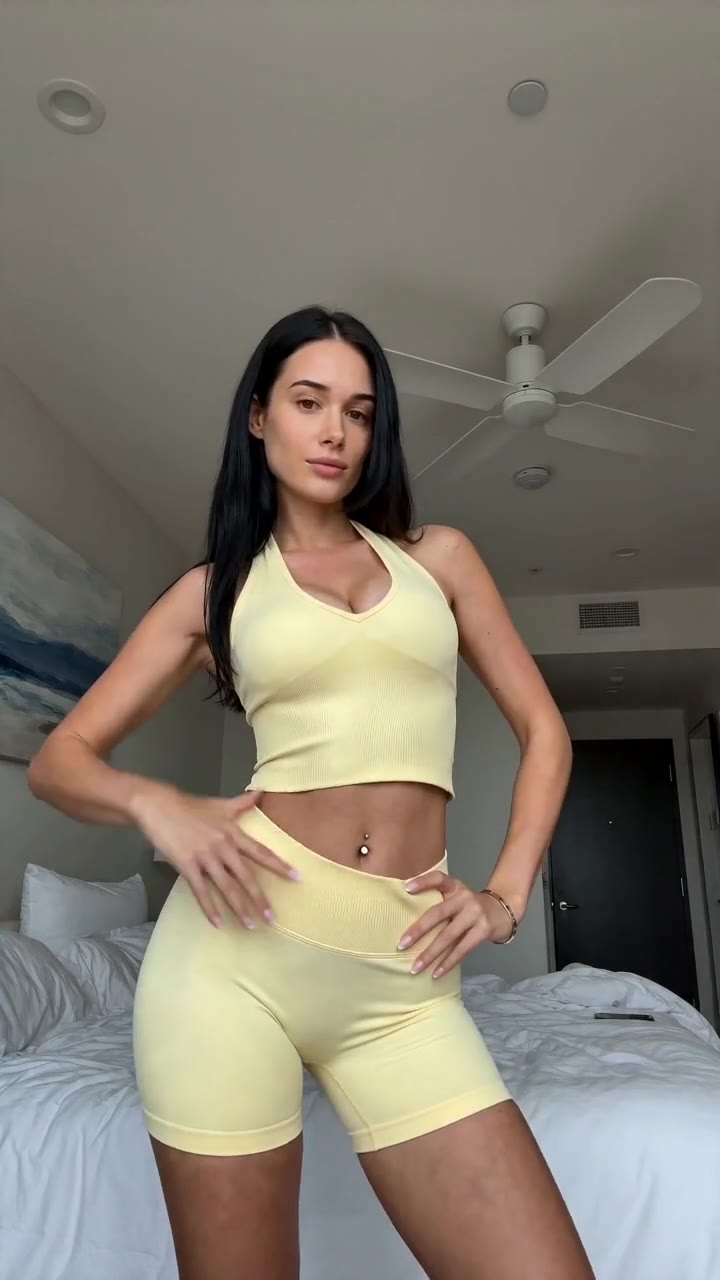
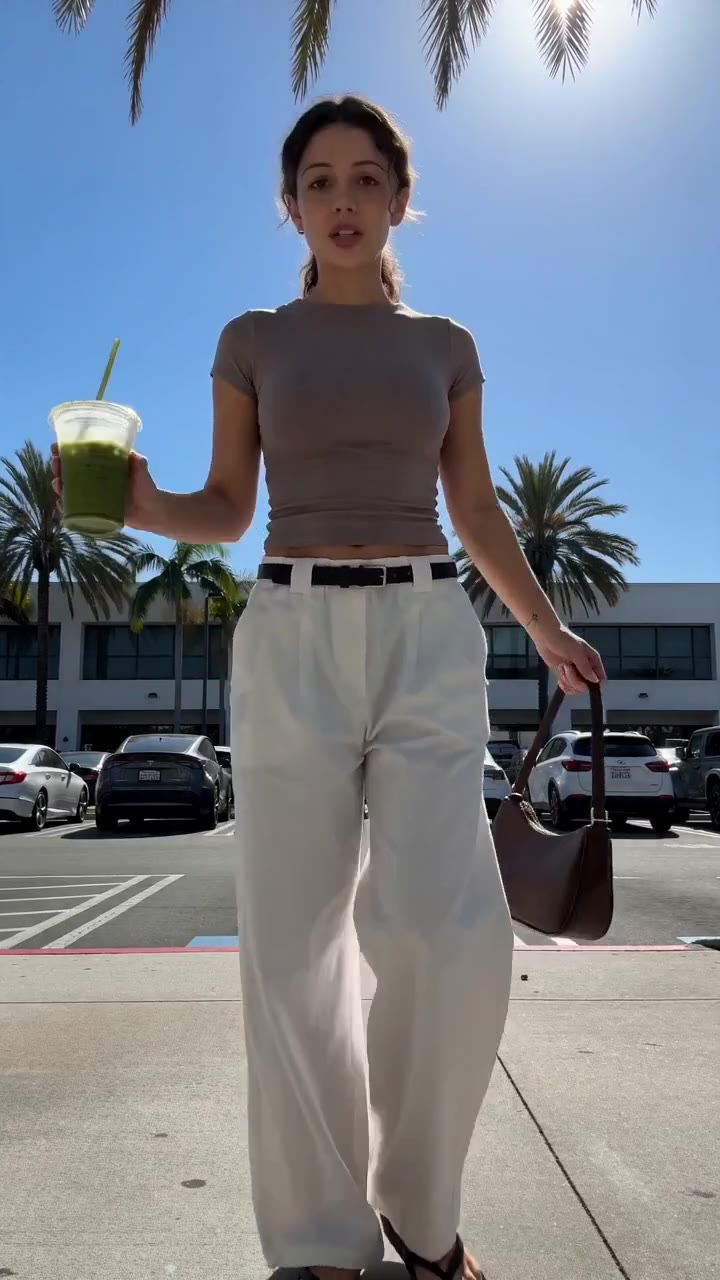
### See it: real Alvin's Club Studio sample videos
[](https://studio.alvinsclub.ai/examples/apparel-3-b438de8f.mp4)
*▶ Sunny yellow halter neck top try-on*
[](https://studio.alvinsclub.ai/examples/apparel-1-7a18676b.mp4)
*▶ Chic white wide-leg trousers styling*
[See all samples and make your first video free →](https://studio.alvinsclub.ai/samples?utm_source=hashnode&utm_medium=blog&utm_campaign=studio)
## Which AI video tools suit fashion dropshipping ads?
| Name | What it actually does | Best for | Pricing / free tier | Key limitation |
|---|---|---|---|---|
| **Alvin’s Club Studio** | Converts a product page link or 1–3 product photos into a vertical 8-, 12-, or 15-second product video with an AI model, script, voiceover, caption, and hashtags | Sellers who need short, product-focused ads at volume without holding inventory | First video free with no card; then $3 for 8 seconds, $4 for 12 seconds, or $5 for 15 seconds; credit packs reduce the per-[video cost](https://blog.alvinsclub.ai/how-much-does-a-ugc-video-cost-for-fashion-brands-in-2026); no subscription | Sellers must check every render because AI can still slip on product details |
| **HeyGen** | Creates presenter-led videos using AI avatars, voiceovers, translation, and scripts | Brands that need a spokesperson or talking-head explanation | Free access and paid plans are available; current limits and pricing vary by plan | Avatar presentation does not automatically solve accurate product shots or fashion fit representation |
| **Synthesia** | Produces structured AI-avatar videos from scripts using digital presenters and multilingual voice options | Instructional, corporate, or explanatory videos with consistent presenters | Free demo access and paid plans are available; plan limits vary | Its presentation format can feel too formal for impulse-driven fashion ads |
| **Creatify** | Turns product links into short-form ad concepts with generated scripts, visuals, voiceovers, and variations | Sellers who want a fast link-to-ad workflow for performance creative testing | Free access and paid plans are available; current credits and limits vary | Generated ad concepts still require product and claim review before publishing |
| **InVideo AI** | Generates and edits videos from text prompts, scripts, or supplied media using templates, stock assets, voiceovers, and editing tools | Sellers who want broad control over ad structure and supporting footage | Free plan access is available with paid plans for higher usage; limits vary | It is a general video creation platform, so product accuracy and final ad quality depend heavily on the input and editing |
| **Runway** | Generates and transforms video and images using AI models for creative visual production | Conceptual fashion visuals, motion treatments, and high-control creative experimentation | Limited free access and paid plans are available; usage is credit-based or plan-limited | Generative transformations can alter product shape, materials, logos, or details |
| **CapCut** | Edits short-form videos with templates, captions, effects, voice tools, and social publishing features | Sellers who already have product footage and need fast mobile-first editing | Free version available; paid features and plans vary by market | It is primarily an editor, not a product-link-to-finished-ad system |
This table separates a critical distinction: **a tool that generates video is not necessarily a tool that produces a finished product advertisement**. Dropshipping sellers often need both speed and product fidelity. A visually impressive clip that changes a handbag’s hardware, removes a garment detail, or misrepresents a chair’s proportions creates a review problem rather than solving a production problem.
## What should a dropshipping seller judge before choosing an AI video tool?
A dropshipping ad tool should be judged by the entire production path, not by the quality of a demo clip.
The practical workflow is:
1. **Input the product**
2. **Create a selling angle**
3. **Show the product accurately**
4. **Add a usable script and voiceover**
5. **Format the video for the destination platform**
6. **Produce enough variations to test**
7. **Review the finished asset before publishing**
Many tools perform strongly in one or two steps and leave the rest to the seller.
### Product accuracy matters more than cinematic quality
Fashion dropshipping products are often sold from supplier images, catalog photos, or product-page media. The seller may not physically inspect the item before launching ads. That makes product preservation central to the tool choice.
Watch for:
- Changed garment colors
- Incorrect logos or printed text
- Altered jewelry shapes
- Missing pockets, straps, buttons, or closures
- Inconsistent fabric texture
- Incorrect chair dimensions or upholstery details
- AI-generated accessories that were never part of the product
AI-generated video should be checked frame by frame before posting. Alvin’s Club Studio is built to keep products true to their photos, but its own stated limitation remains important: AI can still slip.
### Pay for finished output, not for an endless generation loop
General AI tools often charge through subscriptions, credits, or usage limits. That structure can work for a production team that needs broad experimentation. It is less attractive for a seller who needs a small number of finished advertisements and does not want unused credits or a permanent monthly commitment.
The relevant question is not simply “What is the monthly price?” Ask:
- How many usable videos does the plan produce?
- Are failed renders charged?
- Do unused credits expire?
- How much editing remains after generation?
- Does the platform produce a complete vertical ad or only raw footage?
- Can the seller generate multiple openings and product angles quickly?
Studio’s model is pay per finished video. The first video is free without a card, followed by $3 for 8 seconds, $4 for 12 seconds, or $5 for 15 seconds. Credit packs lower the cost per video, down to $2.14, and credits do not expire.
Failed renders and stopped scripts are free.
### Volume matters because one creative rarely answers every question
Dropshipping ads need testing across:
- Hook
- Product benefit
- Audience
- Voice
- Pace
- Demonstration style
- Caption
- Call to action
- Product framing
A seller cannot know in advance which combination will perform best. The answer is not to spend longer polishing one video. The answer is to produce a useful number of distinct, accurate variations and evaluate them in the market.
That does not mean generating random versions. A disciplined test changes one major variable at a time. For example:
- Version A: “The jacket that makes layered outfits easier”
- Version B: “A lightweight layer for unpredictable weather”
- Version C: “The oversized fit that works with basics”
The product stays consistent while the selling angle changes.
## How does Alvin’s Club Studio work for dropshipping ads?
Alvin’s Club Studio suits sellers who need product-centered videos without holding the item physically. The seller pastes a product-page link or uploads one to three product photos. Studio then produces an 8-, 12-, or 15-second vertical video on an AI model with a script, voiceover, caption, and hashtags in about 10 minutes.
Its strongest fit is the link-in, video-out workflow. A dropshipper can use supplier or storefront imagery instead of booking a model, sending a sample, organizing a shoot, or waiting for a creator to deliver a post.
Studio supports English, Spanish, and Brazilian Portuguese voiceovers. It also supports remaking the pacing and structure of a TikTok the seller likes with the seller’s own product, which gives the seller a repeatable creative reference rather than requiring a completely new concept for every item.
The limitation is product verification. Studio is built to keep products true to their photos, but no AI rendering process should be published without checking the final video. The other limitation is scope: Studio is built only for selling products, not as a general-purpose cinematic video tool.
Its self-serve categories are clothing, personalized jewelry, chairs, and furniture; other categories are handled through the managed programme.
For fashion dropshipping sellers, that narrow scope is often useful rather than restrictive. The workflow is designed around the commercial output: a short vertical product ad ready for posting.
## Who should use HeyGen for fashion dropshipping ads?
HeyGen suits sellers who want a visible presenter explaining a product, narrating a comparison, or delivering a scripted recommendation. Its central strength is the AI avatar: a digital presenter can speak a prepared script without the seller hiring a creator or recording themselves.
This works best when the product requires context. A seller promoting a garment can write a script about fit, styling, or use occasions, then place that explanation in a presenter-led format. For products where trust depends on a clear explanation, an avatar can be more useful than silent product footage.
HeyGen also supports multilingual production and a range of presenter styles. That gives international sellers a way to adapt the same message for different audiences without arranging multiple recordings.
The concrete limitation is that an avatar is not a product demonstration. The presenter may explain a handbag, dress, or accessory, but the seller still needs accurate product visuals and must check whether the claims match the product page. HeyGen is therefore better suited to **talking-presenter creative** than to a fully automated product-link-to-finished-fashion-ad workflow.
It also requires script judgment. A generic avatar reading generic copy can look like an announcement rather than a native social ad. Dropshipping sellers still need a strong hook, a specific benefit, and visual proof.
## When does Synthesia make sense for dropshipping video ads?
Synthesia is designed around structured AI-presenter videos. It is particularly suitable for scripted communication, training, product explanations, internal presentations, and multilingual narration with consistent digital presenters.
A dropshipping seller could use Synthesia for a product explainer when the purchase requires education. Examples include a garment with a complicated construction, a furniture item that needs assembly context, or a personalized product where the buyer needs to understand the customization process.
The advantage is consistency. The seller can keep a recognizable presenter and repeat a controlled format across a catalog. That is useful when a business wants a standardized explanation rather than a highly varied social feed.
The limitation is format fit. Fashion dropshipping ads often depend on quick visual impact, close product framing, native-feeling speech, and an immediate reason to keep watching. A structured avatar presentation can feel too formal for a product that needs to create desire quickly.
Synthesia also does not remove the need for product-specific visual assets. The avatar can introduce the item, but the ad still needs accurate shots, clear pricing or offer language where permitted, and a call to action that matches the destination page.
Choose Synthesia when the product needs explanation and consistent presenter delivery. Do not choose it solely because it can read a script.
## Is Creatify a strong option for product-link-to-ad creation?
Creatify is built around a workflow that turns product information into short-form ad concepts. That makes it relevant to dropshipping sellers who want to paste a product URL, generate ad scripts and visuals, and create multiple versions without starting from a blank timeline.
Its strongest use case is performance creative testing. A seller can explore different hooks, voiceovers, scenes, and ad structures faster than with a traditional shoot. The tool is aimed at the problem of producing more social ad concepts from the same product information.
Creatify can suit a seller who wants broader automated ad ideation than a fixed template. It is useful when the bottleneck is not editing but deciding how to position the product in a short video.
The limitation is review and control. A product page can contain incomplete, inconsistent, or exaggerated information. The generated script may inherit those weaknesses, and generated visuals can present details that the source material does not prove.
The seller must inspect claims, product appearance, and the relationship between the voiceover and the footage.
Creatify also represents a broader ad-generation approach, so the seller should assess whether each output is genuinely ready to publish or still needs editing. It can reduce the blank-page problem without eliminating creative judgment.
> 👗 **Selling online? Turn any product link into a ready-to-post shoppable video** — no shoot, no samples. [Try Alvin's Club Studio free →](https://studio.alvinsclub.ai/?utm_source=hashnode&utm_medium=blog&utm_campaign=studio) Your first video is free, then from $3 a video.
## What is InVideo AI good at for fashion dropshipping?
InVideo AI is a broad text-to-video and editing platform. It can generate videos from prompts or scripts and combine supplied assets with templates, stock media, voiceovers, captions, and editing controls.
This makes it useful for sellers who want to build more than a simple product showcase. A fashion dropshipper might create a video that combines product images, lifestyle context, benefit-led copy, captions, and a voiceover. The platform’s broader editing environment gives the seller more control over the structure than a narrow product-video generator.
InVideo AI suits sellers who are willing to manage the creative process. It provides tools for constructing an ad, but the seller remains responsible for selecting the right scenes, correcting the script, checking the product visuals, and removing irrelevant stock footage.
Its concrete limitation is that it is not focused solely on commerce product accuracy. General-purpose generation can introduce decorative material that distracts from the item or implies product experiences the seller cannot verify. The tool can help make an ad, but it does not guarantee that the output is a commercially accurate product representation.
For an operator who wants a flexible editing workspace, InVideo AI is practical. For a seller who wants a narrow link-to-finished-product-video workflow with minimal assembly, a specialized product tool is a closer fit.
## When should a dropshipping seller use Runway?
Runway is best understood as a generative video and visual-production platform rather than a dedicated dropshipping ad maker. It supports AI-assisted generation and transformation of video and images, making it useful for conceptual fashion scenes, creative motion, backgrounds, transitions, and visual treatments.
A seller with a strong creative director or editor can use Runway to develop an attention-grabbing opening. For example, a product image can become part of a stylized visual sequence that establishes a mood before the ad shows the item more clearly.
Runway suits campaigns where visual experimentation is the priority. It can help create assets that would otherwise require more production resources, particularly when the idea is difficult to film directly.
The limitation is product fidelity. Generative transformations can change the shape, material, color, logo, or construction of a product. That risk is especially serious for fashion items with recognizable details, personalized jewelry, printed graphics, or specific hardware.
Runway is therefore a poor default choice when the seller’s primary requirement is “keep this product exactly as shown.” It is better as a creative production layer used alongside verified product imagery. A seller should avoid using a generative transformation as the only product evidence in an advertisement.
## How does CapCut fit into a dropshipping ad workflow?
CapCut is primarily a short-form video editor. It offers templates, captions, effects, transitions, audio tools, and other features used to produce social video quickly.
CapCut is a good fit when the seller already has usable product footage, creator clips, screen recordings, or AI-generated assets. It can turn those materials into a platform-friendly edit and is particularly accessible for sellers who prefer a mobile-first workflow.
A seller could use CapCut to:
- Cut a product demonstration into a short vertical ad
- Add large captions for silent viewing
- Test different openings
- Reformat footage for social platforms
- Combine creator footage with product images
- Add a voiceover or music track
The limitation is that CapCut does not solve the first production problem. It does not replace the sample, model, product photographer, or product-video generator when the seller has no footage. It is an editing layer, not a complete product-link-to-ad system.
CapCut also leaves the seller responsible for the commercial logic. The app can make a video more polished, but it cannot decide whether the hook is persuasive, whether the product is represented accurately, or whether the visual sequence proves the spoken claim.
Use CapCut after acquiring product assets. Do not mistake editing speed for production automation.
## Which tool suits AI UGC-style fashion ads?
AI UGC-style ads imitate the structure of creator content: a direct opening, conversational delivery, a product introduction, a benefit, and a recommendation. They do not require the creator to be physically present, but they still need to feel specific and credible.
Tools such as HeyGen, Synthesia, Creatify, and Studio approach this format differently:
| Approach | Typical output | Best use | Main risk |
|---|---|---|---|
| AI avatar presenter | Digital person speaking to camera | Product explanation and scripted recommendation | The presenter can feel generic or disconnected from the product |
| Automated ad generator | Product-linked ad concepts with scripts and visuals | Rapid creative testing | Source-page errors can flow into copy and visuals |
| Product-video agent | Short product-focused video with script, voiceover, captions, and hashtags | High-volume selling videos from links or photos | Final AI render still requires accuracy review |
| Manual editor | Seller-assembled video using existing assets | Control over every cut and caption | Requires usable footage and more labor |
| Generative video system | Stylized scenes and visual transformations | Creative concepts and mood-led campaigns | Product details can change |
The term **UGC** can obscure an important distinction. A creator-style format is not the same as authentic customer content. Sellers should label AI-generated videos as AI-generated when posting and should avoid implying that a real customer used or endorsed a product when that did not happen.
For a seller who wants a conversational AI presenter, HeyGen or Synthesia may fit. For a seller who wants product-link automation, Creatify or Studio is more relevant. For a seller who already has footage, CapCut may be enough.
## What does a complete dropshipping ad workflow look like?
The strongest tool choice starts with the seller’s input situation.
### Workflow A: The seller has only a product page
This is common in dropshipping. The seller may have a supplier listing, a Shopify product page, or a marketplace URL but no physical sample.
A practical workflow is:
1. Review the product page for accurate claims.
2. Select the strongest product images.
3.
Use a product-link tool such as Studio or Creatify.
4. Generate several hooks around different benefits.
5. Check every product detail in the finished videos.
6.
Label the content as AI-generated when posting.
7. Test the videos with controlled changes.
Studio is particularly direct for this situation because its input is a product link or one to three product photos and its output includes the script, voiceover, caption, and hashtags.
### Workflow B: The seller has product footage
If the seller has supplier footage, customer footage, creator footage, or a sample in hand, an editor such as CapCut may be appropriate.
The workflow becomes:
1. Select the right product demonstration.
2. Cut the first seconds around the clearest hook.
3.
Add captions that reinforce the spoken message.
4. Remove unsupported claims.
5. Create alternate openings and endings.
6.
Export in the required vertical format.
7. Review the product, text, and audio before publishing.
This route gives the seller more manual control but requires more work. It is not the best answer when the seller lacks footage.
### Workflow C: The seller needs an avatar presenter
A presenter-led workflow uses HeyGen or Synthesia.
The seller should:
1. Write a specific script instead of generic praise.
2. Keep the presenter’s role clear.
3.
Use product visuals alongside the avatar.
4. Avoid unsupported first-person claims.
5. Match the presenter’s tone to the platform.
6.
Review pronunciation and product terminology.
7. Label the video as AI-generated where required or appropriate.
The avatar should support the product story, not become the entire ad. A talking face without convincing product evidence often creates attention without purchase intent.
### Workflow D: The seller wants stylized creative
Runway or InVideo AI can support a more visual production process.
The seller should treat generated scenes as creative framing rather than proof of product construction. The product page and original product imagery remain the reference for color, shape, dimensions, and included components.
This workflow is most useful for brand-building or concept-led campaigns. It is less suitable for products where the buyer needs to inspect specific details.
## How should you write scripts for AI dropshipping ads?
The tool cannot compensate for an empty selling idea. A short ad needs a clear reason to continue watching.
A usable structure is:
1. **Hook:** Identify the problem, desire, or surprising product benefit.
2. **Product proof:** Show the product detail that supports the hook.
3. **Use case:** Show who uses it, where, or when.
4. **Close:** Tell the viewer what to do next without making unsupported promises.
For a clothing product:
- Hook: “This is the layer that fixes a plain outfit.”
- Proof: Show the silhouette, fabric, closure, or styling detail.
- Use case: Show it over a basic top with a clear outfit change.
- Close: Direct the viewer to the product page.
For personalized jewelry:
- Hook: “A gift feels different when the name is already on it.”
- Proof: Show the personalization field or finished name detail accurately.
- Use case: Frame it as a birthday, anniversary, or milestone gift without inventing an occasion.
- Close: Direct the viewer to customize or view the item.
For furniture:
- Hook: “The chair that makes the unused corner useful.”
- Proof: Show the shape, upholstery, and placement.
- Use case: Demonstrate the room context without claiming dimensions that are not shown.
- Close: Direct the viewer to the listing.
The script should match the evidence in the visuals. If the video does not show stretch, do not claim stretch. If the seller has not verified waterproofing, do not say waterproof.
If a product comes in several colors, show or state only the colors supported by the product page.
## What are the most common mistakes when using AI video tools?
### Choosing a general AI video tool because the demo looks cinematic
A cinematic demo tests visual novelty, not commercial accuracy. Fashion dropshipping ads need clear product identity, a specific benefit, and a credible reason to click.
A tool that generates beautiful but unstable product visuals is not solving the seller’s main constraint.
### Publishing the first render without checking it
Every AI video should be inspected for:
- Product color
- Product shape
- Text and logos
- Hands and jewelry
- Clothing fit
- Accessories
- Voiceover accuracy
- Caption spelling
- Unsupported claims
The final check is part of the production process, not an optional quality step.
### Treating one video as the campaign
One video tests one creative route. It does not establish the full demand potential of a product.
A better approach is to create a small set of controlled variations:
- Same product, different hooks
- Same hook, different voiceovers
- Same script, different openings
- Same product, different use cases
- Same visuals, different captions
### Using a subscription without a production plan
Subscription tools can be useful when the seller creates videos continuously. They are less efficient when the seller produces sporadically or abandons products quickly.
Pay-per-video pricing can be easier to manage for product testing because the cost maps directly to finished assets. It also prevents a monthly tool expense from becoming part of every product’s margin calculation.
### Presenting AI content as real customer content
An AI avatar is not a customer. An AI model is not a customer. A generated testimonial should not imply lived experience that did not occur.
Label AI-generated videos when posting and keep the script factual. Trust is difficult to recover after a viewer discovers that a supposed personal recommendation was synthetic.
## Which AI video tool should a dropshipper pick by situation?
The right choice changes with the production constraint.
### Pick Alvin’s Club Studio when:
- You have a product page or one to three product photos.
- You need a finished vertical product video rather than raw clips.
- You do not hold the product physically.
- You want a script, voiceover, caption, and hashtags included.
- You need short videos for volume testing.
- You prefer pay-per-video pricing without a subscription.
- Your products fit its self-serve categories: clothing, personalized jewelry, chairs, or furniture.
Studio’s limitation is straightforward: the seller must review each render, and the self-serve category coverage is focused rather than universal. Other categories go through the managed programme.
### Pick HeyGen when:
- The ad needs a talking presenter.
- You want an avatar explaining a product or use case.
- You need multilingual presenter-led content.
- You already have or can supply accurate product visuals.
Do not pick it as the sole solution when the main problem is generating accurate product footage.
### Pick Synthesia when:
- The product requires structured explanation.
- You want consistent presenter delivery.
- You are producing educational or instructional content.
- A formal presentation style suits the brand.
Do not pick it when the ad depends on highly native, fast-moving social commerce energy.
### Pick Creatify when:
- You want to convert product links into multiple ad concepts.
- You need help with hooks, scripts, voiceovers, and short-form variations.
- You want to test several creative directions quickly.
Do not publish its output without checking the product page, generated claims, and final visuals.
### Pick InVideo AI when:
- You want a broad creation and editing workspace.
- You need stock footage, voiceover, captions, and templates.
- You are willing to assemble and revise the ad yourself.
- You want more control over the narrative structure.
Do not expect a general-purpose platform to guarantee product-specific accuracy automatically.
### Pick Runway when:
- The campaign needs stylized or conceptual visual production.
- You want creative motion and generative scene development.
- You have an editor who can preserve product truth.
Do not use it as the only source of evidence for a product with precise visual details.
### Pick CapCut when:
- You already have product footage.
- You need quick edits, captions, effects, or alternate cuts.
- You prefer hands-on control.
- You want to turn raw clips into social-ready exports.
Do not choose it when you have no sample, no footage, and no product assets.
## How do you choose the right AI video tool for dropshipping ads?
The **best AI video tool for dropshipping ads** is the one that matches the missing part of your production system.
If the missing part is a finished product video from a link or photos, Alvin’s Club Studio is the closest fit. It is built only for selling products, produces short vertical videos with selling components included, and charges per video rather than requiring a subscription.
If the missing part is a presenter, HeyGen or Synthesia is more appropriate. If the missing part is ad ideation from a product URL, Creatify is a practical option. If you already have footage, CapCut may be sufficient.
If you need broad assembly and stock-media control, InVideo AI offers more flexibility. If you need stylized generative scenes, Runway is the stronger creative-production choice.
The deciding criteria are **product accuracy, finished-video readiness, cost per usable asset, creative volume, script quality, and how much manual work remains**. A tool that produces more dramatic footage is not automatically better for commerce. A tool that produces a complete, accurate, reviewable ad from limited product input is often the more useful answer.
For a broader comparison of commerce-focused options, see [AI Product Video Tools for Clothing Brands](https://blog.alvinsclub.ai/the-best-ai-product-video-tools-for-clothing-brands) and [AI Tools for Shoppable Fashion Videos, Compared](https://blog.alvinsclub.ai/the-best-ai-tools-for-shoppable-fashion-videos-compared).
Alvin’s Club Studio turns a product link into a ready-to-post shoppable video in about 10 minutes — no shoot, no samples. [Make your first video free →](https://studio.alvinsclub.ai/?utm_source=hashnode&utm_medium=blog&utm_campaign=studio)
## Summary
- The **best AI video tool for dropshipping ads** converts product links or photos into ready-to-post vertical advertisements without requiring inventory, a photoshoot, or paid creators.
- The comparison evaluates tools by product accuracy, input requirements, finished-video readiness, pricing, creative testing, presenter options, and manual effort.
- Alvin’s Club Studio and similar product-video systems focus on creating fashion ads from product pages or images while preserving the product’s appearance.
- Other tools serve distinct needs, including avatar-led UGC, text-to-video generation, product-focused videos, editing, and managed ad production.
- Sellers should choose based on whether they prioritize talking presenters, polished product footage, rapid creative variations, or outsourced production, and verify current pricing before subscribing.
## Key Takeaways
- **best AI video tool for dropshipping ads**
- **Key Takeaway:**
- **Best AI video tool for dropshipping ads:**
- **product accuracy, input requirements, finished-video readiness, pricing structure, creative testing, presenter options, and the amount of manual work left to the seller**
- **Alvin’s Club Studio**
## Frequently Asked Questions
### How do you choose the right AI video tool for fashion dropshipping ads?
The right AI video tool for fashion dropshipping ads depends on whether you need product demonstrations, avatar-led UGC, or fast creative testing. Tools that turn product photos and listings into short vertical videos are often the most practical choice for dropshippers without inventory.
### How does AI create videos for dropshipping products?
AI creates dropshipping videos by analyzing product photos, descriptions, and selected marketing angles, then generating scenes, scripts, voiceovers, captions, or presenters. Many platforms can automatically format the result for TikTok, Instagram Reels, YouTube Shorts, and paid social campaigns.
### Can AI video generators make [fashion product](https://blog.alvinsclub.ai/7-steps-in-demnas-ai-workflow-for-fashion-product-development) ads from images?
AI video generators can turn fashion product images into animated ads with motion effects, text overlays, music, and promotional messaging. The strongest results usually come from using clear photos that show the product from multiple angles.
### Is AI-generated UGC worth using for clothing ads?
AI-generated UGC can be worth using for clothing ads when you need to test multiple hooks, creators, and customer personas quickly. However, brands should review the output for authenticity, accurate product details, and compliance with advertising platform policies.
### How do you choose the right AI tool for creating [product videos](https://blog.alvinsclub.ai/how-ai-is-changing-product-videos-without-a-photoshoot-in-2026) from Shopify listings?
The right AI tool for creating product videos from Shopify listings is one that imports product images, descriptions, pricing, and branding with minimal manual setup. Automated listing-to-video workflows can help store owners produce ads faster than editing each product video from scratch.
### Why does product accuracy matter in AI [fashion video](https://blog.alvinsclub.ai/7-elements-that-make-a-tiktok-shop-fashion-video-convert)s?
Product accuracy matters because distorted colors, incorrect patterns, unrealistic fits, or altered logos can mislead shoppers and increase refunds. Reviewing every generated video before publishing helps ensure the advertised garment matches the item customers receive.
### How much do AI [video tools for](https://blog.alvinsclub.ai/the-best-ai-product-video-tools-for-clothing-brands) ecommerce ads cost?
AI [video tools for](https://blog.alvinsclub.ai/the-best-ai-ugc-video-tools-for-fashion-ecommerce-brands) ecommerce ads range from free plans with watermarks or usage limits to subscription platforms priced for regular creative production. Costs typically depend on video credits, export quality, avatar access, commercial licensing, and the number of variations you create.
### Can AI fashion videos be used in TikTok and Meta ads?
AI fashion videos can be used in TikTok and Meta ads when they meet each platform’s technical, copyright, disclosure, and advertising requirements. Vertical videos with a strong opening, readable captions, clear product benefits, and an obvious call to action are generally suited to these placements.
## Related on Alvin's Club Studio
- [Product videos for Shopify stores](https://studio.alvinsclub.ai/for/shopify-stores?utm_source=hashnode&utm_medium=blog&utm_campaign=studio)
- [What AI UGC videos cost](https://studio.alvinsclub.ai/learn/ai-ugc-video-pricing?utm_source=hashnode&utm_medium=blog&utm_campaign=studio)
- [TikTok Shop affiliate videos without samples](https://studio.alvinsclub.ai/learn/tiktok-shop-affiliate-videos-without-samples?utm_source=hashnode&utm_medium=blog&utm_campaign=studio)
---
### About the author
Building Alvin's Club Studio — an AI agent that turns a product link into a shoppable video [for TikTok Shop](https://blog.alvinsclub.ai/the-best-ai-video-generators-for-tiktok-shop-fashion-sellers), Shopify and DTC sellers. Writing about what makes product videos sell.
**Credentials**
- Founder at Alvin's Club (Echooo E-Commerce Canada Ltd.)
- Writes on shoppable video and e-commerce growth at blog.alvinsclub.ai
[X / @alvinsclub](https://x.com/alvinsclub) · [LinkedIn](https://www.linkedin.com/company/alvin-s-club/) · [alvinsclub.ai](https://www.alvinsclub.ai)
---
*From the [Alvin's Club Studio](https://studio.alvinsclub.ai/?utm_source=hashnode&utm_medium=blog&utm_campaign=studio) team — an AI agent that turns a product link into a ready-to-post shoppable video. First video free, then from $3.*
---
## Related Articles
- [AI Product Video Tools for Clothing Brands](https://blog.alvinsclub.ai/the-best-ai-product-video-tools-for-clothing-brands)
- [AI UGC Video Tools for Fashion Ecommerce Brands](https://blog.alvinsclub.ai/the-best-ai-ugc-video-tools-for-fashion-ecommerce-brands)
- [AI Tools for Shoppable Fashion Videos, Compared](https://blog.alvinsclub.ai/the-best-ai-tools-for-shoppable-fashion-videos-compared)
- [AI Video Generators for TikTok Shop Fashion Sellers](https://blog.alvinsclub.ai/the-best-ai-video-generators-for-tiktok-shop-fashion-sellers)
- [Product Video Maker for Shopify Fashion Stores](https://blog.alvinsclub.ai/the-best-product-video-maker-for-shopify-fashion-stores)
- [How Much Does a UGC Video Cost for Fashion Brands in 2026?](https://blog.alvinsclub.ai/how-much-does-a-ugc-video-cost-for-fashion-brands-in-2026)
- [AI Fashion Apps for Smarter Travel Packing](https://blog.alvinsclub.ai/the-best-ai-fashion-apps-for-smarter-travel-packing)
- [AI Outfit Planners Compared: Find Your Perfect Occasion Look](https://blog.alvinsclub.ai/ai-outfit-planners-compared-find-your-perfect-occasion-look)
- [Demna AI Outfit Recommendations for Effortless Travel Style](https://blog.alvinsclub.ai/demna-ai-outfit-recommendations-for-effortless-travel-style)
- [Can Demna AI Create the Perfect Outfit for Any Occasion?](https://blog.alvinsclub.ai/can-demna-ai-create-the-perfect-outfit-for-any-occasion)
- [7 Demna AI Alternatives for Professional Fashion Stylists](https://blog.alvinsclub.ai/7-demna-ai-alternatives-for-professional-fashion-stylists)
- [AI Stylist Apps for Building a Capsule Wardrobe](https://blog.alvinsclub.ai/the-best-ai-stylist-apps-for-building-a-capsule-wardrobe)